- Home
- :
- All Communities
- :
- Products
- :
- ArcGIS Pro
- :
- ArcGIS Pro Questions
- :
- Re: Multi-line text entry in Model Builder Paramet...
- Subscribe to RSS Feed
- Mark Topic as New
- Mark Topic as Read
- Float this Topic for Current User
- Bookmark
- Printer Friendly Page
Multi-line text entry in Model Builder Parameter


- Mark as New
- Bookmark
- Subscribe to RSS Feed
- Permalink
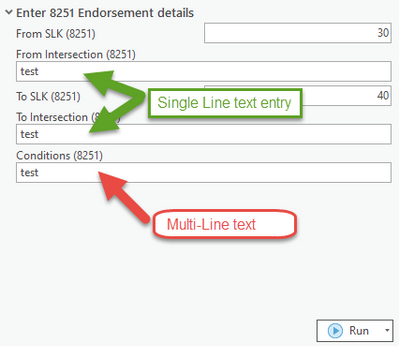
Hi Brains Trust. I thought this was a simple thing, but I can't quite figure it out. I want to be able to enter multi-line text into a Models string parameter, but it seems to only accept single line of text. Destination will be a string field in a feature class.

GIS Officer
Forest Products Commission WA

- Mark as New
- Bookmark
- Subscribe to RSS Feed
- Permalink
There is multivalue, but not multiline (same in modelbuilder)
Setting script tool parameters—ArcGIS Pro | Documentation
I suspect you want a "textbox" rather than a "textline" to display the full text of field entry
... sort of retired...
- Mark as New
- Bookmark
- Subscribe to RSS Feed
- Permalink
I assume text boxes are not an option?
Could a text file work in place of a text line/box?
GIS Officer
Forest Products Commission WA

- Mark as New
- Bookmark
- Subscribe to RSS Feed
- Permalink
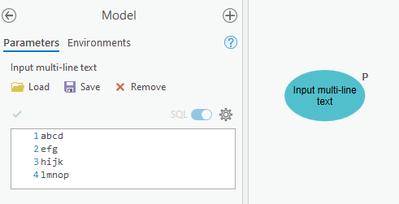
Ugly workaround - use a "SQL Expression" datatype...?
- Mark as New
- Bookmark
- Subscribe to RSS Feed
- Permalink
Thanks for the suggestion. I've had a look at that now and don't think that's really a viable option. Would it be possible to load the text in a text file (using the Text File variable) and use a python code to extract the text and calculate field?
GIS Officer
Forest Products Commission WA
- Mark as New
- Bookmark
- Subscribe to RSS Feed
- Permalink
I feel like I'm getting closer - but still need guidance. I've created a Calculate Value Code Block as per below but have 2 problems (at least, 2 for now):
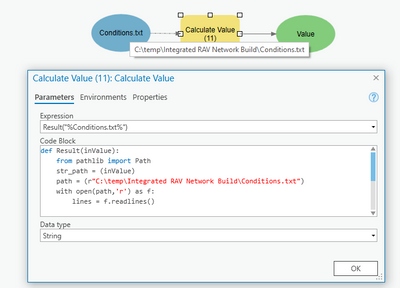
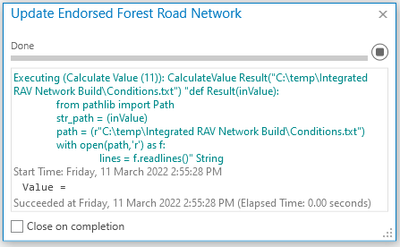
1. I can't figure out how to replace the written file path on line 4 with the pathway from the variable (which is a text file) i.e. path = (str_path). When I do, I get the below error.
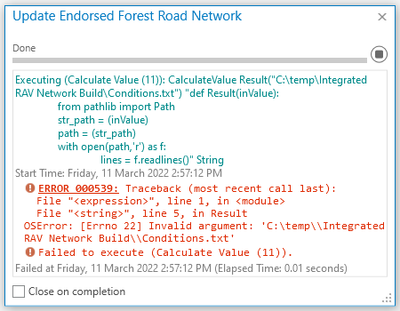
2. When I run it successfully as per the original script, the output Value is still blank (at least as far as I can tell).
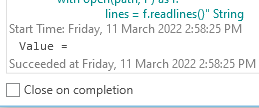
GIS Officer
Forest Products Commission WA
- Mark as New
- Bookmark
- Subscribe to RSS Feed
- Permalink
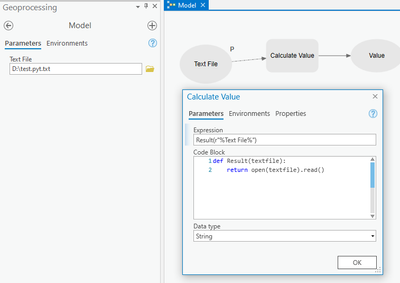
return open(txtfile).read()
- Mark as New
- Bookmark
- Subscribe to RSS Feed
- Permalink
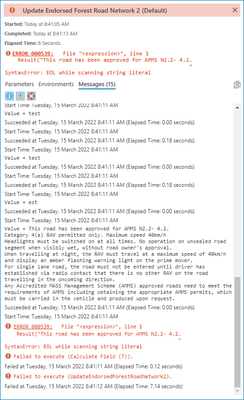
Nearly worked! It did indeed calculate the Value as you suggested (just using the Expression instead of the code block) but the calculate field step failed where it encountered the new line.
GIS Officer
Forest Products Commission WA
- Mark as New
- Bookmark
- Subscribe to RSS Feed
- Permalink
Trying to fix the issue by turning the multiline text file into a single, long string. Started a new expression as per below, but the Code block keeps removing the \n and just moving the text onto a new line.
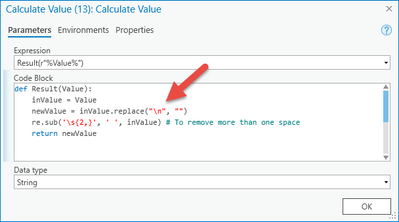
becomes this:
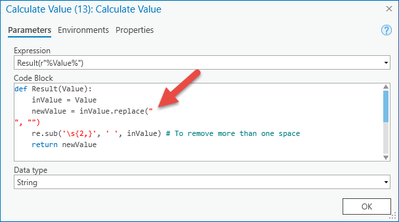
So I tried this too:
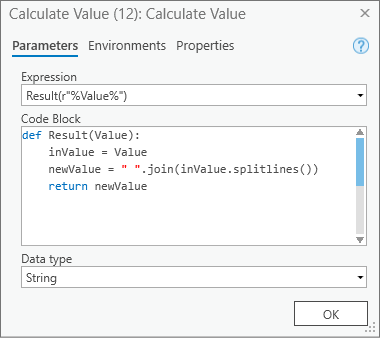
but get this error:
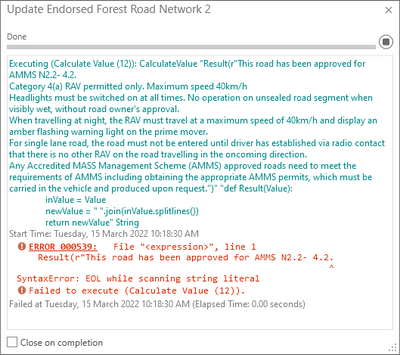
which is the same error I get from just running the field calculator with the original multiline text value. So frustating!
GIS Officer
Forest Products Commission WA
- Mark as New
- Bookmark
- Subscribe to RSS Feed
- Permalink
Leave your new lines/ carriage returns in and just wrap in triple quotes instead of single quotes in the calculate field expression. String literals inside triple quotes, """ or ''', can span multiple lines of text.
r"""%Value%"""
