- Home
- :
- All Communities
- :
- Products
- :
- ArcGIS Pro
- :
- ArcGIS Pro Questions
- :
- Re: Masking Issues with Create Underpass
- Subscribe to RSS Feed
- Mark Topic as New
- Mark Topic as Read
- Float this Topic for Current User
- Bookmark
- Printer Friendly Page
Masking Issues with Create Underpass

- Mark as New
- Bookmark
- Subscribe to RSS Feed
- Permalink
Hi all,
Just a query on Create Underpass tool if anyone has come across the same issues or has any ideas what could be happening:
Using ArcPro version 2.6.1
Layer Ref Scale 50000K
So to start off this is my initial parameters for the tool
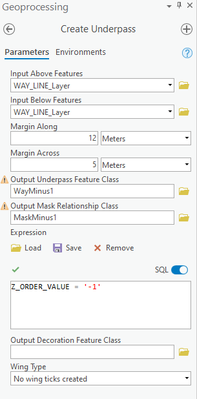
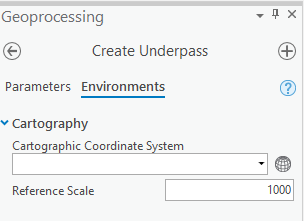
That gives me the following output:
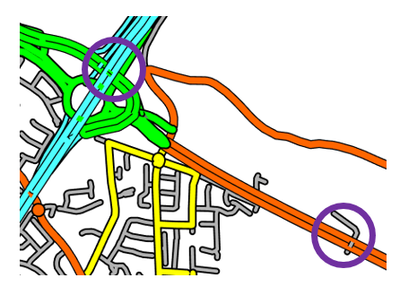
The moment I try to improve the masking by increasing the Margin Across, Margin Across or Ref Scale in the Tool Environments undesired masking appear
The following output I just changed the ref scale to 2500 and the square white mask appears
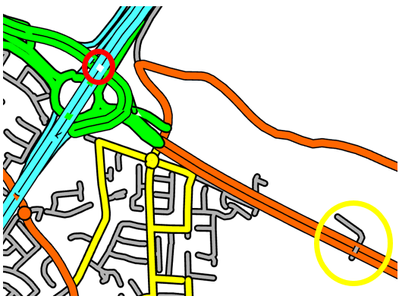
To get the mask to make a clear underpass marked in yellow the parameters had to be increased to 25m Across 25m Along and Ref Scale 20000 but this comes with the expense of even worse masking at junction marked in red.
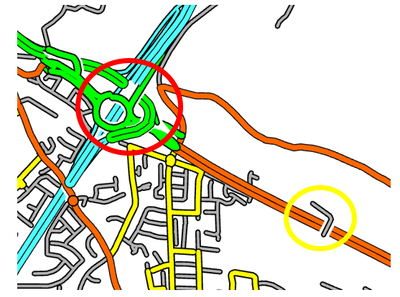
Having the same issues in Arc Map 10.8, please ignore bad symbology just testing roughly in Arc Pro.
Testing in Arc Map I was finding Arc Map crashing out after I run the tool and refresh my output so easier to test in Pro.
Any help would be welcomed.
Thanks,
Tauna


- Mark as New
- Bookmark
- Subscribe to RSS Feed
- Permalink
The Cartographic Coordinate system seems to be unspecified. Is there a reason? It is used
to determine the size, extent, and spatial relationships of features when making calculations
which may or may not make a difference.
... sort of retired...
- Mark as New
- Bookmark
- Subscribe to RSS Feed
- Permalink
Hi Dan,
Thank you for your response, no reason for not having it in I have tried with and without co-ord system and does not improve things🤔
The tool seems to work great when layers are set for 25k ref scale and the tool environment is set to 10k but the moment I set the layer to 50k and change any of the parameters things start to deteriorate.
