- Home
- :
- All Communities
- :
- Products
- :
- ArcGIS Pro
- :
- ArcGIS Pro Questions
- :
- Re: How do I Fix Arc Pro Freezing when Selecting a...
- Subscribe to RSS Feed
- Mark Topic as New
- Mark Topic as Read
- Float this Topic for Current User
- Bookmark
- Printer Friendly Page
How do I Fix Arc Pro Freezing when Selecting an Annotated Feature

- Mark as New
- Bookmark
- Subscribe to RSS Feed
- Permalink
Hi all,
I am trying to delete unnecessary annotated road labels using the Selection tool under the Edit tab. It was working just fine until recently; Arc Pro highlights the label when I click on it but does not fully select it, and I cannot delete the label or press ESC to cancel the selection attempt. This freezes all other functions besides allowing me to swap between layouts or maps. See the image below:
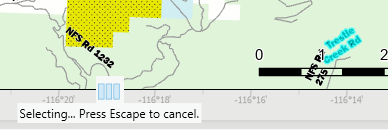
My usual fix for this has been to delete the annotated feature class and remake it (after closing the program with Task Manager). Unfortunately, this no longer works.
I have tried deleting the labels from both activated layouts and the source maps but it makes no difference. Restarting the computer does not fix the issue either.
Does anyone know how I can get back to deleting labels normally?
Much thanks for any help!
--Spencer
Solved! Go to Solution.

- Mark as New
- Bookmark
- Subscribe to RSS Feed
- Permalink
still happening on 3.7.0

- « Previous
-
- 1
- 2
- Next »
- « Previous
-
- 1
- 2
- Next »