- Home
- :
- All Communities
- :
- Products
- :
- ArcGIS Pro
- :
- ArcGIS Pro Questions
- :
- Re: How can I get exact 3D building structure with...
- Subscribe to RSS Feed
- Mark Topic as New
- Mark Topic as Read
- Float this Topic for Current User
- Bookmark
- Printer Friendly Page
How can I get exact 3D building structure with smooth roof and faces from from lidar data after extracting 3D buildings ?

- Mark as New
- Bookmark
- Subscribe to RSS Feed
- Permalink
Hi,
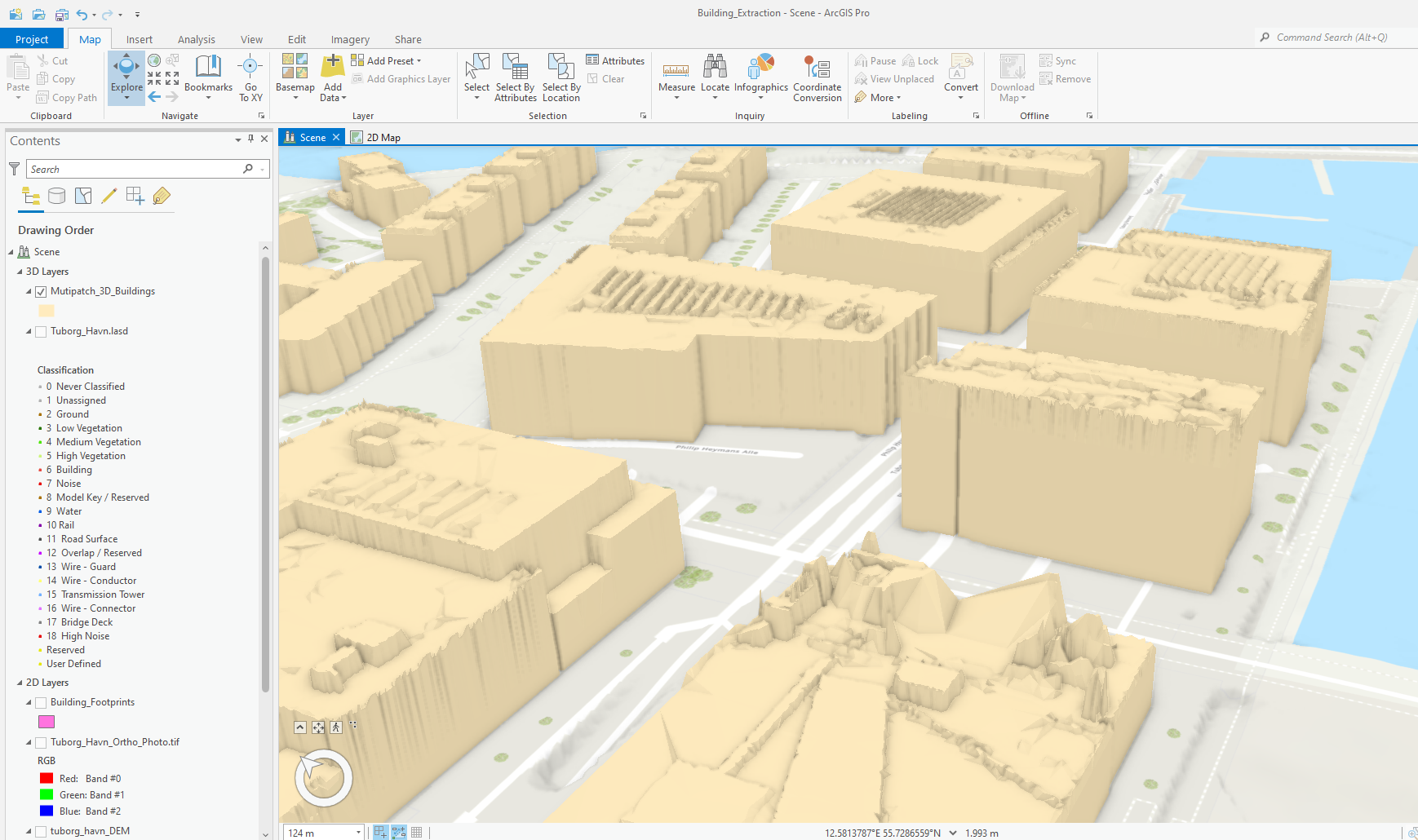
I have done the ArcGIS Lesson which is Extract 3D buildings from lidar data lesson (https://learn.arcgis.com/en/projects/extract-3d-buildings-from-lidar-data/) in ArcGIS Pro desktop with the help of ArcGIS 3D Analyst extension. When I get the final result in 3D scene and visualize the data and zoom in to the 3D building , I find the roof and edge surface are not smooth, flat and in shape . They do not show the perfect building model. So what should I do to get exact build structure from Lidar data? I have attached below the photo of 3D extract building from Lidar data in ArcGIS pro which has not smooth roof and surface.
Solved! Go to Solution.
Accepted Solutions

- Mark as New
- Bookmark
- Subscribe to RSS Feed
- Permalink
have you tried using ESRI's 3D Basemap solution?
https://doc.arcgis.com/en/arcgis-solutions/latest/reference/use-3d-basemaps.htm
- Mark as New
- Bookmark
- Subscribe to RSS Feed
- Permalink
have you tried using ESRI's 3D Basemap solution?
https://doc.arcgis.com/en/arcgis-solutions/latest/reference/use-3d-basemaps.htm
- Mark as New
- Bookmark
- Subscribe to RSS Feed
- Permalink
Thanks.....Yes, it is working good.

- Mark as New
- Bookmark
- Subscribe to RSS Feed
- Permalink
The 3D buildings solution is now getting errors in ArcGIS Pro 3.3. This is a major problem for me since it was working perfectly when I used arcpro 3.2 back in June. This needs to be addressed ASAP.


- Mark as New
- Bookmark
- Subscribe to RSS Feed
- Permalink
The Extract LOD2 Building tool is ideal to solve this now. You can use the tool by itself or use the tasks in 3D Building Solution to create 3D buildings in mass. Here's an example of a State of Tennessee and St. Louis Greater Metro area done with the Extract LOD2 Building tool: https://arcg.is/14imXr1 and https://arcg.is/1u09Pi2
