- Home
- :
- All Communities
- :
- Products
- :
- ArcGIS Pro
- :
- ArcGIS Pro Questions
- :
- Edit Vertices Broken ArcGIS Pro 2.7.2
- Subscribe to RSS Feed
- Mark Topic as New
- Mark Topic as Read
- Float this Topic for Current User
- Bookmark
- Printer Friendly Page
Edit Vertices Broken ArcGIS Pro 2.7.2

- Mark as New
- Bookmark
- Subscribe to RSS Feed
- Permalink
Since updating Pro to 2.7.2, it seems that the Edit Vertices tool has broken. Trying to edit a vertex will rotate and scale the feature around the starting point. The tool is supposed to allow me to move the single vertex independent of other vertices around however I want.
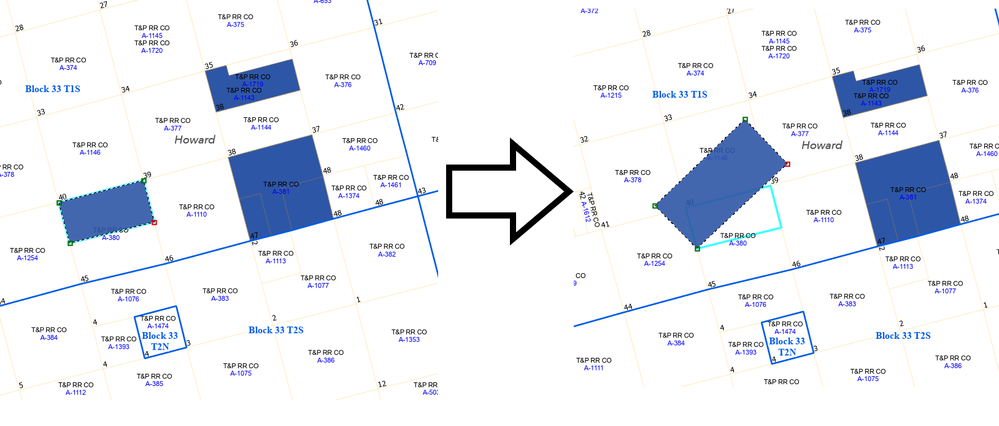
Solved! Go to Solution.
Accepted Solutions


- Mark as New
- Bookmark
- Subscribe to RSS Feed
- Permalink
Do you have Stretch Proportionately on? https://pro.arcgis.com/en/pro-app/latest/help/editing/modify-feature-vertices.htm

- Mark as New
- Bookmark
- Subscribe to RSS Feed
- Permalink
Do you have Stretch Proportionately on? https://pro.arcgis.com/en/pro-app/latest/help/editing/modify-feature-vertices.htm
- Mark as New
- Bookmark
- Subscribe to RSS Feed
- Permalink
Ok, that fixed the problem. I feel silly now, but then again, I've never used that feature. Thank you for the quick reply.
- Mark as New
- Bookmark
- Subscribe to RSS Feed
- Permalink
No need to feel silly. There are a lot of different settings - I'm just glad that it was a quick and easy solution rather than a bug! Cheers.
