- Home
- :
- All Communities
- :
- Products
- :
- ArcGIS Pro
- :
- ArcGIS Pro Questions
- :
- Re: Attribute Rule Error on Published Feature Serv...
- Subscribe to RSS Feed
- Mark Topic as New
- Mark Topic as Read
- Float this Topic for Current User
- Bookmark
- Printer Friendly Page
Attribute Rule Error on Published Feature Service

- Mark as New
- Bookmark
- Subscribe to RSS Feed
- Permalink
Hello,
I am applying the following Attribute Rule Arcade expression to a FC with a related table:
var table = FeatureSetByName($datastore,"Arrowhead_Ph2_Relocation_Table")
var total = 0
for (var t in table)
if (t.BLK_PRCL_NUM == $feature.BLK_PRCL_NUM) {
total = total + t.TOT_RELO_AMNT_OFRD
}
return total
I publish the FC and related table as a service, however, when I try to edit I get the error message below. If I look at the attribute rules of the published service FC, I notice it changes my Arcade expression from the related table name above to an ID number.
When I test the attribute rule directly from the GDB it works perfect.
Here is the portion of the expression in the attribute rule it changes once it's published as a feature service:
var table = FeatureSetByName($datastore,"{A2D0EBF1-2A6C-4EC2-BAE3-852F03E47EBB}")
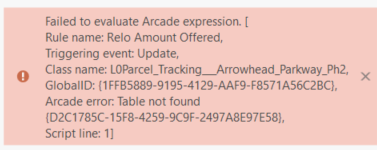
Why does it change my arcade expression from the Table Name I input in the expression, to the ID number? When it does this it's making the expression not find the table name in the GDB and generates this error.
Thanks!

- Mark as New
- Bookmark
- Subscribe to RSS Feed
- Permalink
Figured out the source of our issue. We were referencing a table within a few rules that unbeknownst to us was updated every 3-6 months via a full replace- meaning the table was deleted a new one (of the same name) was imported. We have now advised the table be updated via a truncate/append method and have not seen the same behavior since switching. Hope this helps someone!

- Mark as New
- Bookmark
- Subscribe to RSS Feed
- Permalink
This absolutely helped me @JBeasley, thank you!
The issue occurs for me even in just a file geodatabase, nothing involving services published or AGOL etc. Say my attribute rule on an address point feature class is pulling info from an underlying parcel polygon. The rule is using:
FeatureSetByName($datastore, "Parcels"...
If I delete the Parcels feature class, I assumed I could replace it with another feature class of the same name, and the attribute rule on my address point layer would be unaffected. And it seemed to work fine at first. So I did some more testing. If I check the attribute rule immediately after deleting/replacing the Parcels fc, then the expression code still looks fine and the rule still functions normally. However, if I close the project and reopen, then the attribute rule throws an error, and when inspecting the rule expression I will find the code is changed to something like this:
FeatureSetByName($datastore, "{AEDA8ED7-1785-4D10-9C54-0DCB1F4A8A6A}"...

- « Previous
-
- 1
- 2
- Next »
- « Previous
-
- 1
- 2
- Next »