- Home
- :
- All Communities
- :
- Products
- :
- ArcGIS Pro
- :
- ArcGIS Pro Questions
- :
- ArcGIS Pro random freezing
- Subscribe to RSS Feed
- Mark Topic as New
- Mark Topic as Read
- Float this Topic for Current User
- Bookmark
- Printer Friendly Page
ArcGIS Pro random freezing

- Mark as New
- Bookmark
- Subscribe to RSS Feed
- Permalink
I'm wondering if anyone out there has ever experienced all buttons and menus in ArcGIS Pro become unresponsive. It's not necessarily freezing in that I get no error, my CPU doesn't start going bonkers, I'm getting no indication that the machine or the program is hung on anything, but none of the menus or buttons respond to clicking. The only thing I can do is click the X button in Windows to close the program and save it when it prompts me. Or I can minimize or resize the program Window, which doesn't help much... I'm not seeing any pattern to it - no particular function or action seems to trigger it.
Solved! Go to Solution.


- Mark as New
- Bookmark
- Subscribe to RSS Feed
- Permalink
I'm not sure what exactly this item means but I did view the internal support cases and there was a related Esri Support case that an analyst reviewed. In the case, it stated that their IT department installed some type of compenent recently but did not know what it was. The only resolution was completely clean uninstall and reinstall as documented here - Performing a clean uninstall of ArcGIS Pro | Esri Australia Technical Blog - then the issue went away. Not the answer you'd like to hear but it did resolve their case.

- Mark as New
- Bookmark
- Subscribe to RSS Feed
- Permalink
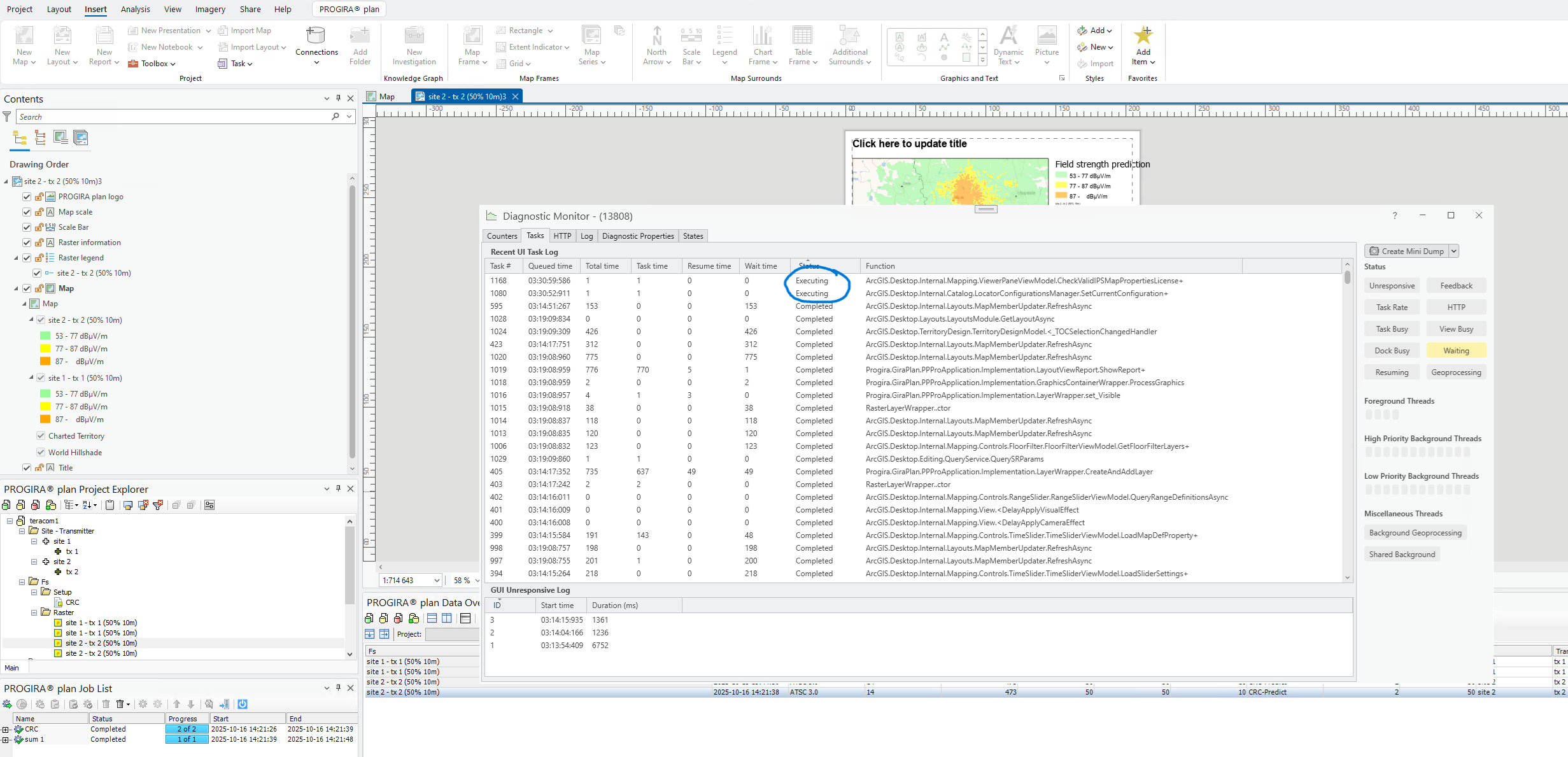
Hi, we are running into this freezing mode often in the latest ArcGIS Pro 3.5.4. We have done a clean install as described in the Australia post but problem is still there. It happens often when new layouts are created. In the enclosed picture the tasks executing during this freezing period can be seen. What are they up to?
- Mark as New
- Bookmark
- Subscribe to RSS Feed
- Permalink
@PatrikBEngstedt - in your screen grab, I see that you have a Progira add-in installed for ArcGIS Pro. I'm not familiar with this item. For testing purposes, I wonder if you can uninstall the add-in and then see if inserting a new layout performs better.
Since you started seeing this with ArcGIS Pro 3.5.4, you may want to uninstall the 3.5.4 patch and return to the 3.5.3 patch by using the workflow seen in this post - Returnig to an older version of Pro

- « Previous
- Next »
- « Previous
- Next »