- Home
- :
- All Communities
- :
- Products
- :
- ArcGIS Pro
- :
- ArcGIS Pro Questions
- :
- ArcGIS Pro Geodatabase Error
- Subscribe to RSS Feed
- Mark Topic as New
- Mark Topic as Read
- Float this Topic for Current User
- Bookmark
- Printer Friendly Page
ArcGIS Pro Geodatabase Error

- Mark as New
- Bookmark
- Subscribe to RSS Feed
- Permalink
I have an ArcGIS Pro project which encountered an error when I was trying to create a feature class.
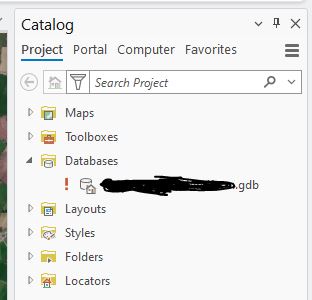
There is one geodatabase associated with this project. In the Catalog Pane, when I right-click the name of the geodatabase in order to create the feature class, I immediately get an error message that says 'Unspecified error' and this then puts a red exclamation mark beside the name of the project geodatabase (screenshots attached). If I click on the exclamation mark I am able to repair the geodatabase. Doing this removes the exclamation mark and it looks as if everything is okay.
I am then able to right-click the geodatabase and the 'Create Feature Class' window opens as normal. I enter the name of the feature class and all other details, click 'Finish', but then the name of the feature class goes red and will not create it (screenshot attached). Cancelling this and going back to the Catalog Pane shows the red exclamation mark beside the name of the geodatabase again.
I can go through this process over and over, repairing the geodatabase, trying to create the feature class, the process failing, but it just keeps going in an endless cycle.
Does anyone know why this is happening or how I might fix it? The geodatabase is saved to my C:Drive and is not shared with anyone. I also have a number of other ArcGIS Pro projects, but this issue is not happening to them, only to this one specific project. Any help is appreciated.


- Mark as New
- Bookmark
- Subscribe to RSS Feed
- Permalink
Update:
I was in contact with Esri about this issue for a number of weeks and tried many different suggestions to get the issue solved. In all, I had 3 geodatabases with the above-mentioned issue and I was able to recover one of them using the 'Recover File Geodatabase' tool. The other two geodatabases however seem to be utterly corrupted.
There was no obvious reason as to why this happened, even after I sent Esri one of the problem GDB and they did their own investigation on it. They did provide some advice for creating projects going forward:
• When creating a project, use underscores instead of spaces in the name (i.e. name the project Test_Project rather than Test Project)
• Ensure the project is saved to the C:Drive or equivalent local drive of the PC rather than on a shared drive.
Not exactly good news, but that's where we are. The 'Recover File Geodatabase' tool might be of use to someone experiencing the same issues.

- « Previous
-
- 1
- 2
- Next »
- « Previous
-
- 1
- 2
- Next »