- Home
- :
- All Communities
- :
- Products
- :
- ArcGIS Pro
- :
- ArcGIS Pro Ideas
- :
- Save As Layer File: Let us save with Absolute path...
- Subscribe to RSS Feed
- Mark as New
- Mark as Read
- Bookmark
- Printer Friendly Page


- Mark as New
- Bookmark
- Subscribe to RSS Feed
- Permalink
Related: https://community.esri.com/t5/arcgis-pro-ideas/need-absolute-path-names-in-pro/idc-p/1569417
Pro 3.1
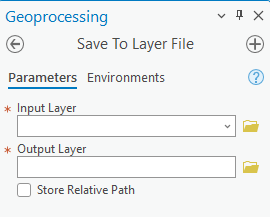
Give us the option to save with absolute paths when using "Sharing--> Save as Layer File"

This is available through the geoprocessing tool Save To Layer File (Data Management)—ArcGIS Pro | Documentation
But is unavailable through "Save As Layer File"
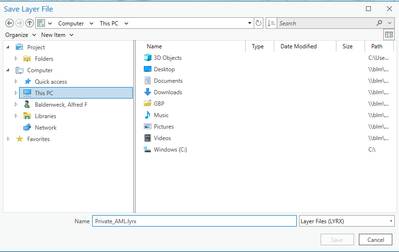
This discrepancy causes issues: LYRX files are meant to be easily moved around and re-organized, and being tied to relative paths means that they have to be re-created manually (Since we still can't edit the LYRX in Catalog). Additionally, most users do not use the geoprocessing tool to create LYRXs, meaning that the majority of our LYRX end up being created using relative paths.

Totally agreed with that @AlfredBaldenweck . i've just make a ticket about that.
Hope it will change in the future version of ArcGIS Pro.
@AlfredBaldenweck
Just les you know that a ticket is in review about that topic:
bugNumber=ENH-000183980
In ArcGIS Pro, provide the option to save with absolute paths when sharing layer files under right-click layer > Sharing > Share As Layer File
Oh excellent. I'll see if we can get added to it. Thanks for the update!
You must be a registered user to add a comment. If you've already registered, sign in. Otherwise, register and sign in.