- Home
- :
- All Communities
- :
- Products
- :
- ArcGIS Pro
- :
- ArcGIS Pro Ideas
- :
- Minimize Floating Attribute Tables in ArcGIS Pro
- Subscribe to RSS Feed
- Mark as New
- Mark as Read
- Bookmark
- Printer Friendly Page

- Mark as New
- Bookmark
- Subscribe to RSS Feed
- Permalink
Many have posted in the past about the ability to minimize attribute tables in ArcMap (current release 10.3). A few links are here: , ,
The problem remains in the first release of ArcGIS Pro 1.0.0. Close, Maximize and Restore options are all present, but no Minimize. Justification for this functionality has been given numerous times in other posts since 2010. Please consider bringing this basic functionality back into both products.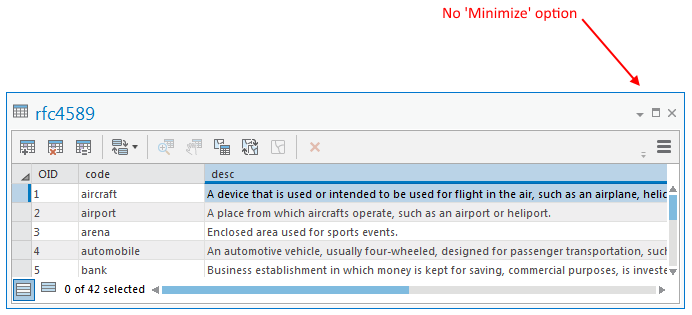
- « Previous
-
- 1
- 2
- 3
- 4
- Next »

can you please change this from Implemented so other can still Kudo's this idea and it can get added to In Production Plan 😊

Please add the minimize option ("Auto-Hide" Pin) to docked attribute tables too!
Idea posted here: Add Ability to Pin or Minimize Docked Table View - Esri Community


Hi @CathyAppleton this was implemented. Note that it is to minimize floating views. We understand that there is a separate and distinct request to auto-hide a docked table view. That is a different idea: https://community.esri.com/t5/arcgis-pro-ideas/auto-hide-attribute-table-in-arcgis-pro/idi-p/946356
You must be a registered user to add a comment. If you've already registered, sign in. Otherwise, register and sign in.