- Home
- :
- All Communities
- :
- Products
- :
- ArcGIS Pro
- :
- ArcGIS Pro Ideas
- :
- Link from layer properties source to catalog view
- Subscribe to RSS Feed
- Mark as New
- Mark as Read
- Bookmark
- Printer Friendly Page
Link from layer properties source to catalog view

- Mark as New
- Bookmark
- Subscribe to RSS Feed
- Permalink
When going into a layer's properties and looking at its source, I'd say the very next thing I do 99% of the time is close it and navigate into the catalog view to find it. Then, the next thing I do is re-open the layer properties because I couldn't remember the long file path to the FGDB or the exact name of the feature class/raster. Back and forth and back and forth...
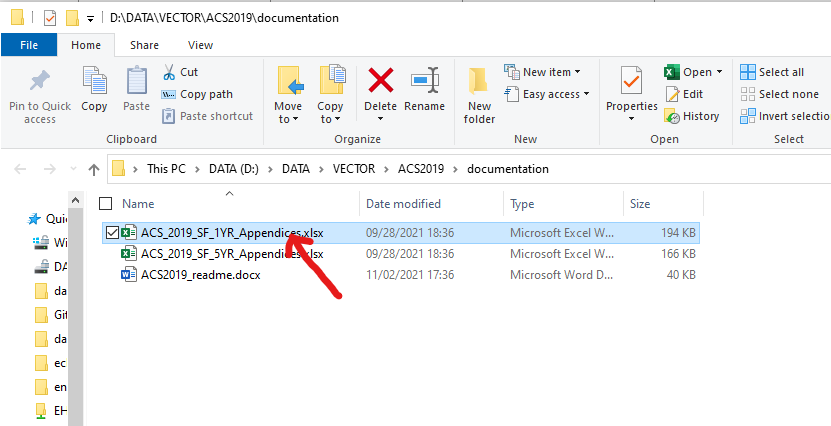
In the layer properties source tab, please give us a link or button to click on to navigate directly to it in the catalog. I included a screenshot of my browser's downloads page, and it has a link to open Windows Explorer to that folder and even highlights the downloaded item. Something like that would be really helpful (but go to the Catalog pane, not Windows Explorer).
Maybe it's not possible if it's something like a hosted feature layer or Excel sheet drawn as X/Y points, but I'd guess that most of the time I have that file geodatabase, folder (e.g.: where a shapefile is), service, or SDE connection mapped in my catalog view.


Hear hear. I also navigate in Explorer to my project home folder often so I added a tool to the quick access toolbar to do that for me:
https://pm.maps.arcgis.com/home/item.html?id=1dfcb2ddf2c549f7a0cca8c6ffc8985d

While not exactly the same (the requested entry point is different) this idea is highly related: Open dataset location in the Catalog Window - Esri Community

Many of the applications I use, including Microsoft Office applications, have a function or feature to either copy file paths or open a file in the File Explorer. It feels that esri may be a little late to this particular party. Having that function is not only a time saver, but just makes sense. You already do a similar function for drag and drop objects into the Python window (a brilliant and efficient use of functionality), so please take the next logical step and provide this needed functionality!


Similar to my request but this is a more elegant solution.

This would be very useful in helping us to get to the Source Metadata from the Layer item in the Contents Pane.
Since viewing/editing the Layer metadata is something I almost never want to do, and viewing/editing the Data Source Metadata is something I always need to do, it would be nice if the [View metadata] click had an option to view/edit the data source's metadata.


From the map pane, view metadata/ item description takes me to a workflow dead end/ warning message. It would be most helpful if the view metadata button were smart and would show me the existing metadata in its authored format (FGDC, Item Description, etc.) rather than showing erroneous blank fields. As long as I am wishing, if the metadata is only editable from the catalog pane, please have the 'edit metadata' button on the map pane, open catalog and the layer source location. Second best would be to include 'this must be edited from the catalog pane' in the warning message.
Hello @EdCarter,
We think that your suggestion is the same as expressed in this user idea: https://community.esri.com/t5/arcgis-pro-ideas/link-from-layer-properties-source-to-catalog-view/idi... , but we would like to confirm it with you before merging your idea into the existing one. Were you trying to edit the metadata for a map layer? The warning message you mentioned - is it this one?

Note that a map layer can assume (and display) the metadata of its data source (e.g. a feature class in a geodatabase). In that case when you want to edit "its" metadata, currently you need to browse to that data source item and edit that item's metadata. Any changes you make there will automatically show up when you view the map layer's metadata. The exiting user idea above is about making it easier to get from a map layer to its data source to edit the data source's metadata.
(A map layer can also have its own metadata independent of that of its data source. You can set it up this way in the layer's Properties dialog, Metadata tab. Once set up, if you want to edit the map layer's metadata, you can simply right click the map layer and click Edit Metadata in the context menu.)
Something like this in python?
--------------------------------------------------
import arcpy
# Path to your dataset
md = arcpy.metadata.Metadata(r"C:\Path\To\Your.gdb\FeatureClass")
# Create a blank metadata object
new_md = arcpy.metadata.Metadata()
# Get the blank XML
new_xml = new_md.xml
# Overwrite the existing metadata
md.xml = new_xml
md.save()
Metadata is a critical part of geospatial data management. Software that just says 'we can't show it to you' after this much time, seems like a deficit in market understanding.
You must be a registered user to add a comment. If you've already registered, sign in. Otherwise, register and sign in.