- Home
- :
- All Communities
- :
- Products
- :
- ArcGIS Pro
- :
- ArcGIS Pro Ideas
- :
- ArcGIS Pro - Creating Project Templates without De...
- Subscribe to RSS Feed
- Mark as New
- Mark as Read
- Bookmark
- Printer Friendly Page
ArcGIS Pro - Creating Project Templates without Default File Geodatabase

- Mark as New
- Bookmark
- Subscribe to RSS Feed
- Permalink
With Pro, it doesn't want to remember SDE connections or folder connections, I have template MXDs that I always start with ArcMap projects, so I'd like to the same thing with Pro. Or even start a blank Pro Project, however have all those folder/SDE connections and maybe a layout set with page sizes. The solution it to create Project Templates.
I've created Templates. Now want to update that templates with some new changes. I've even tried creating a brand new templates. However when creating a new Project, you have to select the default folder location, which sets the default file geodatabase, and toolbox. So I get everything set in my Pro Project, then Share > Export Project Template. It creates the template and I can share it how I please. However those default file geodatabase come with the template. Therefore another user at my organization that would use this template would have the same default FGDB as me. Which is something I don't want.
I know there is an option to pick the same FGDB for every Project, for example a network location, however I don't really want my users to be using the same one for all projects.
I'd like to be able to create a template without the default file geodatabase that was used in that original template Project (aspx file). Because the user creates the default FGDB when they open the template and create a new Project.
- « Previous
-
- 1
- 2
- 3
- Next »


Out of curiosity, has there been any further consideration given to this Idea since the "Under Consideration" tag was applied back in October 2021?
We have a template my team uses regularly, and I keep running into this 2-GDB tedium as a result.
I have a project called "MapTemplate_Master" where I maintain updates to the template. Because I have to have a default GDB, it has an empty GDB by the same name inside the folder. Then I create a template via Share->Save As...-> Project Template and save it to file.
Then I go start a new project from this template, let's call it "MapRequest7". Inside that MapRequest7 folder is a MapRequest7.gdb (the default database for that project, which is empty), and a MapTemplate_Master.gdb (from the original template project; this is also empty).
Note that that last one isn't a link back to the original, it's a new copy.
For every project my team creates using this template, we're ending up with two empty GDBs cluttering the folders that we don't need.
I cannot see why this should be standard procedure.
When you export the template, there are even checkboxes for whether or not to include Toolboxes & History items:
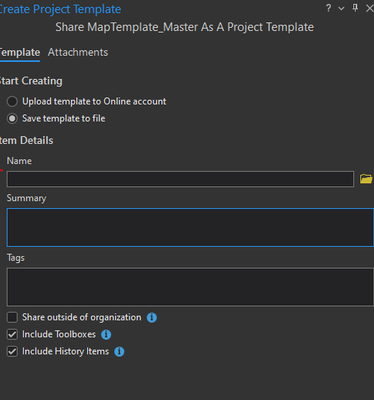
Why not just include a checkbox for whether to include (select) GDBs or not? Or at the very minimum, have a way for the template to detect that it has a local GDB embedded and rename said local GDB to match the new Project name.
I could live with a single GDB, if it came to it. But two is absurd.


We would also like to have better control over templates and what follows the project. Ideally not including the default project databases etc...

This would be very helpful, trying to keep these templates clean for users for ease of use and this quirk makes it hard.
I've also noticed this with empty toolboxes, I have the "Include toolboxes" unchecked, when the template is used to create a new project, it creates the new default toolbox in the location of the project that the template was created from.

Real status update when?
-----
Actually a substantive comment. The template utilized a mobile geodatabase as the default and when opening up the template, as a template, the new default geodatabase is a file geodatabase. This defeats the whole purpose of putting a mobile geodatabase as the default to gain the benefit of using a single file instead of the smorgasbord that is the file geodatabase. Totally tedious to have to delete the auto-created file geodatabase.
And it looks like this is an inter-related idea:
https://community.esri.com/t5/arcgis-pro-ideas/select-type-of-default-geodatabase-to-be-created/idi-...


Any update with this? We're using 3.5 and still seeing this.

I would love to see a solution to this.
Only way I have worked around is to copy my project used to create a template into a temporary folder. After saving the .aptx file I delete the temporary folder. Since the file path is gone, when I use the template to create a new project I end up with only the newly created default gdb. No sign of the gdb from the template project, but the old folder connection is still there in my list of folders. Before I create the .aptx I rename the folder to REMOVE_ME, so at least the user understands not to worry and to remove the broken folder connection from the project.
Anyway, I would love to avoid this run around process.
In a few months it will be 10 years since this Idea was raised and 5 years since it was "Under Consideration". I get that some things prove complicated or just fall by the wayside, but I would love at least an acknowledgement from ESRI about the likelihood this will ever see the light of day.
This post has already drummed up 122 Kudos as of this message, it has been independently requested at least twice based on the comments merged in, and it has generated 19 comments discussing the matter—many of them of moderate length and filled with systemic confusion, case studies, and suggestions.
I struggle to understand how this does not land on the ESRI development radar in any meaningful way somewhere along the way. Even more frustrating, this is the sort of development that seems it would have synergized well with the new Organization Favorites in 3.7 and other similar upgrades to the Content Pane along the way.
------------------------------
M Reed
"The pessimist may be right oftener than the optimist, but the optimist has more fun, and neither can stop the march of events anyhow." — Lazarus Long, in Time Enough for Love, by Robert A. Heinlein


Hi @MErikReedAugusta ,
Thank you for your continued engagement with this Idea. We receive around 1000 new Ideas each year, so there is a significant prioritization effort involved with any given release. We hear you and the members of the community who would like to see this implemented and we continue to track user demand on this thread. In other words, its certainly on our radar. That said, there is not a simple way to address this (in general, if there is high demand for a feature or behavior change and it is really easy to do, we try to get to it quickly --> High Value, Low Effort...). That isn't the case here.
I would like to take this opportunity to clarify expectations around Idea statuses. As per the ArcGIS Ideas Submission Guidelines and Statuses, “Under Consideration” means: “You've got our attention! We think this is a good suggestion and have entered it in our backlog. This does not guarantee that the idea will be developed so we encourage the community to continue voting and sharing feedback which will help teams gauge user demand.”
Thank you for being an active member of the Esri Community.
Thanks for the response and clarification. I will admit to having been a little salty about having to constantly deal with/clean up these unnecessary items at the time I posted that comment and may have bit a bit more abrasive than I needed to be. The current behavior definitely still baffles me, but I understand that tech debt happens, sometimes.
From the outside, it is mildly surprising and troubling to me that something like this isn't as simple a fix as it might first appear. I'm also even more disappointed with that when taken in conjunction with some of the closely-linked concerns and Ideas others have cited above. The projects created from the Template certainly are capable of creating their own databases and other items, and there's already precedent in the process with toolboxes being able to be excluded.
But again, I recognize that I'm looking from the outside and that tech debt happens, so it is entirely possible that this is significantly more difficult to implement than it appears. I'll just continue to look forward to the chance of this one day hopefully making it on the development radar.
You must be a registered user to add a comment. If you've already registered, sign in. Otherwise, register and sign in.