- Home
- :
- All Communities
- :
- Products
- :
- ArcGIS Notebooks
- :
- ArcGIS Notebooks Questions
- :
- Set Notebook Data Rate Limit Enterprise
- Subscribe to RSS Feed
- Mark Topic as New
- Mark Topic as Read
- Float this Topic for Current User
- Bookmark
- Subscribe
- Mute
- Printer Friendly Page
Set Notebook Data Rate Limit Enterprise


- Mark as New
- Bookmark
- Subscribe
- Mute
- Subscribe to RSS Feed
- Permalink
Hey all,
Not sure if this has been posted before, but I cannot seem to find it.
How do I set this variable within the Python Notebook, or on the Notebook server itself:
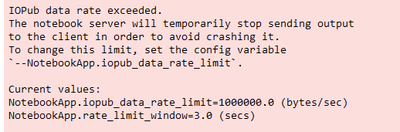
Unfortunately we seem to have more than the data rate limit, and it has caused quite a lot of issues.
I assume this is quite easy to set, but I have not been fruitful in my efforts.
UPDATE: As another question to keep everything together, how is this done on the AGOL Notebook?
Thanks in advance!
Cody

- Mark as New
- Bookmark
- Subscribe
- Mute
- Subscribe to RSS Feed
- Permalink
Hey Cody,
I've just encountered this issue myself. I'm wondering if you ever figured out how to take care of this?
I found something online that might work, but it was all outside the context of the Python workings of Pro. Thanks!
- Mark as New
- Bookmark
- Subscribe
- Mute
- Subscribe to RSS Feed
- Permalink
Hey @CS_VT
I have unfortunately not found a solution to this, I encounter this quite often and hopefully will figure it out soon!
If you have any suggestions please share!
Cody
- Mark as New
- Bookmark
- Subscribe
- Mute
- Subscribe to RSS Feed
- Permalink
I actually encountered this issue only once - so I haven't had to change anything.
I did find this item yesterday, but I'm not sure how to implement it:
Good luck!

- Mark as New
- Bookmark
- Subscribe
- Mute
- Subscribe to RSS Feed
- Permalink
Any update on this?
Also interested in addressing this data rate limit in ArcGIS Pro Notebooks.

- Mark as New
- Bookmark
- Subscribe
- Mute
- Subscribe to RSS Feed
- Permalink
Hello,
for what it's worth, I had the same issue (Notebook in AGS Pro), I open a Support ticket and below is how I solved MY issue:
- I was trying to loop through an item list (3400 records), I was having a bunch of "print" statement an I was trying to write into a CSV...
Solution:
- Stop all printing statements
- use logging instead of writing to the csv file
I was able to complete my process.
import time
import logging
icount = 0
tcount = 0

strFileNameESRI = drNotebookFolder + "\\" + "brokenLinks_ESRIV2_01262026.txt"
logging.basicConfig(filename=strFileNameESRI,level=logging.INFO, format='%(message)s',filemode='w')


for n in no_item_nodes:
    #print("*******************")
    logging.info("*******************")
    #print("Broken Item: " + (str(n.id)))
    logging.info("Broken Item: " + (str(n.id)))
    #print(" ")
    broken_node = n
    #print(broken_node)
    #print("Contained By")
    logging.info("Contained By: ")
    #print(broken_node.contained_by())
    logging.info(str(broken_node.contained_by()))
    # print("-----------------------")
    #print("required By")
    #txtoutputM.write("required By: "+"\n")
    logging.info("required By: ")
    #print(broken_node.required_by())
    logging.info(str(broken_node.required_by()))
    #print(" ")
    icount +=1
    logging.info(str(icount))
    # tcount +=1
    # print(tcount)


print("Process all done")
below is the summary from my Support case from the analyst

Good luck!
