- Home
- :
- All Communities
- :
- Developers
- :
- JavaScript Maps SDK
- :
- JavaScript Maps SDK Questions
- :
- Why Would Vector Basemap "streets-vector" Not Disp...
- Subscribe to RSS Feed
- Mark Topic as New
- Mark Topic as Read
- Float this Topic for Current User
- Bookmark
- Printer Friendly Page
Why Would Vector Basemap "streets-vector" Not Display in IE11?

- Mark as New
- Bookmark
- Subscribe to RSS Feed
- Permalink
I have one computer that will not display an ESRI vector base map:
var map = new Map({
basemap: "streets-vector"
});
It works on all other computers I have tried, just one computer for all users won't display this base map. The "topo" and "streets" base maps work just fine. Any ideas? I'm guessing it's a settings issue, but I am simply helping debug this app, I am not very familiar with ArcGIS for JavaScript API. I haven't found anything different in Compatibility View on a computer that works and this one that doesn't. Same with the Internet Options settings. The computer is on Windows 8 and the one I'm testing against that does work is Windows 10. Both IE11. Firefox and Chrome display the basemap just fine. I welcome any ideas on what to look for, either in IE settings or in code.


- Mark as New
- Bookmark
- Subscribe to RSS Feed
- Permalink
Kirsten,
Make sure that the JS code specifies the document mode (line 5):
<!DOCTYPE html>
<html>
<head>
<meta http-equiv="Content-Type" content="text/html; charset=utf-8">
<meta http-equiv="X-UA-Compatible" content="IE=edge, chrome=1" />
<meta name="viewport" content="initial-scale=1, maximum-scale=1,user-scalable=no"/>
<title>Simple Map</title>
<link rel="stylesheet" href="https://js.arcgis.com/3.18/esri/css/esri.css">
<style>
html, body, #map {
height: 100%;
margin: 0;
padding: 0;
}
</style>
<script src="https://js.arcgis.com/3.18/"></script>
<script>
var map;
require(["esri/map", "dojo/domReady!"], function(Map) {
map = new Map("map", {
basemap: "streets-vector", //For full list of pre-defined basemaps, navigate to http://arcg.is/1JVo6Wd
center: [-122.45, 37.75], // longitude, latitude
zoom: 13
});
});
</script>
</head>
<body>
<div id="map"></div>
</body>
</html>- Mark as New
- Bookmark
- Subscribe to RSS Feed
- Permalink
Thanks Robert for the response! It looks like we have that in the html file:
<!DOCTYPE html>
<html>
<head>
<meta http-equiv="X-UA-Compatible" content="IE=Edge">
<meta charset="utf-8">
<meta name="viewport" content="initial-scale=1,maximum-scale=1,user-scalable=no">
<title>Average Daily Traffic</title>
<!-- Include ArcGIS stylesheets -->
<link rel="stylesheet" href="http://js.arcgis.com/4.0/esri/css/main.css">
<!-- Include jquery -->
<script type="text/javascript" src="../jquery/jquery-1.11.3.min.js"></script>
<script type="text/javascript" src="../jquery/jquery-ui-1.10.4/ui/jquery-ui.js"></script>
<!-- Include ArcGIS API -->
<script src="https://js.arcgis.com/4.0/"></script>
<!-- Include ADT JavaScript-->
<script type="text/javascript" src="ADT.js"></script>
<!-- Include ADT stylesheets -->
<link rel="stylesheet" href="ADT.css">
</head>
The JS file is included and here's a snippet of the code:
function (
Map,
MapView,
Extent,
SpatialReference,
FeatureLayer,
PopupTemplate,
Legend,
Home,
on,
dom,
domAttr,
domConstruct
) {
var map = new Map({
basemap: "streets"
});
var view = new MapView({
container: "viewDiv",
map: map,
center: [-117.427677, 47.644390],
zoom: 9,
// padding: {
// right: 200
// },
popup: {
// dockEnabled: true,
dockOptions: {
breakpoint: false, // to prevent automatic docking when screen gets small
position: "bottom-left",
}
}
});
view.constraints = {
minScale: 2000000, // User cannot zoom out beyond a scale of 1:2,000,000
maxScale: 0, // User can overzoom tiles
rotationEnabled: false // Disables map rotation
};
Would you concur, or did I overlook something?


- Mark as New
- Bookmark
- Subscribe to RSS Feed
- Permalink
Good thought! I'll take a look.
- Mark as New
- Bookmark
- Subscribe to RSS Feed
- Permalink
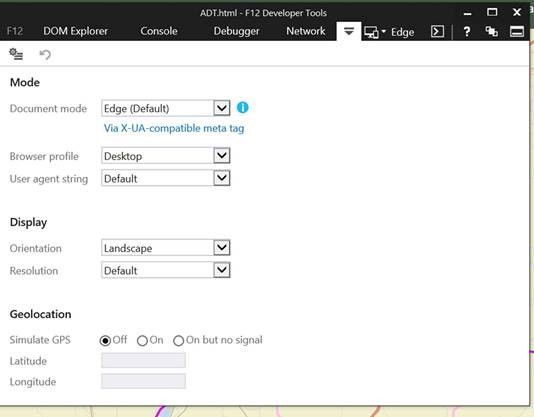
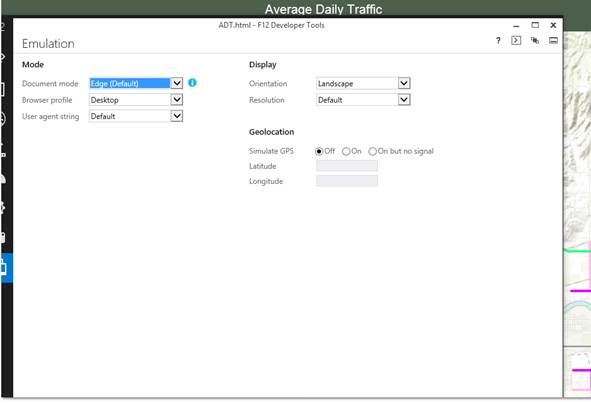
Steve, apparently the computer that doesn't work doesn't see the "via x-ua-compatible" meta tag. So that may be the key, especially given Robert's suggestions. So I need to figure out why not.
This is from a computer that works:
This is from a computer that doesn't display the basemap on the same network:
- Mark as New
- Bookmark
- Subscribe to RSS Feed
- Permalink
If you manually change the setting within Emulation, does the basemap appear?
- Mark as New
- Bookmark
- Subscribe to RSS Feed
- Permalink
Kirsten,
OK you neglected to mention you were using 4.x JS API. When I specify the document mode I have not issue with this code on IE 11.
<!DOCTYPE html>
<html>
<head>
<meta charset="utf-8">
<meta http-equiv="X-UA-Compatible" content="IE=Edge">
<meta name="viewport" content="initial-scale=1,maximum-scale=1,user-scalable=no">
<title>Get started with MapView - Create a 2D map - 4.0</title>
<style>
html,
body,
#viewDiv {
padding: 0;
margin: 0;
height: 100%;
width: 100%;
}
</style>
<link rel="stylesheet" href="https://js.arcgis.com/4.0/esri/css/main.css">
<script src="https://js.arcgis.com/4.0/"></script>
<script>
require([
"esri/Map",
"esri/views/MapView",
"dojo/domReady!"
], function(Map, MapView) {
var map = new Map({
basemap: "streets-vector"
});
var view = new MapView({
container: "viewDiv",
map: map,
center: [-117.427677, 47.644390],
zoom: 9,
// padding: {
// right: 200
// },
popup: {
// dockEnabled: true,
dockOptions: {
breakpoint: false, // to prevent automatic docking when screen gets small
position: "bottom-left",
}
}
});
view.constraints = {
minScale: 2000000, // User cannot zoom out beyond a scale of 1:2,000,000
maxScale: 0, // User can overzoom tiles
rotationEnabled: false // Disables map rotation
};
});
</script>
</head>
<body>
<div id="viewDiv"></div>
</body>
</html>Is the machine that is failing running this website over an Intranet url or a true www url? IE can default to a certain document mode when using an Intranet url.
- Mark as New
- Bookmark
- Subscribe to RSS Feed
- Permalink
Sorry, I overlooked that detail.
The machine is running over a true inTERnet URL, however it IS connected to our internal network. That might be a test, to see if it works when connected to a network outside of the office. Good thought!
