- Home
- :
- All Communities
- :
- Developers
- :
- JavaScript Maps SDK
- :
- JavaScript Maps SDK Questions
- :
- Sketch Tooltip Options Coordinate Input for all ve...
- Subscribe to RSS Feed
- Mark Topic as New
- Mark Topic as Read
- Float this Topic for Current User
- Bookmark
- Printer Friendly Page
Sketch Tooltip Options Coordinate Input for all vertices

- Mark as New
- Bookmark
- Subscribe to RSS Feed
- Permalink
Hi,
via sketchTooltipOptions it is possible to enable Coordinate-Input.
Unfortunately I do not get it working except for once and only for the very fist vertex.
To activate Tooltip one presses tab button. The tooltip opens. On activated coordinates it shows inputs to out in coordinates.
It looks like this:
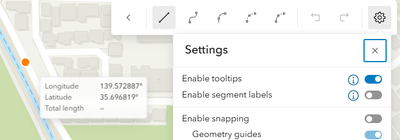
Right before clicking tab of the very first point:
Right after clicking tab of the very first point:
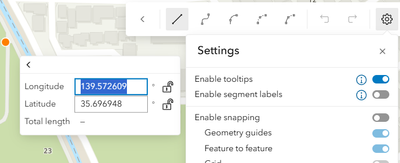
It seems I only can set the coordinate by left clicking on the map after fixing the coordinates.
Hitting Enter only collapses the tooltip.
Right after left clicking the tooltip changes. It does not show coordinate tooltip any more, instead it shows deflection mode:


Our customer wants to input every coordiante of the polyline or polygon. One after the other.
How do I achieve that?
I used this page to work with a sample:
https://developers.arcgis.com/javascript/latest/sample-code/sketch-geometries/
I used this sketch in the linked codepen to enable coordiante input:
const sketch = new Sketch({
  layer: graphicsLayer,
  view: view,
  // graphic will be selected as soon as it is created
  creationMode: "update",
  tooltipOptions: {enabled: true, visibleElements: {coordinates: true}}
});
