Good Day (Editing to push back up the forum)
I integrated a print template to capture the maps in our software. When I capture polylines they render without colour, but if I capture points, they render just fine, is there something I have to set when building the polylines to in order for the capture to grab the colour?
I've attached some sample captures showing the difference:
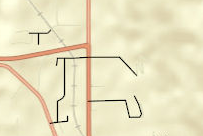
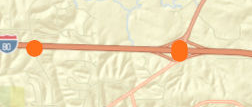
The legend / feature layer information at the bottom is correct, with the correct name and colour being shown, so I don't think this is a feature layer issue, this is my print template code, and I've tried using PDF, it renders the same way;
printMap() {
  const usePrintTask = true;
  if (usePrintTask) {
    const printTask = this.PrintTask({
      url: 'https://utility.arcgisonline.com/arcgis/rest/services/Utilities/PrintingTools/GPServer/Export Web Map Task'
    });

    const template = new this.PrintTemplate({
      format: 'jpg',
      layout: 'a4-landscape',
      layoutOptions: {
        titleText: 'DOT ESRI Map',
        authorText: 'Infrasol'
      }
    });

    const params = new this.PrintParameters({
      view: this._view,
      template: template
    });

    printTask.execute(params).then(this.printResult, this.printError);
  } else {
    this._view.takeScreenshot().then( (res) => {
      console.log('Res');
      console.log(res);

      const w = window.open('about:blank');
      const image = new Image();
      image.src = res.dataUrl;
      setTimeout(() => {
        w.document.write(image.outerHTML);
      },  0);
    });
  }
}printResult(result) {
console.log('Result');
console.log(result);
console.log(result.url);
window.open(result.url);
}
printError(err) {
console.log('ESRI Print Task Error: ', err);
}Have I done anything clearly wrong?
Thanks



