- Home
- :
- All Communities
- :
- Developers
- :
- JavaScript Maps SDK
- :
- JavaScript Maps SDK Questions
- :
- Re: Popup Style Issues
- Subscribe to RSS Feed
- Mark Topic as New
- Mark Topic as Read
- Float this Topic for Current User
- Bookmark
- Printer Friendly Page

- Mark as New
- Bookmark
- Subscribe to RSS Feed
- Permalink
Greetings, I'm working with popups in an ESRI Javascript API 3.18 bootstrapmap.js map and my popups are not styling correctly. It appears to me like I am missing both the minimize and maximize buttons and the popup pointers appear to not be drawing correctly. See below:
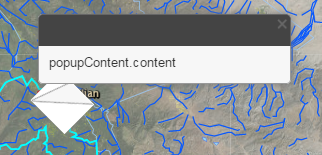
Initially the popup titlePane was white and the close button was invisible. I followed the directions at Making Your Pop-up Pop! | ArcGIS Blog and copied the css from http://serverapi.arcgisonline.com/jsapi/arcgis/3.1/js/esri/dijit/css/Popup.css and that got me this far. How do I take this the rest of the way?
Thanks, Tyler
Solved! Go to Solution.
Accepted Solutions


- Mark as New
- Bookmark
- Subscribe to RSS Feed
- Permalink
Tyler,
Here is what I have working:
<!DOCTYPE html>
<html>
<head>
<title>Bootstrap 101 Template</title>
<meta name="viewport" content="width=device-width, initial-scale=1.0, maximum-scale=1.0, user-scalable=no">
<!-- Bootstrap -->
<link href="http://maxcdn.bootstrapcdn.com/bootstrap/3.3.2/css/bootstrap.min.css" rel="stylesheet" media="screen">
<!-- Step 1. Add CSS for the mapping components -->
<link rel="stylesheet" type="text/css" href="http://js.arcgis.com/3.18/esri/css/esri.css">
<link rel="stylesheet" type="text/css" href="http://esri.github.io/bootstrap-map-js/src/css/bootstrapmap.css">
<style>
#mapDiv {
min-height: 100px;
max-height: 1000px;
}
.esriPopup .titlePane, .esriPopup.light .titlePane, .esriPopup.dark .titlePane {
background-color: rgb(112,112,112);
}
/* Change color of icons to match bar chart and selection symbol */
.esriPopup.dark div.titleButton,
.esriPopup.dark div.titlePane .title,
.esriPopup.dark div.actionsPane .action {
color: #A4CE67;
}
/* Additional customizations */
.esriPopup.dark .esriPopupWrapper {
border: none;
}
.esriViewPopup .gallery {
margin: 0 auto;
}
</style>
<!-- HTML5 IE8 support of HTML5 elements and media queries -->
<!--[if lt IE 9]>
<script src="../assets/js/html5shiv.js"></script>
<script src="../assets/js/respond.min.js"></script>
<![endif]-->
</head>
<body>
<!-- Step 2. Add HTML to define the layout of the page and the map -->
<div class="container">
<div id="mapDiv"></div>
</div>
<!-- Step 3. Add JS to load the responsive map -->
<script>
var package_path = window.location.pathname.substring(0, window.location.pathname.lastIndexOf('/'));
var dojoConfig = {
packages: [{
name: "application",
location: package_path + '/js'
}, {
name: "bootstrap",
location: "http://rawgit.com/xsokev/Dojo-Bootstrap/master"
}]
};
</script>
<script src="http://js.arcgis.com/3.18/"></script>
<script>
require(["esri/map", "esri/layers/FeatureLayer", "application/bootstrapmap", "esri/dijit/PopupTemplate", "esri/dijit/Popup", "dojo/dom-construct", "dojo/dom-class","dojo/domReady!"],
function(Map, FeatureLayer, BootstrapMap, PopupTemplate, Popup, domConstruct, domClass) {
var popup = new Popup({
titleInBody: true
}, domConstruct.create("div"));
//Add the dark theme which is customized further in the <style> tag at the top of this page
domClass.add(popup.domNode, "dark");
// Get a reference to the ArcGIS Map class
var map = BootstrapMap.create("mapDiv",{
basemap:"national-geographic",
center:[-122.45,37.77],
zoom:12,
infoWindow: popup
});
var popupTemplate = new PopupTemplate({
"title": "Location",
"description": "<b>Crime Desc: </b> {Desc_} </br><br/> <b>Case #: </b> {Case_Num}"
});
var featureLayer = new FeatureLayer("my url/0", {
mode: FeatureLayer.MODE_SNAPSHOT,
infoTemplate: popupTemplate,
opacity:1,
outFields: ["*"]
});
map.addLayers([featureLayer]);
});
</script>
</body>
</html>
- Mark as New
- Bookmark
- Subscribe to RSS Feed
- Permalink
Tyler,
Here is what I have working:
<!DOCTYPE html>
<html>
<head>
<title>Bootstrap 101 Template</title>
<meta name="viewport" content="width=device-width, initial-scale=1.0, maximum-scale=1.0, user-scalable=no">
<!-- Bootstrap -->
<link href="http://maxcdn.bootstrapcdn.com/bootstrap/3.3.2/css/bootstrap.min.css" rel="stylesheet" media="screen">
<!-- Step 1. Add CSS for the mapping components -->
<link rel="stylesheet" type="text/css" href="http://js.arcgis.com/3.18/esri/css/esri.css">
<link rel="stylesheet" type="text/css" href="http://esri.github.io/bootstrap-map-js/src/css/bootstrapmap.css">
<style>
#mapDiv {
min-height: 100px;
max-height: 1000px;
}
.esriPopup .titlePane, .esriPopup.light .titlePane, .esriPopup.dark .titlePane {
background-color: rgb(112,112,112);
}
/* Change color of icons to match bar chart and selection symbol */
.esriPopup.dark div.titleButton,
.esriPopup.dark div.titlePane .title,
.esriPopup.dark div.actionsPane .action {
color: #A4CE67;
}
/* Additional customizations */
.esriPopup.dark .esriPopupWrapper {
border: none;
}
.esriViewPopup .gallery {
margin: 0 auto;
}
</style>
<!-- HTML5 IE8 support of HTML5 elements and media queries -->
<!--[if lt IE 9]>
<script src="../assets/js/html5shiv.js"></script>
<script src="../assets/js/respond.min.js"></script>
<![endif]-->
</head>
<body>
<!-- Step 2. Add HTML to define the layout of the page and the map -->
<div class="container">
<div id="mapDiv"></div>
</div>
<!-- Step 3. Add JS to load the responsive map -->
<script>
var package_path = window.location.pathname.substring(0, window.location.pathname.lastIndexOf('/'));
var dojoConfig = {
packages: [{
name: "application",
location: package_path + '/js'
}, {
name: "bootstrap",
location: "http://rawgit.com/xsokev/Dojo-Bootstrap/master"
}]
};
</script>
<script src="http://js.arcgis.com/3.18/"></script>
<script>
require(["esri/map", "esri/layers/FeatureLayer", "application/bootstrapmap", "esri/dijit/PopupTemplate", "esri/dijit/Popup", "dojo/dom-construct", "dojo/dom-class","dojo/domReady!"],
function(Map, FeatureLayer, BootstrapMap, PopupTemplate, Popup, domConstruct, domClass) {
var popup = new Popup({
titleInBody: true
}, domConstruct.create("div"));
//Add the dark theme which is customized further in the <style> tag at the top of this page
domClass.add(popup.domNode, "dark");
// Get a reference to the ArcGIS Map class
var map = BootstrapMap.create("mapDiv",{
basemap:"national-geographic",
center:[-122.45,37.77],
zoom:12,
infoWindow: popup
});
var popupTemplate = new PopupTemplate({
"title": "Location",
"description": "<b>Crime Desc: </b> {Desc_} </br><br/> <b>Case #: </b> {Case_Num}"
});
var featureLayer = new FeatureLayer("my url/0", {
mode: FeatureLayer.MODE_SNAPSHOT,
infoTemplate: popupTemplate,
opacity:1,
outFields: ["*"]
});
map.addLayers([featureLayer]);
});
</script>
</body>
</html>
- Mark as New
- Bookmark
- Subscribe to RSS Feed
- Permalink
Hi Robert, Thanks for providing me this template. The css that you provided fixed my issue. However, in my original application I am not referencing bootstrapmap.js only bootstrapmap.css. Is that an issue? Should I be using bootstrapmap.js as you are? If so, I'm getting a 404 on bootstrapmap.js in this template. I dug a little deeper and found the 404 at:
http://rawgit.com/xsokev/Dojo-Bootstrap/masterI downloaded bootstrap map locally and changed the dojoConfig to:
var package_path = window.location.pathname.substring(0, window.location.pathname.lastIndexOf('/'));
        var dojoConfig = {
            packages: [{
                name: "application",
                location: package_path + '/js'
            }, {
                name: "bootstrap",
                location: "bootstrapmap.js"
            }]
        };
However, I'm getting a BootstrapMap is not a constructor when i create my map.
Any idea how I should proceed?
Thanks, Tyler
- Mark as New
- Bookmark
- Subscribe to RSS Feed
- Permalink
Tyler,
I followed the instructions found here and the code I provided worked fine:
- Mark as New
- Bookmark
- Subscribe to RSS Feed
- Permalink
Thanks Robert, I'll continue to play around with it. I'm sure I must have made a mistake somewhere. It's probably a good time for me to walk away and come back. My popups look awesome, now. And that is what I needed. Thanks for your help!
Tyler
