- Home
- :
- All Communities
- :
- Developers
- :
- JavaScript Maps SDK
- :
- JavaScript Maps SDK Questions
- :
- Double-click event & infoWindow
- Subscribe to RSS Feed
- Mark Topic as New
- Mark Topic as Read
- Float this Topic for Current User
- Bookmark
- Printer Friendly Page

- Mark as New
- Bookmark
- Subscribe to RSS Feed
- Permalink
I'm having a little trouble with the double click event and infoWindows. My featureLayer has a popup associated with it which displays when features are single clicked. I want to implement a double click to toggle between starting/stopping vertex editing. When I double click a feature, I still get the popup window even though I think I have coded to prevent it:
        theLayer.on("dbl-click", function(evt) {
            map.infoWindow.hide();
            event.stop(evt);
             //Do Something...
        });
I would imagine that the event.stop() method is only addressing the double click event and not the single click event so how do I stop the popup during a double click event?
Solved! Go to Solution.
Accepted Solutions


- Mark as New
- Bookmark
- Subscribe to RSS Feed
- Permalink
Have you tried pausing the map's click event when you are doing vertex editing? "dojo/on" has a pausable method where you can stop and start the event as needed.
- Mark as New
- Bookmark
- Subscribe to RSS Feed
- Permalink
Thanks, Ken. I haven't looked into that method before. It seemed a little confusing at first but I think I know how I might implement it. I'm using a "control key + click" event in order to bring up the attributeInspector so I'm thinking I could also just pause the click event listener at that time and then resume it when the attributeInspector is dismissed.
We'll see how that goes. Thanks for the tip!
Steve
- Mark as New
- Bookmark
- Subscribe to RSS Feed
- Permalink
I marked Ken's response as correct because, well, it is technically correct and likely a sound approach. I have decided to go a simpler route instead since I was going to need to pause/resume click events on multiple feature layers and that seemed like it was destined to be a headache.
The alternative was to add a button to my attribute inspector and serve as a toggle button. Click once to enable vertex editing and click a second time to save changes.
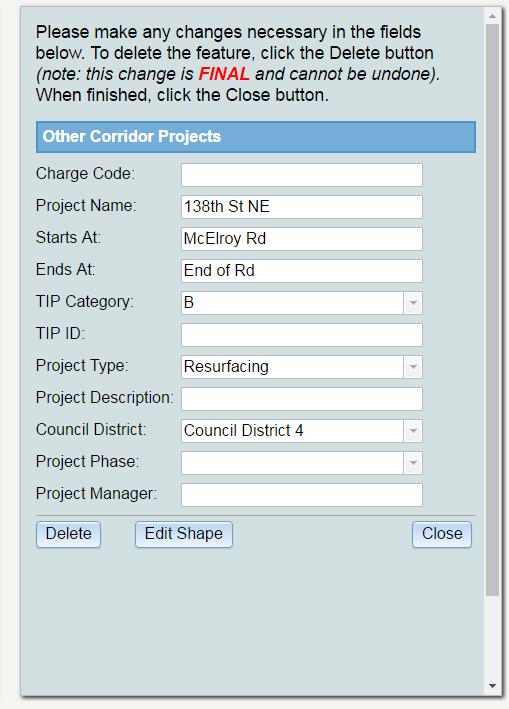
        editShapeButton.on('click',function(e) {
            if(app.editingEnabled) {
                app.editToolbar.deactivate();
                app.attInspector._currentFeature._layer.applyEdits(null,[app.attInspector._currentFeature],null);
                editShapeButton.set("label","Edit Shape");
                app.editingEnabled = false;
            } else {
                app.editToolbar.activate(Edit.EDIT_VERTICES, app.attInspector._currentFeature);
                editShapeButton.set("label","Save Edits");
                app.editingEnabled = true;
            }
        });
