- Home
- :
- All Communities
- :
- Products
- :
- ArcGIS Experience Builder
- :
- ArcGIS Experience Builder Questions
- :
- Re: Survey123 Data Connection: Survey questions [o...
- Subscribe to RSS Feed
- Mark Topic as New
- Mark Topic as Read
- Float this Topic for Current User
- Bookmark
- Printer Friendly Page
Survey123 Data Connection: Survey questions [object Object]

- Mark as New
- Bookmark
- Subscribe to RSS Feed
- Permalink
Enterprise 10.9.1, Survey123 Connect 3.16.110
Setting up Survey123 Widget as a 'Submit a new record' and 'Send data to this survey' to yes.
When I attempt to make a connection from the map layer field to the survey question. The drop down list contains [object Object] rather than the survey question names.
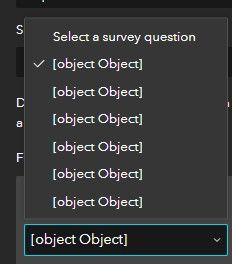
Solved! Go to Solution.
Accepted Solutions


- Mark as New
- Bookmark
- Subscribe to RSS Feed
- Permalink
Following further testing on ArcGIS Enterprise 11.0, this has been logged as BUG-000155338: Question labels display as [object Object] in Experience Builder Survey widget when linking to a survey published from Survey123 Connect
Thanks
- Mark as New
- Bookmark
- Subscribe to RSS Feed
- Permalink
I've not seen this before. I just tested on 10.9.1 with a test survey I just published and I couldn't recreate the issue. If you publish a test survey, do you see the same behaviour?
Thanks
- Mark as New
- Bookmark
- Subscribe to RSS Feed
- Permalink
If I create a new survey using the web designer. The survey question drop down in the 'create data connection' displays the questions with the label name.
If I create a new survey using survey123 connect. I get the [object Object] shown above.
Using ArcGIS Online Assistant and looking at the underlying files for the two different surveys they are quite different.
Survey Web Designer
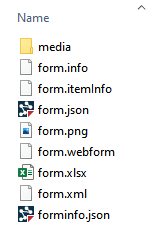
The form.json file has this format for the survey question
"questions": [
{
"id": "field_1",
"position": 0,
"fieldName": "note_fld",
"name": "note_fld",
"type": "esriQuestionTypeText",
"isRequired": false,
"fieldType": "esriFieldTypeString",
"validation": {
"valueRange": {
"isEnabled": false
},
"inputMask": {
"isEnabled": false,
"customFormat": ""
}
},
"label": "abc",
"description": null
}
],
Survey123 Connect
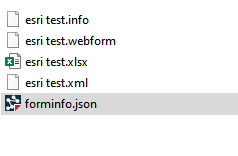
The esri test.webform file has this format for the question
"questions": [
{
"calculation": {
"expression": ""
},
"defaultValue": "",
"description": {
"en": null
},
"fieldName": "example1",
"fieldType": "esriFieldTypeString",
"id": "/esri_test/example1",
"isRequired": false,
"label": {
"en": "Example text question"
},
The json format for Label is different depending on how the survey was created.
- Mark as New
- Bookmark
- Subscribe to RSS Feed
- Permalink
Thanks for confirming your survey was published from Connect. I have now recreated this issue.
I will test at version 11 tomorrow and confirm if this is a BUG.
Thanks
- Mark as New
- Bookmark
- Subscribe to RSS Feed
- Permalink
Following further testing on ArcGIS Enterprise 11.0, this has been logged as BUG-000155338: Question labels display as [object Object] in Experience Builder Survey widget when linking to a survey published from Survey123 Connect
Thanks
- Mark as New
- Bookmark
- Subscribe to RSS Feed
- Permalink
Thanks for the followup and logging it as a bug.
