- Home
- :
- All Communities
- :
- Products
- :
- ArcGIS Experience Builder
- :
- ArcGIS Experience Builder Questions
- :
- Measurement Widget Buttons Not Visible
- Subscribe to RSS Feed
- Mark Topic as New
- Mark Topic as Read
- Float this Topic for Current User
- Bookmark
- Printer Friendly Page

- Mark as New
- Bookmark
- Subscribe to RSS Feed
- Permalink
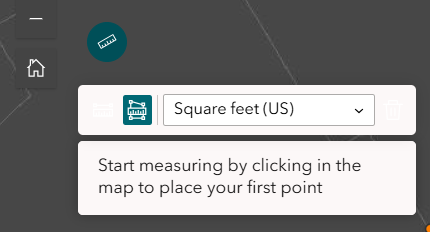
Not sure if there's a solution here, but I'm working on an Experience Builder app that includes the Measurement widget tool, and when the widget is opened the buttons to select area or linear measurement aren't visible against the background (see screenshots). I know for users familiar with the measurement tool this won't be much of a problem, but for folks who aren't as knowledgeable it may be a significant barrier to using the app. When I select the widget it says there are no style standards to adjust. Has anyone run into this issue before?
Solved! Go to Solution.
Accepted Solutions


- Mark as New
- Bookmark
- Subscribe to RSS Feed
- Permalink
Does it act the same in incognito mode? Have you tried changing theme colors to see if that changes it?
- Mark as New
- Bookmark
- Subscribe to RSS Feed
- Permalink
Good call! Changing the theme fixed the issue. I had wanted to use my organization's shared theme but that's life I guess! Have a good weekend Laura.
- Mark as New
- Bookmark
- Subscribe to RSS Feed
- Permalink
I know! Hopefully we can customize widgets more in the future.
