- Home
- :
- All Communities
- :
- Products
- :
- ArcGIS Experience Builder
- :
- ArcGIS Experience Builder Questions
- :
- Feature Info widget: "The information for this fea...
- Subscribe to RSS Feed
- Mark Topic as New
- Mark Topic as Read
- Float this Topic for Current User
- Bookmark
- Printer Friendly Page
Feature Info widget: "The information for this feature could not be displayed"

- Mark as New
- Bookmark
- Subscribe to RSS Feed
- Permalink
I'm using the Feature Info widget to display popup info for a couple tables, and it's giving me the error "The information for this feature could not be displayed".
- This is different from the "no data" message.
- The error occurs whether or not a feature is selected.
- In the widget configuration, data source is configured for "default", not "selected features"
- The popup contains Arcade expressions and is working fine in map viewer.
- This error is occurring for 2 of 6 views in my app (the views show different web maps with different themes; each map has a table connected to a Feature Info widget. Tables in each map are from the same hosted table.) All the Feature Info widgets are configured similarly - four are working fine, but two are showing this error.
- When I googled the error, the only hit was for this bug: BUG-000143889 for ArcGIS Online
- I'm using ArcGIS Enterprise 11.3
The error:

The widget configuration:

The functioning popup in Map Viewer:

Similarly configured widget working in a different view (comes from the same hosted table in a different web map):
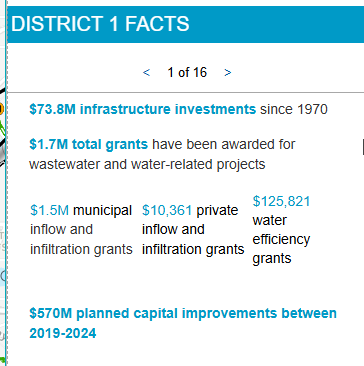
Here are the expressions used:
{expression/expr0}:
var awards = FeatureSetByName($map, "Livable Communities Grant Awards")
var districts = FeatureSetByName($map, "Met Council Districts")

// Filter for the district polygon corresponding to the district in this table
// should be a featureset with one feature
var thisDistrictFS = Filter(districts, "MCDIST = " + $feature.mcdist)

// Get the feature from the featureset
var thisDistrict = First(thisDistrictFS)

// Find award points within the district feature
var districtAwards = Intersects(awards, thisDistrict)

// Create list of the award categories
var awardTypes = []
var awardList = ""
for (var f in districtAwards) {
  Push(awardTypes, f.CATEGORY)
}

// Clean up the list
awardTypes = Distinct(awardTypes)
awardTypes = Sort(awardTypes)
for (var f in awardTypes) {
  awardList += awardTypes[f] + TextFormatting.NewLine
}
awardList = Replace(awardList, "TBRA", "Tax Base Revitalization Account (TBRA)")
awardList = Replace(awardList, "LCDA", "Livable Communities Demonstration Account (LCDA)")
awardList = Replace(awardList, "LHIA", "Local Housing Incentives Account (LHIA)")
awardList = Replace(awardList, "TOD", "Transit-Oriented Development (TOD)")
awardList = Trim(awardList)

return awardList
{expression/expr1}:
// Convert big numbers to $1.7B, etc
var amount = $feature.lcaawardtotal
var millions = "$" + Round(amount / 1000000, 1) + "M"
var billions = "$" + Round(amount / 1000000000, 1) + "B"
var thousands = "$" + Text(amount, "#,###")
When(
  amount >= 1000000 && amount < 1000000000,
  millions,
  amount >= 1000000000,
  billions,
  thousands)
Incorporated into the text block of the popup:
 {lcagrantsawarded} grants awarded through the following programs:

 {expression/expr0}

 {expression/expr1} in grants awarded since 1996


- Mark as New
- Bookmark
- Subscribe to RSS Feed
- Permalink
Layer ID
Ok, so the ID button is not there at 11.3 or 11.4 (not sure about 11.5), but it is there at 12.
Here's a bit of a roundabout workaround, but it works...
Add a list widget, connect your layer, view the experience, click on the list widget and the layer ID is in the URL. It's encoded, so remove the %3A and the last bit :<selectedrecordID>
data_s=id%3A691434bfd3484ac7b735ddc39491b93d-19eb62aa302-layer-3%3A1

691434bfd3484ac7b735ddc39491b93d-19eb62aa302-layer-3

Use this in:
FeatureSetById
Error on first load
It may be that your expression is running before your layers have a chance to load. On refresh they have been cached. Check your console on the first load.
As @NicoleJohnson suggested, adding an Arcade Expression as a field in the Text content (red) is slightly different than adding as an Arcade block content (green).

explains the difference in use, but not the logic.
Arcade content = full element generation

- « Previous
-
- 1
- 2
- Next »
- « Previous
-
- 1
- 2
- Next »