- Home
- :
- All Communities
- :
- Products
- :
- ArcGIS Experience Builder
- :
- ArcGIS Experience Builder Questions
- :
- Re: Feature Info widget: "The information for this...
- Subscribe to RSS Feed
- Mark Topic as New
- Mark Topic as Read
- Float this Topic for Current User
- Bookmark
- Subscribe
- Mute
- Printer Friendly Page
Feature Info widget: "The information for this feature could not be displayed"

- Mark as New
- Bookmark
- Subscribe
- Mute
- Subscribe to RSS Feed
- Permalink
I'm using the Feature Info widget to display popup info for a couple tables, and it's giving me the error "The information for this feature could not be displayed".
- This is different from the "no data" message.
- The error occurs whether or not a feature is selected.
- In the widget configuration, data source is configured for "default", not "selected features"
- The popup contains Arcade expressions and is working fine in map viewer.
- This error is occurring for 2 of 6 views in my app (the views show different web maps with different themes; each map has a table connected to a Feature Info widget. Tables in each map are from the same hosted table.) All the Feature Info widgets are configured similarly - four are working fine, but two are showing this error.
- When I googled the error, the only hit was for this bug: BUG-000143889 for ArcGIS Online
- I'm using ArcGIS Enterprise 11.3
The error:

The widget configuration:

The functioning popup in Map Viewer:

Similarly configured widget working in a different view (comes from the same hosted table in a different web map):
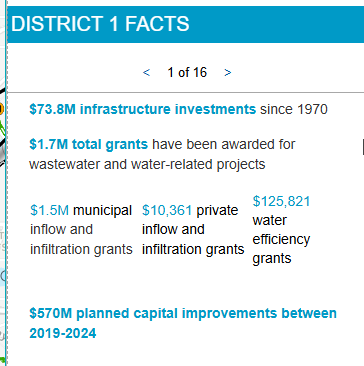
Here are the expressions used:
{expression/expr0}:
var awards = FeatureSetByName($map, "Livable Communities Grant Awards")
var districts = FeatureSetByName($map, "Met Council Districts")

// Filter for the district polygon corresponding to the district in this table
// should be a featureset with one feature
var thisDistrictFS = Filter(districts, "MCDIST = " + $feature.mcdist)

// Get the feature from the featureset
var thisDistrict = First(thisDistrictFS)

// Find award points within the district feature
var districtAwards = Intersects(awards, thisDistrict)

// Create list of the award categories
var awardTypes = []
var awardList = ""
for (var f in districtAwards) {
  Push(awardTypes, f.CATEGORY)
}

// Clean up the list
awardTypes = Distinct(awardTypes)
awardTypes = Sort(awardTypes)
for (var f in awardTypes) {
  awardList += awardTypes[f] + TextFormatting.NewLine
}
awardList = Replace(awardList, "TBRA", "Tax Base Revitalization Account (TBRA)")
awardList = Replace(awardList, "LCDA", "Livable Communities Demonstration Account (LCDA)")
awardList = Replace(awardList, "LHIA", "Local Housing Incentives Account (LHIA)")
awardList = Replace(awardList, "TOD", "Transit-Oriented Development (TOD)")
awardList = Trim(awardList)

return awardList
{expression/expr1}:
// Convert big numbers to $1.7B, etc
var amount = $feature.lcaawardtotal
var millions = "$" + Round(amount / 1000000, 1) + "M"
var billions = "$" + Round(amount / 1000000000, 1) + "B"
var thousands = "$" + Text(amount, "#,###")
When(
  amount >= 1000000 && amount < 1000000000,
  millions,
  amount >= 1000000000,
  billions,
  thousands)
Incorporated into the text block of the popup:
 {lcagrantsawarded} grants awarded through the following programs:

 {expression/expr0}

 {expression/expr1} in grants awarded since 1996


- Mark as New
- Bookmark
- Subscribe
- Mute
- Subscribe to RSS Feed
- Permalink
This might not be the answer, but are the non-working pop-ups created with Arcade content blocks (this is different from Arcade attribute expressions)? You mention expressions in your post, but I figured I'd ask since I've had problems displaying Arcade content blocks before with other widgets, though the result was a blank pop-up, not an error.
If you're using Arcade content blocks, try removing them and adding something "simpler" like a field list, and see if your feature info widget works then.
- Mark as New
- Bookmark
- Subscribe
- Mute
- Subscribe to RSS Feed
- Permalink
It's not using Arcade content blocks - just attribute expressions incorporated into a text block.
- Mark as New
- Bookmark
- Subscribe
- Mute
- Subscribe to RSS Feed
- Permalink
[Edit: had posted the Arcade expressions as a comment; added them to the main post instead]


- Mark as New
- Bookmark
- Subscribe
- Mute
- Subscribe to RSS Feed
- Permalink
FeatureSetByName Creates a FeatureSet from a Feature Layer based on its name within a map or feature service. Keep in mind this name is not necessarily unique. It is therefore more appropriate to create a FeatureSet using FeatureSetById().
FeatureSetByName($map, "Livable Communities Grant Awards")
Livable Communities Grant Awards and Met Council Districts should be the title of the layer within the given map in every map (not the hosted feature layer name), so check all your maps to ensure the names match. Even a trailing space can make a difference.
Intersects() with null geometries
I would also check if there are any null geometries in Met Council Districts.
var districtAwards = Intersects(awards, thisDistrict)
- Mark as New
- Bookmark
- Subscribe
- Mute
- Subscribe to RSS Feed
- Permalink
Thanks for the response @EMani .
There are no null geometries in Met Council Districts - just sixteen valid polygon features.
The names match exactly, even spaces, and are unique within the map. (Met Council Districts is within a group layer - wonder if that requires something special for the name?)
I'm looking into using FeatureSetByID instead of FeatureSetByName, but can't find any clear explanation on how to find the layer's ID!
- Mark as New
- Bookmark
- Subscribe
- Mute
- Subscribe to RSS Feed
- Permalink
Hi @HannahWilson3
FeatureSetById
- id: Text - The ID of the layer within the given map. This layer must be created from a feature service; feature collections are not supported. Please note that this value must be a text literal.
Example
Returns the number of features in the layer with the id DemoLayerWM_1117 in the given map.
var features = FeatureSetById($map,'DemoLayerWM_1117', ['*'], true);Count( features );
To find the layer id:
In the data tab, click on the map.

Then click the ID button on the layer.

I don't think group layers would change anything. You could test with them outside of the group to be sure, but from the Arcade docs, I think by id would be a better option and easier to match a single digit than a string.
- Mark as New
- Bookmark
- Subscribe
- Mute
- Subscribe to RSS Feed
- Permalink
Hi @EMani - are those screenshots from AGOL or maybe ExpB Dev Edition? I'm using Exp Builder in Enterprise 11.3 and do not see the ID.

Weirdly, the error now only occurs on initial page load. I added the optional "fields" parameter to the FeatureSetByName functions to pull only the fields needed for the expression; now, I still get the error when the app is first loaded, but refreshing the page brings up the correct feature info.
var awards = FeatureSetByName($map, "Livable Communities Grant Awards", ["CATEGORY"])
var districts = FeatureSetByName($map, "Met Council Districts", ["MCDIST"])
- Mark as New
- Bookmark
- Subscribe
- Mute
- Subscribe to RSS Feed
- Permalink
All the Feature Info widgets are configured similarly - four are working fine, but two are showing this error.
Are the two that were working fine still working totally fine, or are they also now erroring on first load?
It's definitely worthwhile to have checked that the layer names are valid (when using FeatureSetByName), but if there was a problem there, you would've been seeing issues with the pop-ups in Map Viewer too instead of only Experience Builder.
- Mark as New
- Bookmark
- Subscribe
- Mute
- Subscribe to RSS Feed
- Permalink
Yep, all the others are still working fine.
