- Home
- :
- All Communities
- :
- Products
- :
- ArcGIS Experience Builder
- :
- ArcGIS Experience Builder Questions
- :
- Customize visible scales in Experience Builder
- Subscribe to RSS Feed
- Mark Topic as New
- Mark Topic as Read
- Float this Topic for Current User
- Bookmark
- Printer Friendly Page
Customize visible scales in Experience Builder

- Mark as New
- Bookmark
- Subscribe to RSS Feed
- Permalink
In ArcGIS Web App Builder under the "Map" feature, one could restrict the zoom levels by selecting Customize... under the section "Customize visible scales" and then remove unwanted scales:
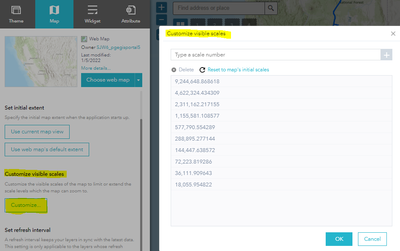
I could not find that feature in Experience Builder. Does it exist? If not could you please add it to the Roadmap, please?

- Mark as New
- Bookmark
- Subscribe to RSS Feed
- Permalink
@Ke_Xu Will we be able to lock the area that they can pan to?
For example, I don't want them to be able to pan outside of this area:

For my generals maps I don't want them to be able to pan outside of our county:


- Mark as New
- Bookmark
- Subscribe to RSS Feed
- Permalink
This is not it, we need to customize all the scales, otherwise the basemap cache (map cache) is not sharp!
Actually I don't even need to add the scales manually. I found out, that Instant Apps are using scales from the basemap automatically. Please add at least this to Experience Builder.

- Mark as New
- Bookmark
- Subscribe to RSS Feed
- Permalink
Dear all,
I just tried this new feature in ArcGIS Experience Builder Developer Edition v1.17.
You can configure the minimum and maximum scales, but unfortunately, you can't define intermediate visible scales like you could in Web AppBuilder.
Best regards,
Simon

- Mark as New
- Bookmark
- Subscribe to RSS Feed
- Permalink
The 'implemented' suggestion here does not do the same thing at all.
This is key functionality for us. We have a custom base map with set scales which our team need to see and print from, however once in Experience Builder the zoom scales do not persist, and are random. Either the option to set the zoom scales is needed, as per the original suggestion, or Experience Builder needs to respect the scales of the base map. We are using Experience Builder Developer Edition, so it is hoped there is a way we can force map scales in the back end?
- Mark as New
- Bookmark
- Subscribe to RSS Feed
- Permalink
For those of you using ExB dev edition, this post may be of use: Can you set scale levels for scroll zooming? - Esri Community seems to have worked for us. We discovered the issue only happened with mouse scrolling so if that's not important for your users, you can try disabling this.


- Mark as New
- Bookmark
- Subscribe to RSS Feed
- Permalink
Hi All,
In the October 2025 ArcGIS Online update, we optimized this feature.

Thanks,
Ke
- « Previous
-
- 1
- 2
- Next »
- « Previous
-
- 1
- 2
- Next »