- Home
- :
- All Communities
- :
- Products
- :
- ArcGIS Experience Builder
- :
- ArcGIS Experience Builder Questions
- :
- Re: Can the feature info widget show data from rel...
- Subscribe to RSS Feed
- Mark Topic as New
- Mark Topic as Read
- Float this Topic for Current User
- Bookmark
- Printer Friendly Page
Can the feature info widget show data from related tables?

- Mark as New
- Bookmark
- Subscribe to RSS Feed
- Permalink
Hi team, My gut feeling is no. I have comms records (table/non-spatial) related to property parcels (polygon/spatial). When I put the feature info widget, it populated spatial data, but not tabular. Can anyone confirm related, non-spatial data won't show in the feature info widget or is it possible, and I've taken the wrong steps? Is there a good work around for this?

- Mark as New
- Bookmark
- Subscribe to RSS Feed
- Permalink
I have been able to get my related tables into the Feature Info widget. However, I did this by publishing a feature service that I hosted on my own servers. The feature service has several related tables published with it. In the experience I am building, my feature service involves bridge locations / info, and then related tables for inspection and activity reports. I was able to go in a specify one of my related tables as a source for the Feature Info widget.

- Mark as New
- Bookmark
- Subscribe to RSS Feed
- Permalink
I am able to show the related table data on its own in a feature info widget.
There seems to be no way to show what it belongs to.
Having the user try to make that association is problematic I think, especially when you have tables with many possible parents.
After the Edit widget, support for related tables is my next request.
- Mark as New
- Bookmark
- Subscribe to RSS Feed
- Permalink
I found that when you click on the parent feature on the map, it shows only the related data in tables/feature info widgets. Assuming you set up the triggers and actions of course.
- Mark as New
- Bookmark
- Subscribe to RSS Feed
- Permalink
Thanks Sandra. I got this figured out now. I don't like the look of it though. It's too busy. It's not the best use of the screen space. I also noticed the title in the feature info widget for the related table has it's full name, but I don't know where it is coming from. The feature info widgets for the spatial features look just as I've set them up to be. Have you found a different way to display the data (more concise/better use of space. I thought about stacking in columns rather than using section/view) than the feature info widget? I've tried removing some of the fields too, but it doesn't work for me on in the related tables... probably a user malfunction.
- Mark as New
- Bookmark
- Subscribe to RSS Feed
- Permalink
Hi - I'd like to do this, but I need the Feature Info widget to filter out the related tables based on a selection - were you able to accomplish anything like that? So far, I can get it to show all the related tables, but not any based on a selection on the map or a list.

- Mark as New
- Bookmark
- Subscribe to RSS Feed
- Permalink
This ExpB is one I've embedded into a Roads Service ExpB allowing the user to see the inspection history of a gully, as you can see the map selection gives the right data in the Feature Info widget.
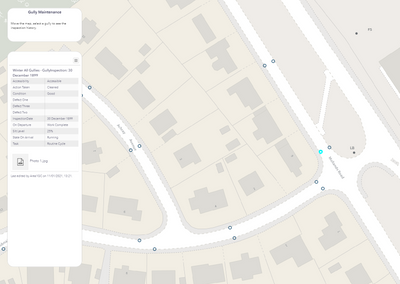
The way to do this is to preserve the relationship between GlobalID and the ParentID (GUID) from the map action selection.
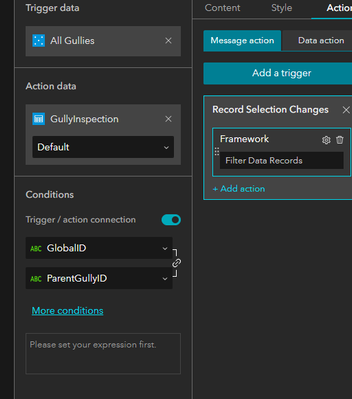
Is this what you're after?
