With ExB version 1.19, it is possible to perform bulk edits in the Edit widget.
1. The user selects the relevant features, either in the attribute table or using the selection tools in the editor on the map (menu above the selected objects)
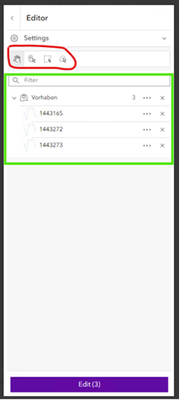
2. Then they click on “Edit” and open the attribute editing widget. (You also have the option to move everything)

3. They make the desired changes and click on “Update”

4. In the attribute table, you can see that the changes have been applied to all features.


We would like to perform the “multiple editing” functionality in ExB directly from the table widget without opening the editor widget. That is, you select multiple table rows, click in a column you want to change, and the entry is applied to all selected rows for that column.
This is not currently possible in the ExB. Therefore, an ENH should be created for this.
