Turn on suggestions
Auto-suggest helps you quickly narrow down your search results by suggesting possible matches as you type.
Cancel
- Home
- :
- All Communities
- :
- Products
- :
- ArcGIS Enterprise
- :
- ArcGIS Enterprise Questions
- :
- What might cause the services to stop as the machi...
Options
- Subscribe to RSS Feed
- Mark Topic as New
- Mark Topic as Read
- Float this Topic for Current User
- Bookmark
- Subscribe
- Mute
- Printer Friendly Page
What might cause the services to stop as the machine restarts?
Subscribe
6918
25
12-12-2013 01:09 AM

12-12-2013
01:09 AM
- Mark as New
- Bookmark
- Subscribe
- Mute
- Subscribe to RSS Feed
- Permalink
What might cause the services to stop as the machine restarts?
I???m wondering why the services stop as the machine restarts. Sometimes, we are forced to restart the server machine which affects the services to stop
[ATTACH=CONFIG]29809[/ATTACH]
What might be the issue here?
Thank you
Best
Jamal
I???m wondering why the services stop as the machine restarts. Sometimes, we are forced to restart the server machine which affects the services to stop
[ATTACH=CONFIG]29809[/ATTACH]
What might be the issue here?
Thank you
Best
Jamal
----------------------------------------
Jamal Numan
Geomolg Geoportal for Spatial Information
Ramallah, West Bank, Palestine
Jamal Numan
Geomolg Geoportal for Spatial Information
Ramallah, West Bank, Palestine
25 Replies

12-13-2013
04:52 AM
- Mark as New
- Bookmark
- Subscribe
- Mute
- Subscribe to RSS Feed
- Permalink
What might cause the services to stop as the machine restarts?
Jamal
Good question Jamal.
It happens to us occasionally. In my environment, I have several virtual machines at play with one single map service. SDE, Web Server, ArcGIS Server(s). When it happens to us, my guess is that it is a result of server patching and not starting the virtual machines up in the correct order.
If your environment is distributed, then start the database, then ArcGIS Server(s) then your web server.
If your environment is all on a single server, then I would ask whoever manages your servers what they did recently. Very rarely we have problems with the SDE machine where the SQL Server service starts, but not the Agent (and that is bad because backups don't run). I suspect that problem is related to all of the server monitoring software that our data center installs, but I can't prove it.
12-14-2013
12:42 PM
- Mark as New
- Bookmark
- Subscribe
- Mute
- Subscribe to RSS Feed
- Permalink
Good question Jamal.
It happens to us occasionally. In my environment, I have several virtual machines at play with one single map service. SDE, Web Server, ArcGIS Server(s). When it happens to us, my guess is that it is a result of server patching and not starting the virtual machines up in the correct order.
If your environment is distributed, then start the database, then ArcGIS Server(s) then your web server.
If your environment is all on a single server, then I would ask whoever manages your servers what they did recently. Very rarely we have problems with the SDE machine where the SQL Server service starts, but not the Agent (and that is bad because backups don't run). I suspect that problem is related to all of the server monitoring software that our data center installs, but I can't prove it.
Many thanks William and Leo for the help,
In my environment:
1. The source data of the services is file geodatabase
2. The ArcGIS Server and the file geodatabase are in the same server machine
3. The OS is Windows server 2012
4. When the serve machine reboots, ALL the services are found in stop mode
Let me just demonstrate why the server machine reboots very often. In winter, it is very common in our city to have electricity cut. Despite the fact that we have UPS that can serve up to half an hour in the best case, the server shuts down. Therefore, we need to start it to find out that services are in stop mode.
My point here is why as the machine reboots then the services are found in stop mode. What is the reason behind this behavior? Is there a way to have the services in start mode as the machine reboots?
----------------------------------------
Jamal Numan
Geomolg Geoportal for Spatial Information
Ramallah, West Bank, Palestine
Jamal Numan
Geomolg Geoportal for Spatial Information
Ramallah, West Bank, Palestine



12-14-2013
04:58 PM
- Mark as New
- Bookmark
- Subscribe
- Mute
- Subscribe to RSS Feed
- Permalink
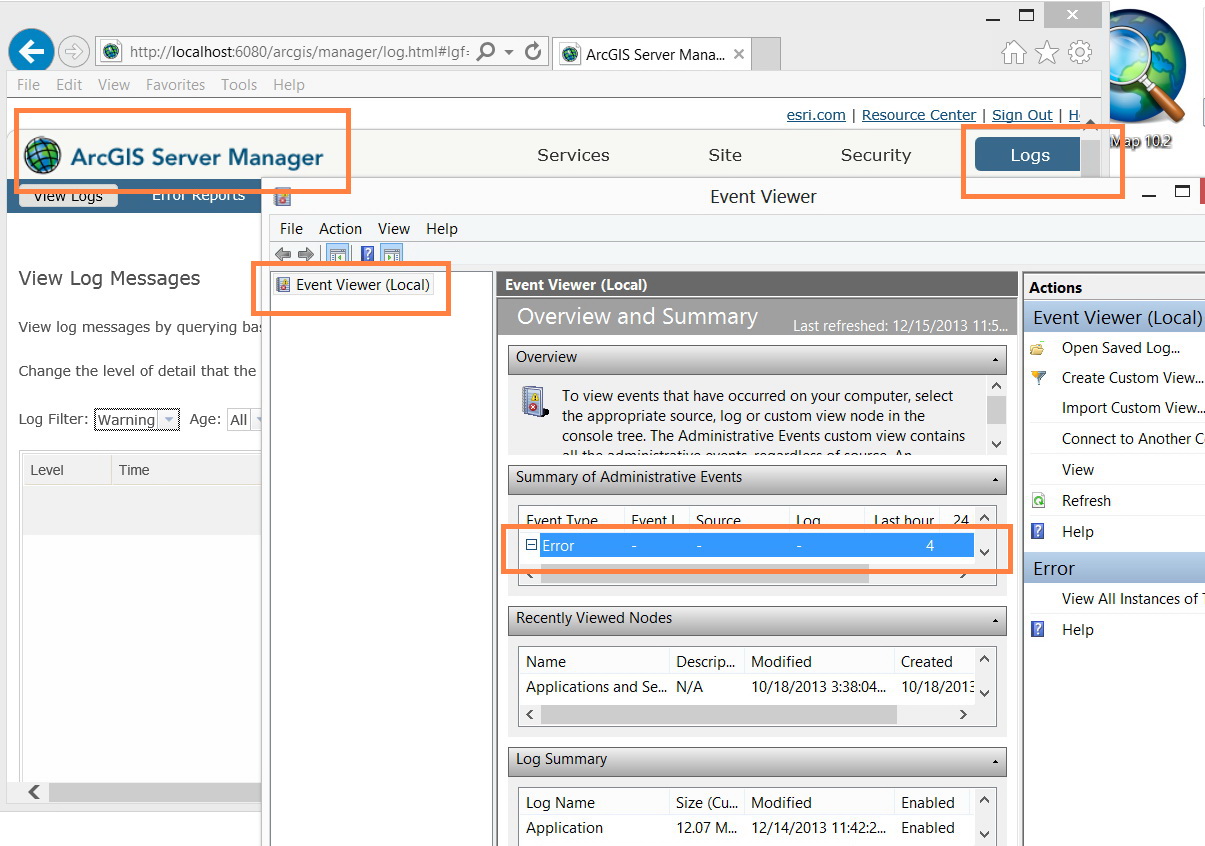
If you're able to connect to AGS in ArcCatalog or in Server Manager alright (which, from your screenshots it appears as such), then in my mind the "SOM" or the ArcGIS Server service is running just fine. That being said, I think the only reason a service might stop or never start is if there is an issue connecting to the underlying data sources. Since your data sources are file geodatabases local to the server, it's hard to believe that would be an issue but you never know. Can you check your ArcGIS Server log to see if there are any errors that might point to an issue? Can you also check your Windows Event Viewer for problems right after the machine boots up?
12-15-2013
03:01 AM
- Mark as New
- Bookmark
- Subscribe
- Mute
- Subscribe to RSS Feed
- Permalink
If you're able to connect to AGS in ArcCatalog or in Server Manager alright (which, from your screenshots it appears as such), then in my mind the "SOM" or the ArcGIS Server service is running just fine. That being said, I think the only reason a service might stop or never start is if there is an issue connecting to the underlying data sources. Since your data sources are file geodatabases local to the server, it's hard to believe that would be an issue but you never know. Can you check your ArcGIS Server log to see if there are any errors that might point to an issue? Can you also check your Windows Event Viewer for problems right after the machine boots up?
Thanks William,
It happens, sometimes, that if I stop the �??ArcGIS Server�?� and restart it then all the services start but after CONSIDERABLE TIME (not immediately) as Justin has already indicated.
[ATTACH=CONFIG]29891[/ATTACH]
What might be the explanation for this? Why does the ArcGIS server consume much of time to start services?
----------------------------------------
Jamal Numan
Geomolg Geoportal for Spatial Information
Ramallah, West Bank, Palestine
Jamal Numan
Geomolg Geoportal for Spatial Information
Ramallah, West Bank, Palestine

12-15-2013
04:53 AM
- Mark as New
- Bookmark
- Subscribe
- Mute
- Subscribe to RSS Feed
- Permalink
I don't think anyone really knows; hence the length of this thread. I will reiterate my questions...
Can you check your ArcGIS Server log to see if there are any errors that might point to an issue?
Can you also check your Windows Event Viewer for problems right after the machine boots up?
Can you check your ArcGIS Server log to see if there are any errors that might point to an issue?
Can you also check your Windows Event Viewer for problems right after the machine boots up?
12-15-2013
10:00 PM
- Mark as New
- Bookmark
- Subscribe
- Mute
- Subscribe to RSS Feed
- Permalink
I don't think anyone really knows; hence the length of this thread. I will reiterate my questions...
Can you check your ArcGIS Server log to see if there are any errors that might point to an issue?
Can you also check your Windows Event Viewer for problems right after the machine boots up?
Thanks William
I�??ll be checking the logs of ArcGIS Server and Windows the next time I get this problem
[ATTACH=CONFIG]29901[/ATTACH]
----------------------------------------
Jamal Numan
Geomolg Geoportal for Spatial Information
Ramallah, West Bank, Palestine
Jamal Numan
Geomolg Geoportal for Spatial Information
Ramallah, West Bank, Palestine
12-16-2013
03:05 AM
- Mark as New
- Bookmark
- Subscribe
- Mute
- Subscribe to RSS Feed
- Permalink
Thanks William
I�??ll be checking the logs of ArcGIS Server and Windows the next time I get this problem
[ATTACH=CONFIG]29901[/ATTACH]
From the looks of your screenshot for ArcGIS Server Manager, you will most likely need to change the logging level filter to ERROR or somehting more granular to see the issues. Make sure you've set the logging level to actually record at ERROR level or better. Good luck!
12-16-2013
03:26 AM
- Mark as New
- Bookmark
- Subscribe
- Mute
- Subscribe to RSS Feed
- Permalink
From the looks of your screenshot for ArcGIS Server Manager, you will most likely need to change the logging level filter to ERROR or somehting more granular to see the issues. Make sure you've set the logging level to actually record at ERROR level or better. Good luck!
Many thanks William for the prompt help,
Seems not to have �??error�?� option in the �??log level�?� as shown in the screenshot below. However, some messages are provided.
[ATTACH=CONFIG]29905[/ATTACH], [ATTACH=CONFIG]29906[/ATTACH]
What these messages might indicate for? I can�??t see that they are helpful.
----------------------------------------
Jamal Numan
Geomolg Geoportal for Spatial Information
Ramallah, West Bank, Palestine
Jamal Numan
Geomolg Geoportal for Spatial Information
Ramallah, West Bank, Palestine


12-16-2013
03:43 AM
- Mark as New
- Bookmark
- Subscribe
- Mute
- Subscribe to RSS Feed
- Permalink
Can you check c:\arcgisserver\logs\JAMAL-SONY\errorreports to see if an error report was produced per the messages in the log?
12-16-2013
11:56 AM
- Mark as New
- Bookmark
- Subscribe
- Mute
- Subscribe to RSS Feed
- Permalink
Can you check c:\arcgisserver\logs\JAMAL-SONY\errorreports to see if an error report was produced per the messages in the log?
Thanks William,
The errorreports folder is empty
[ATTACH=CONFIG]29923[/ATTACH]
Best
Jamal
----------------------------------------
Jamal Numan
Geomolg Geoportal for Spatial Information
Ramallah, West Bank, Palestine
Jamal Numan
Geomolg Geoportal for Spatial Information
Ramallah, West Bank, Palestine

