- Home
- :
- All Communities
- :
- Products
- :
- ArcGIS Dashboards
- :
- ArcGIS Dashboards Blog
- :
- Create a Highly Customized Editing Workflow using ...
Create a Highly Customized Editing Workflow using Dashboards, Arcade, and Survey123


- Subscribe to RSS Feed
- Mark as New
- Mark as Read
- Bookmark
- Printer Friendly Page
By now, this is probably old news, but using Data Expressions in Dashboards can be powerful.
In developing a recent internal workflow, we had a situation. For a list of features, each could have a status. Depending on the status, different things needed to be edited.
When it's all in one table, that's easy: just use XLS Form logic to show and hide elements. But what if it isn't? What if a status in one table requires an edit be made in a separate table? I'm not talking about S123 repeats here, either, but tables in entirely other service layers.
In the past, the solution was to have a tab in the Dashboard for each status, then in each, have a list with accompanying embedded forms. This was adequate, but was visually cluttered, and often redundant.
Redundant because there were other widgets I wanted to interact with the main list of features, like a Details panel. With them all tabbed and split up, I would either have to duplicate those widgets, too, or my users would have to be sure they weren't leaving a feature selected on another tab. Sub-optimal, for sure.
Also, grouping all my widgets and stacking groups means that I can't use stacking of single widgets within a group anymore! So it was creating a UI nightmare, but I needed to somehow get this all to work in a single-page dashboard/survey setup.
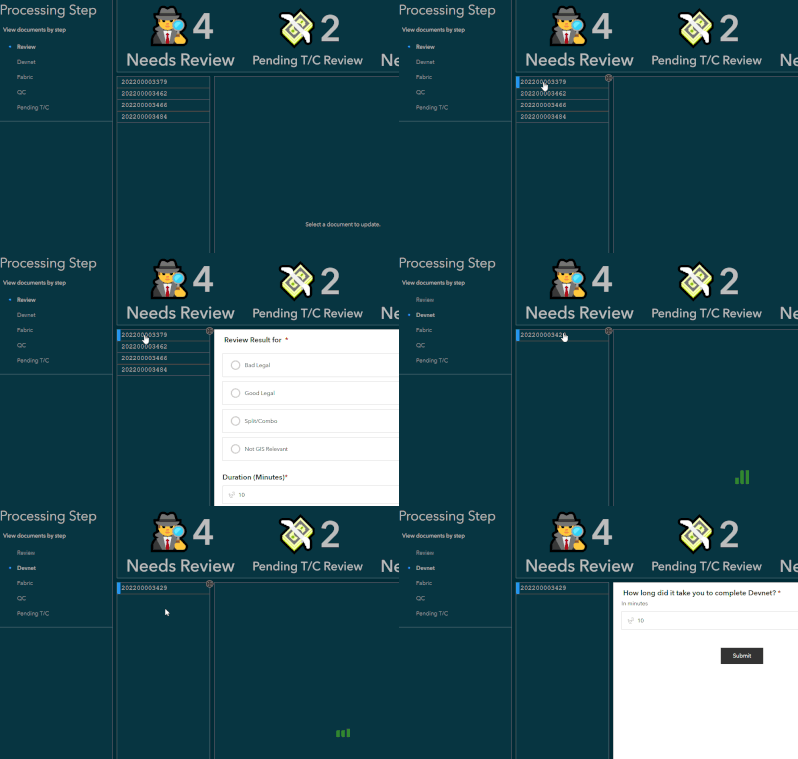
What I wanted was a single list of features, a status filter, and an embedded survey, but I needed it to be dynamic. Enter the Data Expression!
// Get portal connection
var portal = Portal('portal-url')

// Get layer
var fs = FeatureSetByPortalItem(
    portal,
    'itemid',
    0,
    ['globalid', 'status', 'other', 'fields'],
    false
)

// ItemIDs of my forms
var review_form = 'one itemID'
var processing_form = 'another itemID'
var remarks_form = 'a third itemID'

// Output dictionary
var out_dict = {
    fields: [
        {name: 'globalid', type: 'esriFieldTypeGUID'},
        {name: 'form_id', type: 'esriFieldTypeString'}
    ],
    geometryType: '',
    features: []
}

// Populate dict
for (var f in fs){
    var form_id = Decode(
        f['status'],
        0, review_form,
        1, process_form,
        2, remarks_form,
        ''
    )

    Push(
        out_dict['features'],
        {
            attributes: {
                globalid: d['globalid'],
                form_id: form_id
            }
        }
    )
}

return FeatureSet(Text(out_dict))
Next, I set my embed URL to:
https://survey123.arcgis.com/share/{form_id}It's a bit simplified from what I used in reality. There are other attributes being calculated and passed as survey field:name=value URL parameters, etc., but here's the point: I now have one list, one embed, but I can access each of the three forms I need, and precisely where I need them.
The end product feels more adaptive, is nicer to look at and work with, and opens my dashboard up to fully utilize other widgets and layout elements without any redundant widgets!
Do you have a complex workflow that could use a dynamic embed? Git it a shot!