- Home
- :
- All Communities
- :
- Developers
- :
- ArcGIS API for Python
- :
- ArcGIS API for Python Questions
- :
- Re: Granting Licenses to New Users - gis.license.a...
- Subscribe to RSS Feed
- Mark Topic as New
- Mark Topic as Read
- Float this Topic for Current User
- Bookmark
- Subscribe
- Mute
- Printer Friendly Page
Granting Licenses to New Users - gis.license.all() returns empty list

- Mark as New
- Bookmark
- Subscribe
- Mute
- Subscribe to RSS Feed
- Permalink
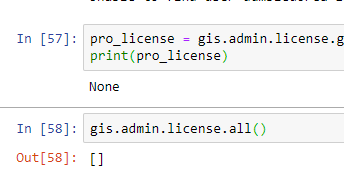
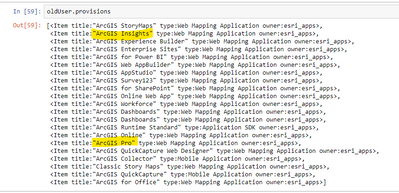
I'm working on a notebook to migrate our organization's enterprise usernames over to email addresses (to facilitate Azure single sign-on). I have most of the kinks worked out, but the one thing I haven't been able to automate just yet is the licensing. I can't delete any users that have licenses assigned, and I want to assign the same licenses to the replacement username. My problem is that the license manager seems to think I don't have any licenses. However, when I go through the Portal GUI, I can see that I have licenses available and assigned for Pro, Insights, etc.
Here's an example of what I get when I try license.all() or license.get():
And here's what I get when I pull the provisions property for a user with Pro and Insights:
Does anyone have any thoughts? This is my first time working with the license manager, so it's entirely possible I've missed something obvious.

- Mark as New
- Bookmark
- Subscribe
- Mute
- Subscribe to RSS Feed
- Permalink
Did you get any resolution on this? I am seeing the same issue after an update from 10.7.1 to 10.9.1.
- Mark as New
- Bookmark
- Subscribe
- Mute
- Subscribe to RSS Feed
- Permalink
Unfortunately, I haven't. In the end I decided that for the number of users I have licenses assigned to, it will be easy enough to just manually unassign licenses and assign them to the new users after the notebook runs.
- Mark as New
- Bookmark
- Subscribe
- Mute
- Subscribe to RSS Feed
- Permalink
Thanks for the quick response! Unfortunate as it may be.

- Mark as New
- Bookmark
- Subscribe
- Mute
- Subscribe to RSS Feed
- Permalink
I also have the same issue. It works perfectly for our AGOL users, but not for the enterprise users. We are upgrading to enterprise 10.9.1, so hopefully it'll work after the upgrade.

- Mark as New
- Bookmark
- Subscribe
- Mute
- Subscribe to RSS Feed
- Permalink
@JCGuarneri Did you ever figure this out? Running into the same issue. Can pull it fine via provisions property in ArcGIS Online. But that returns an empty list in Enterprise Portal (11.5), and I also get empty list using gis.admin.license.all()
Edit (3/2/2026): For anyone who comes across this with the same issue, I think maybe what's happening is that user.provisions is specifically for add-on licenses that have been assigned to a user, not licenses that come inherently with an account type. For example, a Creator user type comes with ArcGIS Pro Basic (as of writing this in March 2026), it isn't manually assigned and can't be removed.
What I ended up doing was looking at gis.users.license_types (which returns a dictionary of user account types in your org and all the apps/bundles/extensions that the account comes with) and pulling info from it based on the user's license id (user.userLicenseTypeId). Here is a function I wrote to pull the account's inherent ArcGIS Pro license, extensions, app bundles, and a full list of apps within those bundles. The "user" input in the function would be a user object, like you'd get from gis.users.search().
def builtin_licenser(user):
    utypes = gis.users.license_types # this returns a list of dictionaries, one for each account type and containing nested dictionaries of apps/extensions
    usertype = user.userLicenseTypeId # get user type id (i.e. creatorUT)
    for u in utypes:
        if usertype == u['id']:

            prolist = []
            bundlelist = []
            fullapplist = []
            extlist = []

            for a in u['apps']: # look through apps dict
                if a['type'] == 'App Bundle': # list app bundles (i.e. Essential Apps, Field Apps, etc.)
                    bundlelist.append(a['title'])
                    for app in a['apps']:
                        fullapplist.append(app['title'])
                else:
                    if a['title'] == 'ArcGIS Pro': # if ArcGIS Pro is included, grab tier (entitlement)
                        arcpro_type = (a['title'] + ' ' + a['entitlements'][0])
                        prolist.append(arcpro_type)
                    else: # grab any other apps included that are not within the bundles
                        fullapplist.append(a['title'])
            for e in u['extensions']: # look through extensions dict
                extlist.append(e['title'])

            result_dict = { # return all this info in a dict
                'Pro': ', '.join(prolist),
                'Bundles': ', '.join(bundlelist),
                'Apps': ', '.join(fullapplist),
                'Extensions': ', '.join(extlist)
            }

            return result_dict
Hope that helps point someone else in the right direction.
