Hi! I'm trying to get labels working in my Jupyter notebook map, and I've tried everything I can think of.
Here's my code:
from arcgis.geometry import Point
from arcgis.features import Feature, FeatureSet, FeatureCollection, FeatureLayer, FeatureLayerCollection
import arcgis.mapping
from ipywidgets import *

name_coords_matches_list = [('American Canyon', 38.1743, -122.2583)]

map_widget = gis.map("Napa County, California, USA")

point_features = []
for point_datum in name_coords_matches_list:
point_geometry = Point({"x": float(point_datum[2]), "y": float(point_datum[1]), "spatialReference": {"wkid": 4326}}) # Create a dict for the long/lat point
point_attributes = {"name": point_datum[0]} # Create a dict for the 'name' attribute
point_feature = Feature(geometry=point_geometry, attributes=point_attributes) # Create the feature
point_features.append(point_feature) # Add the feature to the point_features list

feature_set = FeatureSet(point_features) # Create the feature set of all point features

feature_collection = FeatureCollection.from_featureset(feature_set) # Create a feature collection from the feature set
feature_collection.properties["layers"][0]['layerDefinition']['drawingInfo']['renderer']['symbol']['color'] = [255, 255, 0, 127] # Make the point symbols translucent yellow
labeling_info = [{
"labelExpression": "[name]", "labelExpressionInfo": {"expression": "$feature.name"},
"maxScale": 0, "minScale": 0, "symbol": {
"color": [104, 104, 104, 255], "type": "esriTS",
"font": {"decoration": "none", "family": "Arial", "size": 8, "style": "normal", "weight": "bold"}
}
}]
feature_collection.properties["layers"][0]['layerDefinition']['drawingInfo']['labelingInfo'] = labeling_info # Add the labeling info
feature_collection.properties["layers"][0]['layerDefinition']['showLabels'] = True # Turn on labels

map_widget.add_layer(feature_collection) # Add the feature collection as a map layer

map_widget.layout=Layout(flex='1 1', padding='0px', height='1024px') # Change the dimensions of the map widget in Jupyter
map_widget # Display the map widget
The point is displayed, and its color is right, but it is missing the label 🤔
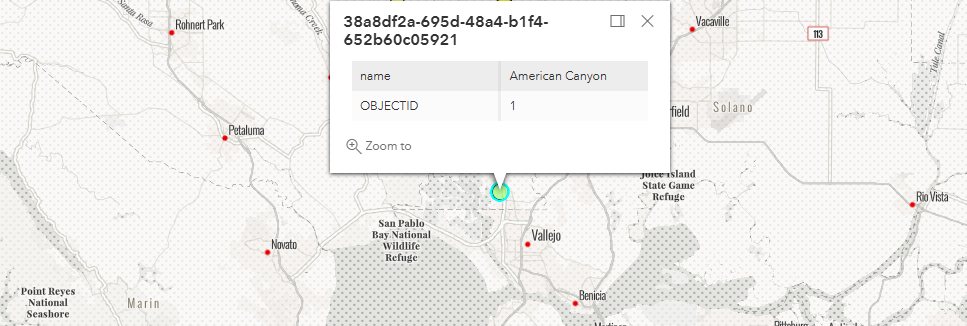
Here's the JSON from printing feature_collection.properties:
{
  "layers": [
    {
      "featureSet": {
        "geometryType": "esriGeometryPoint",
        "features": [
          {
            "geometry": {
              "x": -122.2583,
              "y": 38.1743,
              "spatialReference": {
                "wkid": 4326
              }
            },
            "attributes": {
              "name": "American Canyon",
              "OBJECTID": 1
            }
          },
		]
      },
      "layerDefinition": {
        "geometryType": "esriGeometryPoint",
        "fields": [
          {
            "name": "name",
            "alias": "name",
            "type": "esriFieldTypeString",
            "sqlType": "sqlTypeOther"
          },
          {
            "name": "OBJECTID",
            "type": "esriFieldTypeOID",
            "alias": "OBJECTID",
            "sqlType": "sqlTypeOther"
          }
        ],
        "spatialReference": {
          "wkid": 4326
        },
        "objectIdField": "OBJECTID",
        "type": "Feature Layer",
        "name": "a450db",
        "id": 0,
        "drawingInfo": {
          "renderer": {
            "type": "simple",
            "symbol": {
              "type": "esriSMS",
              "color": [
                255,
                255,
                0,
                127
              ],
              "angle": 0,
              "xoffset": 0,
              "yoffset": 0,
              "size": 12,
              "style": "esriSMSCircle",
              "outline": {
                "type": "esriSLS",
                "color": [
                  0,
                  0,
                  0,
                  255
                ],
                "width": 0.75,
                "style": "esriSLSSolid"
              }
            }
          },
          "labelingInfo": [
            {
              "labelExpression": "[name]",
              "labelExpressionInfo": {
                "expression": "$feature.name"
              },
              "maxScale": 0,
              "minScale": 0,
              "symbol": {
                "color": [
                  104,
                  104,
                  104,
                  255
                ],
                "type": "esriTS",
                "font": {
                  "decoration": "none",
                  "family": "Arial",
                  "size": 8,
                  "style": "normal",
                  "weight": "bold"
                }
              }
            }
          ]
        },
        "showLabels": true
      }
    }
  ]
}
Any help would be appreciated. Thanks in advance!
Brian