Turn on suggestions
Auto-suggest helps you quickly narrow down your search results by suggesting possible matches as you type.
Cancel
- Home
- :
- All Communities
- :
- Developers
- :
- ArcGIS API for Flex (Retired)
- :
- ArcGIS API for Flex Questions
- :
- Re: Working with joined database tables via REST q...
Options
- Subscribe to RSS Feed
- Mark Topic as New
- Mark Topic as Read
- Float this Topic for Current User
- Bookmark
- Subscribe
- Mute
- Printer Friendly Page
Working with joined database tables via REST query
Subscribe

07-06-2012
08:07 AM
- Mark as New
- Bookmark
- Subscribe
- Mute
- Subscribe to RSS Feed
- Permalink
I have a map service that joins a feature class of points to a table that contains the detailed information about each point. When I join the two tables in ArcMap and pulish it as a REST service I can query the data and put the points on a MapServiceLayer using the feature layer coded below. The problem is when I click on the point I don't get any data in the popup window. I get a blank popup window. I also don't get any difference in color coding for the points. THey all show up as black triangles. I think I am missing something in how I need to qualify the names for the feilds but I don't know what. ANy suggestions?
<esri:FeatureLayer id="flayer" load="{doSearch()}" loadError="flayer_loadErrorHandler(event)" updateEnd="flayer_updateEndHandler(event)" updateStart="flayer_updateStartHandler(event)" mode="onDemand" outFields="" url="http://localhost:6080/arcgis/rest/services/Tickets/MapServer/0"> <esri:infoWindowRenderer> <fx:Component> <esri:LabelDataRenderer label="{data.TktNo}"> <s:BorderContainer backgroundColor="white" borderColor="black" cornerRadius="5" minHeight="0" minWidth="0"> <s:layout> <s:VerticalLayout paddingBottom="5" paddingLeft="5" paddingRight="5" paddingTop="5"/> </s:layout> <s:Label text="Issued Date/Time: {data.IssuedTMS.toString()}"/> </s:BorderContainer> </esri:LabelDataRenderer> </fx:Component> </esri:infoWindowRenderer> <esri:renderer> <esri:UniqueValueRenderer field="I2000_53_GIS.sde.vw_ticket_gis.ViolCd"> <esri:UniqueValueInfo value="69"> <esri:CompositeSymbol> <esri:SimpleMarkerSymbol color="#FF0000" size="20" style="triangle"/> </esri:CompositeSymbol> </esri:UniqueValueInfo> <esri:UniqueValueInfo value="74"> <esri:CompositeSymbol> <esri:SimpleMarkerSymbol color="#00FF00" size="20" style="triangle"/> </esri:CompositeSymbol> </esri:UniqueValueInfo> <esri:defaultSymbol> <esri:CompositeSymbol> <esri:SimpleMarkerSymbol color="#000000" size="20" style="triangle"/> </esri:CompositeSymbol> </esri:defaultSymbol> </esri:UniqueValueRenderer> </esri:renderer> </esri:FeatureLayer>
Solved! Go to Solution.
1 Solution
Accepted Solutions
07-06-2012
12:45 PM
- Mark as New
- Bookmark
- Subscribe
- Mute
- Subscribe to RSS Feed
- Permalink
Try:
data["I2000_53_GIS.sde.vw_ticket_gis.TktNo"]
Thats the ticket. Thank YOU. I had tried that before directly in the label text before but it didn't work. It looks like I have to create a script function to format the data I want from that data variable like this.
<esri:LabelDataRenderer label="{formatTktNo(data)}"> <fx:Script> <![CDATA[ import mx.controls.Alert; import mx.formatters.DateFormatter; import mx.utils.ObjectUtil; protected function formatTktNo(data:Object):String { var returnString:String = ""; if ( data != null ) { returnString = data["I2000_53_GIS.sde.vw_ticket_gis.TktNo"]; } return returnString; }
7 Replies

07-06-2012
10:28 AM
- Mark as New
- Bookmark
- Subscribe
- Mute
- Subscribe to RSS Feed
- Permalink
Could you try outFields="*" instead of
outFields="
"
outFields="
07-06-2012
10:44 AM
- Mark as New
- Bookmark
- Subscribe
- Mute
- Subscribe to RSS Feed
- Permalink
Could you try outFields="*" instead of
outFields=""
I tried this and I still get the same results. I think it has something to do with the fact that to do the data binding in the label field I have to use the fully qualified name because it is in the joined table so something like this is what should be the value for the label="{data.I2000_53_GIS.sde.vw_ticket_gis.TktNo}" and when I do that I get an error in the debugger stating that the variable I2000_53_GIS doesn't exist. I think I am missing something to get to the specific field in a joined data set.
07-06-2012
11:05 AM
- Mark as New
- Bookmark
- Subscribe
- Mute
- Subscribe to RSS Feed
- Permalink
Could you try ObjectUtil.toString(data) in the binding expression to see what the contents of data are?
This will show the field name and value of the data....
This will show the field name and value of the data....
07-06-2012
11:48 AM
- Mark as New
- Bookmark
- Subscribe
- Mute
- Subscribe to RSS Feed
- Permalink
Could you try ObjectUtil.toString(data) in the binding expression to see what the contents of data are?
This will show the field name and value of the data....
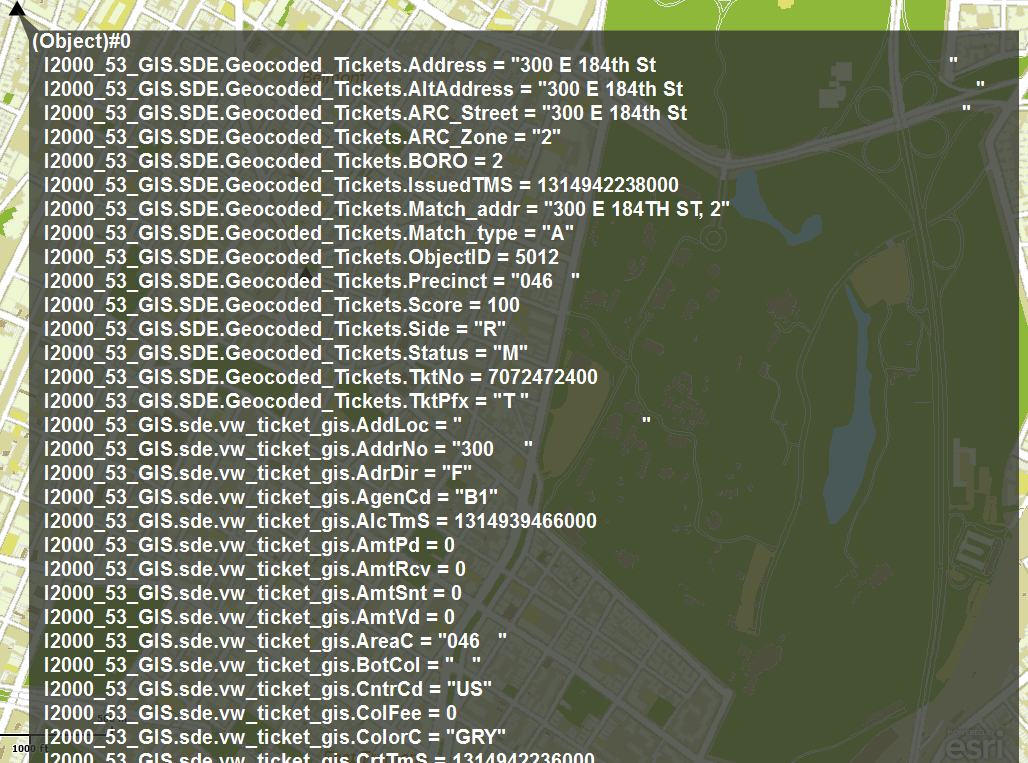
Okay I did that and this is the result. So I know I am getting data I just can't figure how to get at it. I was thinking maybe the object could be accessed like a Dictionary and get values from a key instead of trying to access it like properties.
[ATTACH=CONFIG]15831[/ATTACH]
07-06-2012
12:19 PM
- Mark as New
- Bookmark
- Subscribe
- Mute
- Subscribe to RSS Feed
- Permalink
I was working through the debugger and I changed the binding to be an action script function passing the data object as a parameter and returning a string. I put a break point into the function and when it stopped I put the following into the expression window
TypeError: Error #1123: Filter operator not supported on type Object.
at TestViewerInnerClass0/formatData()
at Function/<anonymous>()
at Function/http://adobe.com/AS3/2006/builtin::apply()
at mx.binding::Binding/wrapFunctionCall()
at mx.binding::Binding/innerExecute()
at Function/http://adobe.com/AS3/2006/builtin::apply()
at mx.binding::Binding/wrapFunctionCall()
at mx.binding::Binding/execute()
at mx.binding::Binding/watcherFired()
at mx.binding::Watcher/notifyListeners()
at mx.binding::PropertyWatcher/eventHandler()
at flash.events::EventDispatcher/dispatchEventFunction()
at flash.events::EventDispatcher/dispatchEvent()
at mx.core::UIComponent/dispatchEvent()
at spark.components::DataRenderer/set data()
at com.esri.ags.layers::GraphicsLayer/mouseUpHandler()
data.("I2000_53_GIS.sde.vw_ticket_gis.TktNo") and it returned the value I would expect. I tried to put that into the action script as the return value and it throws an exception.TypeError: Error #1123: Filter operator not supported on type Object.
at TestViewerInnerClass0/formatData()
at Function/<anonymous>()
at Function/http://adobe.com/AS3/2006/builtin::apply()
at mx.binding::Binding/wrapFunctionCall()
at mx.binding::Binding/innerExecute()
at Function/http://adobe.com/AS3/2006/builtin::apply()
at mx.binding::Binding/wrapFunctionCall()
at mx.binding::Binding/execute()
at mx.binding::Binding/watcherFired()
at mx.binding::Watcher/notifyListeners()
at mx.binding::PropertyWatcher/eventHandler()
at flash.events::EventDispatcher/dispatchEventFunction()
at flash.events::EventDispatcher/dispatchEvent()
at mx.core::UIComponent/dispatchEvent()
at spark.components::DataRenderer/set data()
at com.esri.ags.layers::GraphicsLayer/mouseUpHandler()

07-06-2012
12:41 PM
- Mark as New
- Bookmark
- Subscribe
- Mute
- Subscribe to RSS Feed
- Permalink
Try:
data["I2000_53_GIS.sde.vw_ticket_gis.TktNo"]
data["I2000_53_GIS.sde.vw_ticket_gis.TktNo"]
07-06-2012
12:45 PM
- Mark as New
- Bookmark
- Subscribe
- Mute
- Subscribe to RSS Feed
- Permalink
Try:
data["I2000_53_GIS.sde.vw_ticket_gis.TktNo"]
Thats the ticket. Thank YOU. I had tried that before directly in the label text before but it didn't work. It looks like I have to create a script function to format the data I want from that data variable like this.
<esri:LabelDataRenderer label="{formatTktNo(data)}"> <fx:Script> <![CDATA[ import mx.controls.Alert; import mx.formatters.DateFormatter; import mx.utils.ObjectUtil; protected function formatTktNo(data:Object):String { var returnString:String = ""; if ( data != null ) { returnString = data["I2000_53_GIS.sde.vw_ticket_gis.TktNo"]; } return returnString; }