Turn on suggestions
Auto-suggest helps you quickly narrow down your search results by suggesting possible matches as you type.
Cancel
- Home
- :
- All Communities
- :
- Developers
- :
- ArcGIS API for Flex (Retired)
- :
- ArcGIS API for Flex Questions
- :
- Query Widget from New Sample Viewer
Options
- Subscribe to RSS Feed
- Mark Topic as New
- Mark Topic as Read
- Float this Topic for Current User
- Bookmark
- Printer Friendly Page
Query Widget from New Sample Viewer
1803
5
04-07-2010 09:35 AM

04-07-2010
09:35 AM
- Mark as New
- Bookmark
- Subscribe to RSS Feed
- Permalink
I need to modify this widget to return only two 'baseMaps' (it is written to return all baseMaps). I have been successfull except for one problem: the list in the combo box populates with duplicate values, 5 in fact, or 10 if I choose to include 2 layers, as in my example below. I use an index value to select the layer (the default is var i from the loop).
The original script is as follows:
private function getBasemapLayer():ArrayCollection
{
var baseMaps:ArrayCollection = new ArrayCollection();
for(var i:Number=0; i<configData.configBasemaps.length; i++)
{
baseMaps.addItem(configData.configBasemaps.label);
}
return baseMaps;
}
// TODO: Change to pull from configdata object
private function getLayers():ArrayCollection
{
var basemapLyrs:ArrayCollection = getBasemapLayer();
var layers:ArrayCollection = new ArrayCollection();
for(var i:Number = map.layerIds.length -1; i >= 0; i--)
{
var basemapLyr:Boolean = false;
for each(var id:String in basemapLyrs){
if (map.layerIds == id){
basemapLyr = true;
break;
}
}
if (basemapLyr) continue;
var layer:Layer = map.getLayer(map.layerIds);
if(!(layer is GraphicsLayer))
layers.addItem(layer);
}
return layers;
}
My modification is to the last section:
if (basemapLyr) continue;
var layer:Layer = map.getLayer(map.layerIds[2]);
var layer2:Layer = map.getLayer(map.layerIds[3]);
if(!(layer is GraphicsLayer))
layers.addItem(layer);
layers.addItem(layer2);
}
return layers;
}
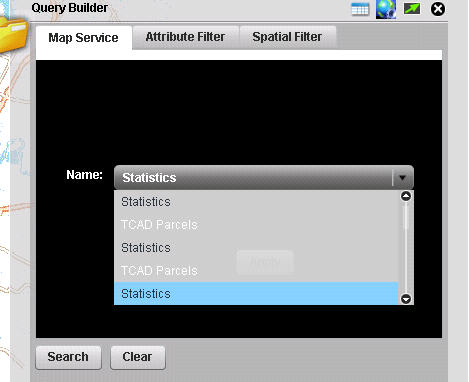
Attached is a jpg of the combo box: it is populated with the two layers, but in pairs of 5, i.e. five duplicate items each (the second layer is in white, hard to see) .
The dataprovider for the combo box is mMapServices, which is declared = to the getLayers() function in the init().
Thanks,
Jim Faron
The original script is as follows:
private function getBasemapLayer():ArrayCollection
{
var baseMaps:ArrayCollection = new ArrayCollection();
for(var i:Number=0; i<configData.configBasemaps.length; i++)
{
baseMaps.addItem(configData.configBasemaps.label);
}
return baseMaps;
}
// TODO: Change to pull from configdata object
private function getLayers():ArrayCollection
{
var basemapLyrs:ArrayCollection = getBasemapLayer();
var layers:ArrayCollection = new ArrayCollection();
for(var i:Number = map.layerIds.length -1; i >= 0; i--)
{
var basemapLyr:Boolean = false;
for each(var id:String in basemapLyrs){
if (map.layerIds == id){
basemapLyr = true;
break;
}
}
if (basemapLyr) continue;
var layer:Layer = map.getLayer(map.layerIds);
if(!(layer is GraphicsLayer))
layers.addItem(layer);
}
return layers;
}
My modification is to the last section:
if (basemapLyr) continue;
var layer:Layer = map.getLayer(map.layerIds[2]);
var layer2:Layer = map.getLayer(map.layerIds[3]);
if(!(layer is GraphicsLayer))
layers.addItem(layer);
layers.addItem(layer2);
}
return layers;
}
Attached is a jpg of the combo box: it is populated with the two layers, but in pairs of 5, i.e. five duplicate items each (the second layer is in white, hard to see) .
The dataprovider for the combo box is mMapServices, which is declared = to the getLayers() function in the init().
Thanks,
Jim Faron
5 Replies


04-07-2010
10:46 AM
- Mark as New
- Bookmark
- Subscribe to RSS Feed
- Permalink
Jim,
Use this instead
Use this instead
if (basemapLyr) continue;
 var layer:Layer = map.getLayer(map.layerIds);
 if(!(layer is GraphicsLayer))
  if(layer.id == "the name of your first layer" || layer.id == "the name of your second layer")
   layers.addItem(layer);
 }
 return layers;
}
04-07-2010
11:02 AM
- Mark as New
- Bookmark
- Subscribe to RSS Feed
- Permalink
Robert,
Worked perfectly!
Thanks once again for your help.
Jim Faron
Worked perfectly!
Thanks once again for your help.
Jim Faron

04-19-2010
02:24 PM
- Mark as New
- Bookmark
- Subscribe to RSS Feed
- Permalink
I have a newbie question regarding the Query Builder Widget. If i am okay taking all the layers under a service, how do I go about setting that up. Right now I have numerous layers under two different livemaps, but when I click on the Map Service tab, I receive the two services but "no layers" found after clicking "apply" and then "search".
Any help would be great.
Thanks,
Jason
Any help would be great.
Thanks,
Jason

05-18-2010
02:20 PM
- Mark as New
- Bookmark
- Subscribe to RSS Feed
- Permalink
I was able to implement Robert's above code to define which map services are available in the drop down box.
Does anyone know how I can define which map service layers are available in the 'Target Layer' drop down box?
Thanks very much.
Does anyone know how I can define which map service layers are available in the 'Target Layer' drop down box?
Thanks very much.

05-19-2010
04:36 AM
- Mark as New
- Bookmark
- Subscribe to RSS Feed
- Permalink
What about if i want to ask for unique values of a field? cause it will make a query @ all my layers but will return me only 500(or configured number of) features, how i can set the query to select only "DISTINCT" values?
Thanks in advance,
Cristiano Benato.
Thanks in advance,
Cristiano Benato.
