Turn on suggestions
Auto-suggest helps you quickly narrow down your search results by suggesting possible matches as you type.
Cancel
- Home
- :
- All Communities
- :
- Developers
- :
- ArcGIS API for Flex (Retired)
- :
- ArcGIS API for Flex Questions
- :
- Query Problems when using query.geometry (Stumped)...
Options
- Subscribe to RSS Feed
- Mark Topic as New
- Mark Topic as Read
- Float this Topic for Current User
- Bookmark
- Subscribe
- Mute
- Printer Friendly Page
Query Problems when using query.geometry (Stumped).
Subscribe
14646
12
04-26-2011 05:46 AM

by
Anonymous User
Not applicable
04-26-2011
05:46 AM
- Mark as New
- Bookmark
- Subscribe
- Mute
- Subscribe to RSS Feed
- Permalink
Original User: cschafer5
Hi,
I am wanting to run a Query that only displays the results within a specified polygon. I am doing this using query.geometry. I am getting the results I am looking for from most of my URLs and some return an error back to me.
I have attached pictures to show the problem.
The two pictures with arrows shows what I want to happen. In the first picture I get the hit the cap of 500 and on the second picture I click my checkbox to add the WV polygon to the query.geometry and get results only within the state.
The other two pictures show what happens with some URLs. The one not bound to the state gives me the results I expect. The second, when bound to the state using query.geometry, returns an HTTP error.
I can't figure this one out. Is there a reason I would get an error when the only additional code between the two is the added geometry?
Here are the two URLs used in the example:
1 (works):
http://publicsafetytemplates.esri.com/ArcGIS/rest/services/EMCOP/PublicSafetyFeedSample/MapServer/0
2(Gives me an Error):
http://rmgsc.cr.usgs.gov/ArcGIS/rest/services/nhss_usdata/MapServer/0
Hi,
I am wanting to run a Query that only displays the results within a specified polygon. I am doing this using query.geometry. I am getting the results I am looking for from most of my URLs and some return an error back to me.
I have attached pictures to show the problem.
The two pictures with arrows shows what I want to happen. In the first picture I get the hit the cap of 500 and on the second picture I click my checkbox to add the WV polygon to the query.geometry and get results only within the state.
The other two pictures show what happens with some URLs. The one not bound to the state gives me the results I expect. The second, when bound to the state using query.geometry, returns an HTTP error.
I can't figure this one out. Is there a reason I would get an error when the only additional code between the two is the added geometry?
Here are the two URLs used in the example:
1 (works):
http://publicsafetytemplates.esri.com/ArcGIS/rest/services/EMCOP/PublicSafetyFeedSample/MapServer/0
2(Gives me an Error):
http://rmgsc.cr.usgs.gov/ArcGIS/rest/services/nhss_usdata/MapServer/0
12 Replies


04-26-2011
01:57 PM
- Mark as New
- Bookmark
- Subscribe
- Mute
- Subscribe to RSS Feed
- Permalink
Could you capture and post http query request using tools like firebug/httpfox/fiddler ?
by
Anonymous User
Not applicable
04-27-2011
07:04 AM
- Mark as New
- Bookmark
- Subscribe
- Mute
- Subscribe to RSS Feed
- Permalink
Original User: caseybentz8
The only thing I see is that the two are using a different spatial reference. Have you tried passing the spatial reference wkid with the query?
The only thing I see is that the two are using a different spatial reference. Have you tried passing the spatial reference wkid with the query?


04-27-2011
09:00 AM
- Mark as New
- Bookmark
- Subscribe
- Mute
- Subscribe to RSS Feed
- Permalink
I have messed around with the spatialReferences with no luck on; however, I don't have much of a background in GIS and may be doing something wrong.
Here is where I run the Query:
I thought perhaps my geometry may be too large, so I tried simplifying it with a GeometryService with no luck either.
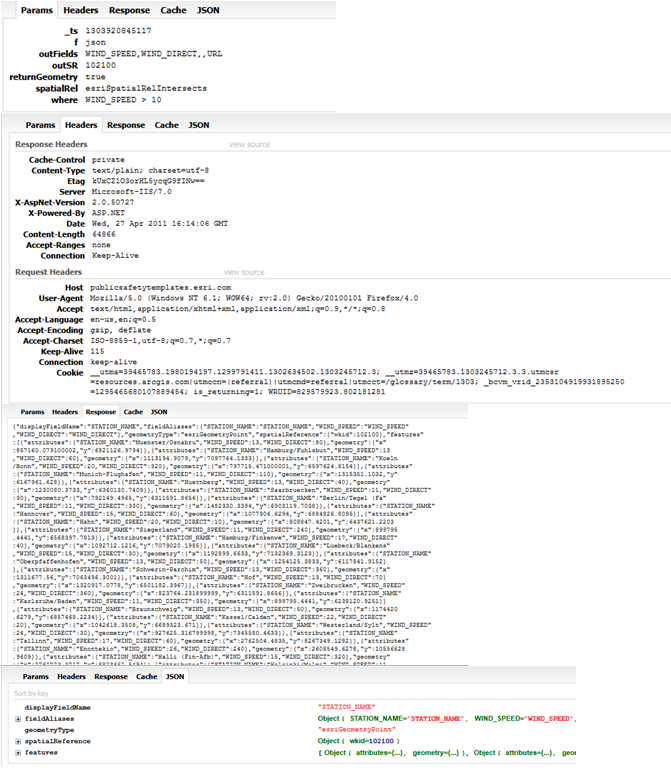
I have attached some images from FireBug. I grouped them together to go along with the images I attached to my first post. Hopefully they aren't too small for you to read. Example 1 goes with the image with the arrows and Example 2 goes with the image with the water droplets.
Thanks for your Help!
Here is where I run the Query:
    var queryTask:QueryTask = new QueryTask(queryLayer);
    var query:Query = new Query();

    query.outFields                = queryFields.split(",");
    query.returnGeometry           = true;
    queryTask.useAMF               = false;

    if(borderCheckBox.selected == true){
     query.geometry = borderGeom;
    }
    query.where                    = rbeQuery;
    //query.where                    = "1=1";
    query.outSpatialReference      = map.spatialReference;

    queryTask.execute(query, new AsyncResponder(onRbeResult, onFault));
I thought perhaps my geometry may be too large, so I tried simplifying it with a GeometryService with no luck either.
I have attached some images from FireBug. I grouped them together to go along with the images I attached to my first post. Hopefully they aren't too small for you to read. Example 1 goes with the image with the arrows and Example 2 goes with the image with the water droplets.
Thanks for your Help!


by
Anonymous User
Not applicable
04-27-2011
09:39 AM
- Mark as New
- Bookmark
- Subscribe
- Mute
- Subscribe to RSS Feed
- Permalink


04-27-2011
10:26 AM
- Mark as New
- Bookmark
- Subscribe
- Mute
- Subscribe to RSS Feed
- Permalink
Thank you for your response. I have also written simple geometries which work with the service too. This makes me believe it has something to do with how I am getting the border's geometry.
I am a bit new to this, so perhaps the way I am getting the geometry is either wrong or harder than it needs to be. Currently, there is a Feature Layer which only has one feature which is the polygon I want to be my geometry. So this is how I am populating the geometry I want to use in the separate query that I am having troubles with.
I then use that borderGeom as the query.geometry in the code I had presented earlier. Is this the best practice when all I want is the geometry from the Feature Layer? It's all I can think of that can be the problem.
I am a bit new to this, so perhaps the way I am getting the geometry is either wrong or harder than it needs to be. Currently, there is a Feature Layer which only has one feature which is the polygon I want to be my geometry. So this is how I am populating the geometry I want to use in the separate query that I am having troubles with.
   private function loadWVBorderGeometry():void{
    if(borderGeom == null){
     var queryTask:QueryTask = new QueryTask(borderURL);
     var query:Query = new Query();
     query.where = "1=1";
     query.returnGeometry = true;
     query.outFields = ["Shape"];
     query.outSpatialReference = map.spatialReference;
     queryTask.execute(query, new AsyncResponder(borderResult, borderFault));
     function borderResult(featureSet:FeatureSet, token:Object = null):void{
      borderGeom = featureSet.features[0].geometry;
      borderGeom.spatialReference = map.spatialReference;
     }
     function borderFault(info:Object, token:Object = null):void{
      Alert.show("Border not loaded");
     }
   }
I then use that borderGeom as the query.geometry in the code I had presented earlier. Is this the best practice when all I want is the geometry from the Feature Layer? It's all I can think of that can be the problem.
by
Anonymous User
Not applicable
04-28-2011
05:51 AM
- Mark as New
- Bookmark
- Subscribe
- Mute
- Subscribe to RSS Feed
- Permalink
Original User: caseybentz8
What is borderGeom declared as?
What is borderGeom declared as?
04-28-2011
06:17 AM
- Mark as New
- Bookmark
- Subscribe
- Mute
- Subscribe to RSS Feed
- Permalink
a global variable as:
private var borderGeom:Geometry;
private var borderGeom:Geometry;
by
Anonymous User
Not applicable
04-28-2011
06:23 AM
- Mark as New
- Bookmark
- Subscribe
- Mute
- Subscribe to RSS Feed
- Permalink
Original User: caseybentz8
I have run out of ideas. I can get it to work using the code below.
I have run out of ideas. I can get it to work using the code below.
protected
 function myMap_loadHandler(event:MapEvent):void


[LEFT]{
var queryTask2:QueryTask = new QueryTask("http://sampleserver1.arcgisonline.com/ArcGIS/rest/services/Demographics/ESRI_Census_USA/MapServer/5");
var query2:Query = new Query();
query2.where = "STATE_NAME ='West Virginia'";
query2.returnGeometry = true;
query2.outFields = ["Shape"];
query2.outSpatialReference = myMap.spatialReference;
queryTask2.execute(query2, new AsyncResponder(borderResult, borderFault));
function borderResult(featureSet:FeatureSet, token:Object = null):void{
borderGeom = featureSet.features[0].geometry;
borderGeom.spatialReference = myMap.spatialReference;
stateLayer.add(featureSet.features[0]);
query.geometry = borderGeom;
queryTask.execute(query);
}
function borderFault(info:Object, token:Object = null):void{
Alert.show("Border not loaded");
}
[/LEFT]
}
<esri:QueryTask
 id="queryTask"
concurrency="last"
executeComplete="onQueryExecuteComplete(event)"
showBusyCursor="true"
url="http://publicsafetytemplates.esri.com/ArcGIS/rest/services/EMCOP/PublicSafetyFeedSample/MapServer/0"
useAMF="false"/>


<esri:Query id="query"
outSpatialReference="{myMap.spatialReference}"


returnGeometry="true"/>
private
 function onQueryExecuteComplete(event:QueryEvent):void


{

var symbol:SimpleMarkerSymbol = new SimpleMarkerSymbol(SimpleMarkerSymbol.STYLE_SQUARE, 8, 0xFFFF00, 0.5);
symbol.outline = new SimpleLineSymbol();

var fset:FeatureSet = event.featureSet;
for each (var graphic:Graphic in fset.features)
{
graphic.symbol = symbol;
myGraphicsLayer.add(graphic);
}


}
05-10-2011
11:08 AM
- Mark as New
- Bookmark
- Subscribe
- Mute
- Subscribe to RSS Feed
- Permalink
I can get that URL to work with the current code I have. The one I am getting an error with and can't figure out why is http://rmgsc.cr.usgs.gov/ArcGIS/rest/services/nhss_usdata/MapServer/0
My only guess is that maybe it is a spatial issue, but I am newer to GIS so I'm not 100%.
I've still been trying different approached with no luck...still stumped as to why it works when the geometry isn't applied, but I get the error when the only change made to the query is the border...
I have changed my code to fetch the border geometry the same way you did (query2.where = "STATE NAME....). It seems to run faster than what I had before with a simpler geometry returned. Still no luck when I use that geometry either though.
BTW thank you so much for your help...
My only guess is that maybe it is a spatial issue, but I am newer to GIS so I'm not 100%.
I've still been trying different approached with no luck...still stumped as to why it works when the geometry isn't applied, but I get the error when the only change made to the query is the border...
I have changed my code to fetch the border geometry the same way you did (query2.where = "STATE NAME....). It seems to run faster than what I had before with a simpler geometry returned. Still no luck when I use that geometry either though.
BTW thank you so much for your help...