Turn on suggestions
Auto-suggest helps you quickly narrow down your search results by suggesting possible matches as you type.
Cancel
- Home
- :
- All Communities
- :
- Developers
- :
- ArcGIS API for Flex (Retired)
- :
- ArcGIS API for Flex Questions
- :
- Re: Draw Widget tooltips
Options
- Subscribe to RSS Feed
- Mark Topic as New
- Mark Topic as Read
- Float this Topic for Current User
- Bookmark
- Subscribe
- Mute
- Printer Friendly Page
Draw Widget tooltips
Subscribe
3862
10
03-17-2011 04:19 AM

03-17-2011
04:19 AM
- Mark as New
- Bookmark
- Subscribe
- Mute
- Subscribe to RSS Feed
- Permalink
Good afternoon all,
I am having a hard time figuring out how to change the tooltips of the draw operations.
Example:
I click on the Draw Circle. The tooltip that is next to the cursor says:
"Press down to start and let go to finish"
Where can i change this text?
TIA,
Hugo
I am having a hard time figuring out how to change the tooltips of the draw operations.
Example:
I click on the Draw Circle. The tooltip that is next to the cursor says:
"Press down to start and let go to finish"
Where can i change this text?
TIA,
Hugo
10 Replies


03-17-2011
05:14 AM
- Mark as New
- Bookmark
- Subscribe
- Mute
- Subscribe to RSS Feed
- Permalink
Hugo,
You can't in the current API. This is already submitted as an enhancement request though.
You can't in the current API. This is already submitted as an enhancement request though.
03-17-2011
05:35 AM
- Mark as New
- Bookmark
- Subscribe
- Mute
- Subscribe to RSS Feed
- Permalink
Hugo,
You can't in the current API. This is already submitted as an enhancement request though.
First of all, thanks for the update.
Second, where can i find the enhancement request list for Flex Viewer and it's API?
03-17-2011
05:38 AM
- Mark as New
- Bookmark
- Subscribe
- Mute
- Subscribe to RSS Feed
- Permalink
Hugo,
It is not publicly available. I only know about it because I am part of a private beta testing of the 2.3 API and Viewer.
It is not publicly available. I only know about it because I am part of a private beta testing of the 2.3 API and Viewer.

03-18-2011
02:12 AM
- Mark as New
- Bookmark
- Subscribe
- Mute
- Subscribe to RSS Feed
- Permalink
You right Robert, but...
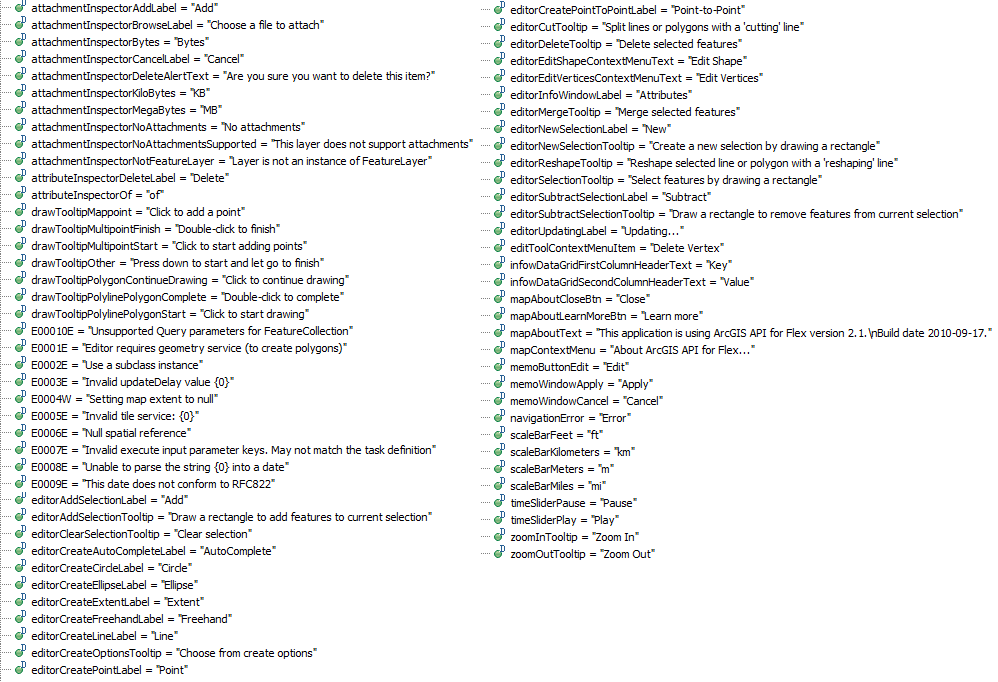
Listen your application (viewer or other) creation complete handler. Get resource bundle with name "ESRIMessages"
Look for more decompiled resources in attachment
Listen your application (viewer or other) creation complete handler. Get resource bundle with name "ESRIMessages"
...
creationComplete="onCreationComplete()"
...
<fx:Script>
    <![CDATA[
...
/**
 * Listen creation complete handler
 */
protected function onCreationComplete():void
{
       var rb:IResourceBundle = resourceManager.getResourceBundle("en_US", "ESRIMessages") as IResourceBundle;
 rb.content["drawTooltipMappoint"] = "New message text 1";
 rb.content["drawTooltipPolygonContinueDrawing"] = "New message text 2";
 rb.content["drawTooltipPolylinePolygonStart"] = "New message text 3";
 rb.content["drawTooltipPolylinePolygonComplete"] = "New message text 4";
}
]]>
</fx:Script>
Look for more decompiled resources in attachment

03-18-2011
04:04 PM
- Mark as New
- Bookmark
- Subscribe
- Mute
- Subscribe to RSS Feed
- Permalink
Thank you Ivan. That works perfect!
Note, I had to add: import mx.resources.IResourceBundle;
Note, I had to add: import mx.resources.IResourceBundle;

12-06-2011
11:33 PM
- Mark as New
- Bookmark
- Subscribe
- Mute
- Subscribe to RSS Feed
- Permalink
Hi,
you must create a ESRIMessages.properties and other properties file from Flex Locale. After that you must to compile a swf for your specific locale and at end you must to pass the path to the new Locale swf in html wrapper. It's a bit hard but I've made that for my specific country it_CH.
If need some infos... write here
you must create a ESRIMessages.properties and other properties file from Flex Locale. After that you must to compile a swf for your specific locale and at end you must to pass the path to the new Locale swf in html wrapper. It's a bit hard but I've made that for my specific country it_CH.
If need some infos... write here
12-07-2011
12:50 AM
- Mark as New
- Bookmark
- Subscribe
- Mute
- Subscribe to RSS Feed
- Permalink
Giosia,
you're right, but a little too late. Where are alot of ways to make it work.
1 - One of them: compile and compile project fo each locale. If the client change language, application loads new swf (if we are tolking about mapping application application loads >1 new swfs) - as a result new initialization of all components ... The cliant lost the result of his work.
2 - Other way to change locale on fly: if final application has >1 locale. For example: your client works with application, and the result of his work is some report, which contains search results, some diagrams, images, map in specific extent, some number of highlighted features ... The client wants to print a report for all possible languages�??�??, without losing search results without losing the map condition, without losing anything except change the language.
P.S. We choosed to: create 1 resource xml file for each language, create public singleton class witch holds information about current locale, create public singleton class witch can read xml resources + listen locale change + has public property for each string property. May be its not better way: but 1-we hold all messages/strings in 1 file, we can access it in anytime from any part of application, it works 🙂
you're right, but a little too late. Where are alot of ways to make it work.
1 - One of them: compile and compile project fo each locale. If the client change language, application loads new swf (if we are tolking about mapping application application loads >1 new swfs) - as a result new initialization of all components ... The cliant lost the result of his work.
2 - Other way to change locale on fly: if final application has >1 locale. For example: your client works with application, and the result of his work is some report, which contains search results, some diagrams, images, map in specific extent, some number of highlighted features ... The client wants to print a report for all possible languages�??�??, without losing search results without losing the map condition, without losing anything except change the language.
P.S. We choosed to: create 1 resource xml file for each language, create public singleton class witch holds information about current locale, create public singleton class witch can read xml resources + listen locale change + has public property for each string property. May be its not better way: but 1-we hold all messages/strings in 1 file, we can access it in anytime from any part of application, it works 🙂

01-25-2012
05:23 AM
- Mark as New
- Bookmark
- Subscribe
- Mute
- Subscribe to RSS Feed
- Permalink
You right Robert, but...
Listen your application (viewer or other) creation complete handler. Get resource bundle with name "ESRIMessages"... creationComplete="onCreationComplete()" ... <fx:Script> <![CDATA[ ... /** * Listen creation complete handler */ protected function onCreationComplete():void { var rb:IResourceBundle = resourceManager.getResourceBundle("en_US", "ESRIMessages") as IResourceBundle; rb.content["drawTooltipMappoint"] = "New message text 1"; rb.content["drawTooltipPolygonContinueDrawing"] = "New message text 2"; rb.content["drawTooltipPolylinePolygonStart"] = "New message text 3"; rb.content["drawTooltipPolylinePolygonComplete"] = "New message text 4"; } ]]> </fx:Script>
Look for more decompiled resources in attachment
Thanks Ivan!! This helps me a lot!! lol
Bruno Faria

03-01-2012
08:43 AM
- Mark as New
- Bookmark
- Subscribe
- Mute
- Subscribe to RSS Feed
- Permalink
You right Robert, but...
Listen your application (viewer or other) creation complete handler. Get resource bundle with name "ESRIMessages"... creationComplete="onCreationComplete()" ... <fx:Script> <![CDATA[ ... /** * Listen creation complete handler */ protected function onCreationComplete():void { var rb:IResourceBundle = resourceManager.getResourceBundle("en_US", "ESRIMessages") as IResourceBundle; rb.content["drawTooltipMappoint"] = "New message text 1"; rb.content["drawTooltipPolygonContinueDrawing"] = "New message text 2"; rb.content["drawTooltipPolylinePolygonStart"] = "New message text 3"; rb.content["drawTooltipPolylinePolygonComplete"] = "New message text 4"; } ]]> </fx:Script>
Look for more decompiled resources in attachment
Thanks very much for this. Using it now in 2.5, works just fine.
