- Home
- :
- All Communities
- :
- User Groups
- :
- 911 GIS
- :
- Questions
- :
- Re: Exporting Map - Line Distortion Problem
- Subscribe to RSS Feed
- Mark Topic as New
- Mark Topic as Read
- Float this Topic for Current User
- Bookmark
- Subscribe
- Mute
- Printer Friendly Page
Exporting Map - Line Distortion Problem

- Mark as New
- Bookmark
- Subscribe
- Mute
- Subscribe to RSS Feed
- Permalink
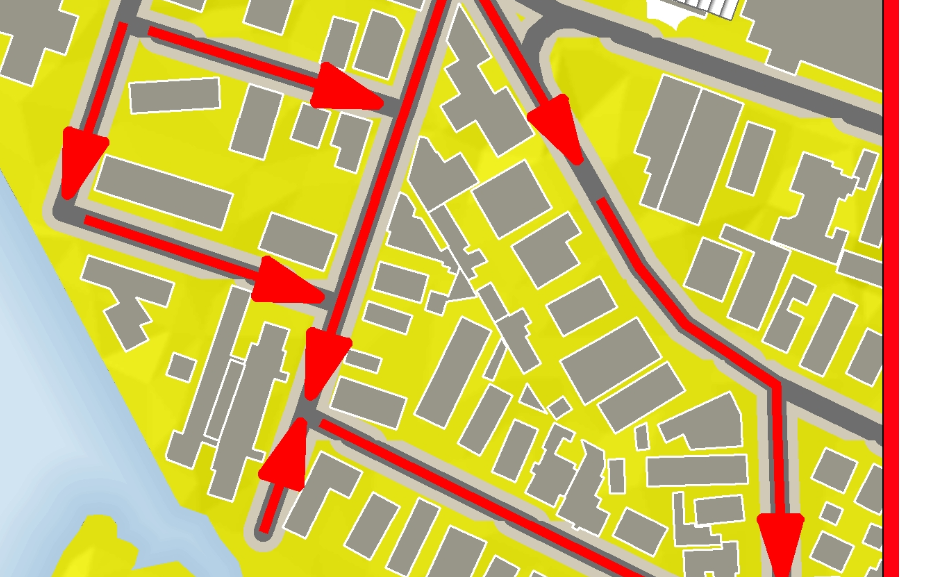
I'm having this problem when exporting the project. I'm working on a 8' x 4' info sign on Arcmap 10.2.2. I have tried exporting jpg, png, pdf without success. Also tried some recommendations for dashed lines found in another forum. I'll appreciate any help in the matter.

- Mark as New
- Bookmark
- Subscribe
- Mute
- Subscribe to RSS Feed
- Permalink
It's just that your question is confusing me because you mention dashed lines.
- Mark as New
- Bookmark
- Subscribe
- Mute
- Subscribe to RSS Feed
- Permalink
Ok sorry, in another discussion somebody had problems with exporting dashed lines. I'm not working with dashed lines.
- Mark as New
- Bookmark
- Subscribe
- Mute
- Subscribe to RSS Feed
- Permalink
I mentioned it, only for reference. This is my fist question here, some forums don't work with question already answered. I was trying to make reference to that discussion adn say that it didn't resolved my problem. 🙂
- Mark as New
- Bookmark
- Subscribe
- Mute
- Subscribe to RSS Feed
- Permalink
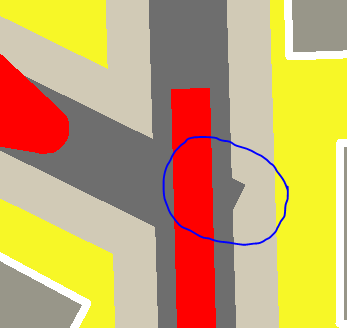
Is there any reason why you need the round line caps and joins? Do these indentations appear at line breaks, or are they random? Are your line4s snapped to each other, or is it possible that there are tiny gaps between line end points?
- Mark as New
- Bookmark
- Subscribe
- Mute
- Subscribe to RSS Feed
- Permalink
Because of the line width the square caps produce the problem presented in the picture below.
- Mark as New
- Bookmark
- Subscribe
- Mute
- Subscribe to RSS Feed
- Permalink
Oh ok, it's starting to get a little clearer now  . Can you just check that your line end points are snapped to each other?
- Mark as New
- Bookmark
- Subscribe
- Mute
- Subscribe to RSS Feed
- Permalink
Yep their snapped. In the photo the problem occur in various places in a single line.


- Mark as New
- Bookmark
- Subscribe
- Mute
- Subscribe to RSS Feed
- Permalink
If you dissolve (un-split the lines) the effect will be less.
- Mark as New
- Bookmark
- Subscribe
- Mute
- Subscribe to RSS Feed
- Permalink
Possibly not the best solution, but what if you buffer the lines and dissolve them (or draw them without borders) would that solve the problem of visualization?
- Mark as New
- Bookmark
- Subscribe
- Mute
- Subscribe to RSS Feed
- Permalink
Didn't work
