- Home
- :
- All Communities
- :
- User Groups
- :
- Web AppBuilder Custom Widgets
- :
- Questions
- :
- LocalLayerWidget Version 2.5 and AccessifizrWidget...
- Subscribe to RSS Feed
- Mark Topic as New
- Mark Topic as Read
- Float this Topic for Current User
- Bookmark
- Printer Friendly Page
LocalLayerWidget Version 2.5 and AccessifizrWidget Layer - 09/28/2017

- Mark as New
- Bookmark
- Subscribe to RSS Feed
- Permalink
I've been having a blast playing around with the new Web AppBuilder, and have taken a few cracks at putting together some custom Widgets that I'd like to share with the community. I hope these can assist in everyone's future Mappmaking endeavours!
LocalLayerWidget
LocalLayerWidget v 2.5
September 28 2017 : LocalLayerWidget v2.5 released: This major release includes the following enhancements for the widget. Thanks to everyone who's donated!:
Release LocalLayerWidget 2.5 · cmndrbensisko/LocalLayer · GitHub
- Support for 2.5 Release of ArcGIS Web App Builder
- Support for Custom Layers via Transformers
- Demos and sample apps
- Prototype 3D Widget
- Dynamic GUI changes at runtime and css insertion via odds.json/odds.css
- And more!
November 14, 2016: LocalLayerWidget v2.2 released: This major release includes the following enhancements for the widget:
Release LocalLayer v2.2 · cmndrbensisko/LocalLayer · GitHub
- Related Table Viewing and Editing
- ImageService Viewing and Popups
- WMS Service Viewing and Popups
- Ability to integrate with the IncidentAnalysis widget
- Hide Layer In Legend capability added
- Dynamic mode added, allowing for URL-fed configuration files
- And more!
May 18, 2016: LocalLayerWidget v.2.0 released: This substantial change for Web App Builder v.2.0. removes the need to edit any core files in the Web App Builder, unlike previous versions. A slight change will still be necessary for the AttributeTable widget to work properly with LocalLayerWidget layers.
- https://github.com/cmndrbensisko/LocalLayer/releases/tag/v2.0
- Enhancements:
- Added autorefresh capability for dynamic layers, and sub-minute decimal values can be specified for time.
- Added support for non-consecutive sublayer numbering to support 10.3.1 mapservices
- Editor Tracking via an organizational Active Directory instead of ArcGIS Online User now supported
- Bug Fixes:
- View Attachments now works for Dynamic Layers
- Addition of GeoJson layers fixed
- Fix to MapService sublayer visibility when no sublayers are selected to display by default.
Mar 29, 2016: LocalLayerWidget v.1.3.1 released; Contains bugfixes to v.1.3. related to custom rendering for Feature Layers and toggling sublayer visibility in the LayerList widget.
Mar 22, 2016: LocalLayerWidget v.1.3 is now available! (Note the version naming change; Version 1.3 refers to its compatibility with v1.3 of the WAB - This is indeed the latest version of the widget as of March 22, 2016). Be sure to read the github page to see what tweaks need to be made to ensure that everything continues running smoothly in version 1.3 of the Web AppBuilder.
- Includes support for GeoJSON and WebTileLayers
- Custom Symbology and Labelling Options for Feature Layers
- Currently requires the use of playground to generate custom json layer and label styling for Feature Layers. For more information, please follow the instructions on the Github page.
Feb 10, 2015: LocalLayerWidget v.1.5 is now available! This release contains full support for adding Tiled layers to your application directly from ArcGIS Server, in addition to the Basemap, Dynamic, and Feature layers available before. Feel free to grab the widget from our Release page located at https://github.com/cmndrbensisko/LocalLayer/releases.
Feb 2, 2015: LocalLayerWidget v.1.2 is now available! This release provides a great GUI developed by Robert Scheitlin to more easily add Feature, Dynamic, and Basemap layers to your ArcGIS Web AppBuilder Applications. Take it for a spin, and please keep us informed of any bugs or desired enhancements through our Github Issue Tracker located at https://github.com/cmndrbensisko/LocalLayerWidget/issues.
Jan 12, 2015: Note that LocalLayerWidget v.1.1 is now available, which provides Click-To-Identify support and the option to add Feature and Basemap layers in addition to Dynamic layers.
The LocalLayer Widget is intended to allow the direct addition of MapServices to an ArcGIS Web AppBuilder application, without needing to wrap the desired services in an ArcGIS Online/Portal Web Map.
https://github.com/cmndrbensisko/LocalLayerWidget
Basically, your basemap will still need to come from Portal/AGOL, but otherwise you just provide direct URLs to your own MapServices in the widget's configuration settings. The MapServices should load and display as usual in the map, and cooperate with the Legend, LayerList, and Attribute Table widgets. Click-To-Identify functionality won't work currently, though, because the current WAB implementation relies on Portal for all the popup info. As stated in the January 12th 2015 release, popups are fully customizable. Note that it's not an in-panel widget, so you'll need to follow a few extra steps in the project's Readme file.
AccessifizrWidget
Let's make Mapps accessible for everyone! With an eye on WCAG compliance, the Accessifizr Widget is designed to help make web applications keyboard navigable without having to modify core application code and UI.
https://github.com/cmndrbensisko/AccessifizrWidget
Information about how to configure this widget is available in the core Accessifizr.js library project available here, but the gist is that you create a JSON-based 'roadmap' detailing the keyboard navigation of your web application, and how it should change in response to users entering modal menus, hitting the escape button, etc. For applying descriptive alternate text to page elements, the widget leverages dojo's built-in internationalization support to specify multilingual alternate text strings. The end result is a web app that, hopefully, is a bit easier to use for people with mobility or visual challenges.

- Mark as New
- Bookmark
- Subscribe to RSS Feed
- Permalink
Do you have Portal installed locally which you registered your WAB Dev to?
I can't do what you're doing, as I can only create apps, not Web Maps, on my local machine, since Portal isn't installed. And as I wrote before, I don't want to have to login to my group AGOL every time I start my local WAB app, so I am just using public AGOL basemaps as the Web Map for my WAB app. A whole new language we are speaking here! I chose an AGOL basemap (USGS National Map) as my Web Map, and it doesn't contain any additional layers in my app, so I'm good.


- Mark as New
- Bookmark
- Subscribe to RSS Feed
- Permalink
No local Portal installed, just the AGOL for my Organization.
- Mark as New
- Bookmark
- Subscribe to RSS Feed
- Permalink
Rebecca,
I think your method of making a new, customized basemap from AGOL basemaps for use in WAB apps may be quite useful to others. Could you clarify in a few steps how you did that?
Did you log in to your group AGOL, created new Web Map, added AGOL basemap, customized it, and saved the Web Map? Then you used that Web Map in your local WAB app made using WAB Dev edition?
- Mark as New
- Bookmark
- Subscribe to RSS Feed
- Permalink
Barnaby, these are the steps I followed:
In ArcGIS Online (in browser):
- Signed into my ArcGIS Online (for Organization) account.
- Went to MyContent and my Basemaps folder. Note: I created the “basemaps” and this folder originally. The actual location of the base map you want to start with may vary.
- The base map I started with contained two services from out local ArcGIS Server, but should work with AGOLS hosted services too. For my starting base map, the Topo service is the base map, and the other layer was dynamic server…just fyi. If you use someone else’s base map to start, you may be limited to what you can change.
- I use the Web Map’s pull down to select “Open in Map viewer”
- With the legend open on the left, I used the pulldown for the layer I wanted to remove, and selected “Remove”
- I then did a “save as” to a new name (and for me, in the same AGOL folder.
- I then “shared’ with Everyone.
In WAB:
- Started editing my application (or started a new one)
- Went to map tab

- Selected “Choose Web Map:
- Went to “Public” tab, and selected new basemap.
- Save, and launch to test.
Thought I'd mention too, I'm the administrator on our AGOL too....so results may vary if someone is not.
- Mark as New
- Bookmark
- Subscribe to RSS Feed
- Permalink
Thanks, Rebecca.
What you described is very straightforward, but I don't understand some of the more complicated details which you did not describe.
I will use the "Imagery with Labels" AGOL basemap as an example. I tried using this as the base Web Map in my local WAB app (chosen through "Map" tab you mentioned). This basemap contains an additional "World Transportation" layer that shows up at the bottom of my local WAB app layer list, and this is the layer I would like to remove using your method. I would have used the "Imagery" AGOL basemap, but the damn thing isn't in the list of public AGOL Web Maps to add via the WAB "Choose Map" selector:

In an AGOL Web Map, if I choose Imagery with Labels as a basemap, I cannot see a way to remove or edit it. I don't even see any mention of the World Transportation layer in the Content view.
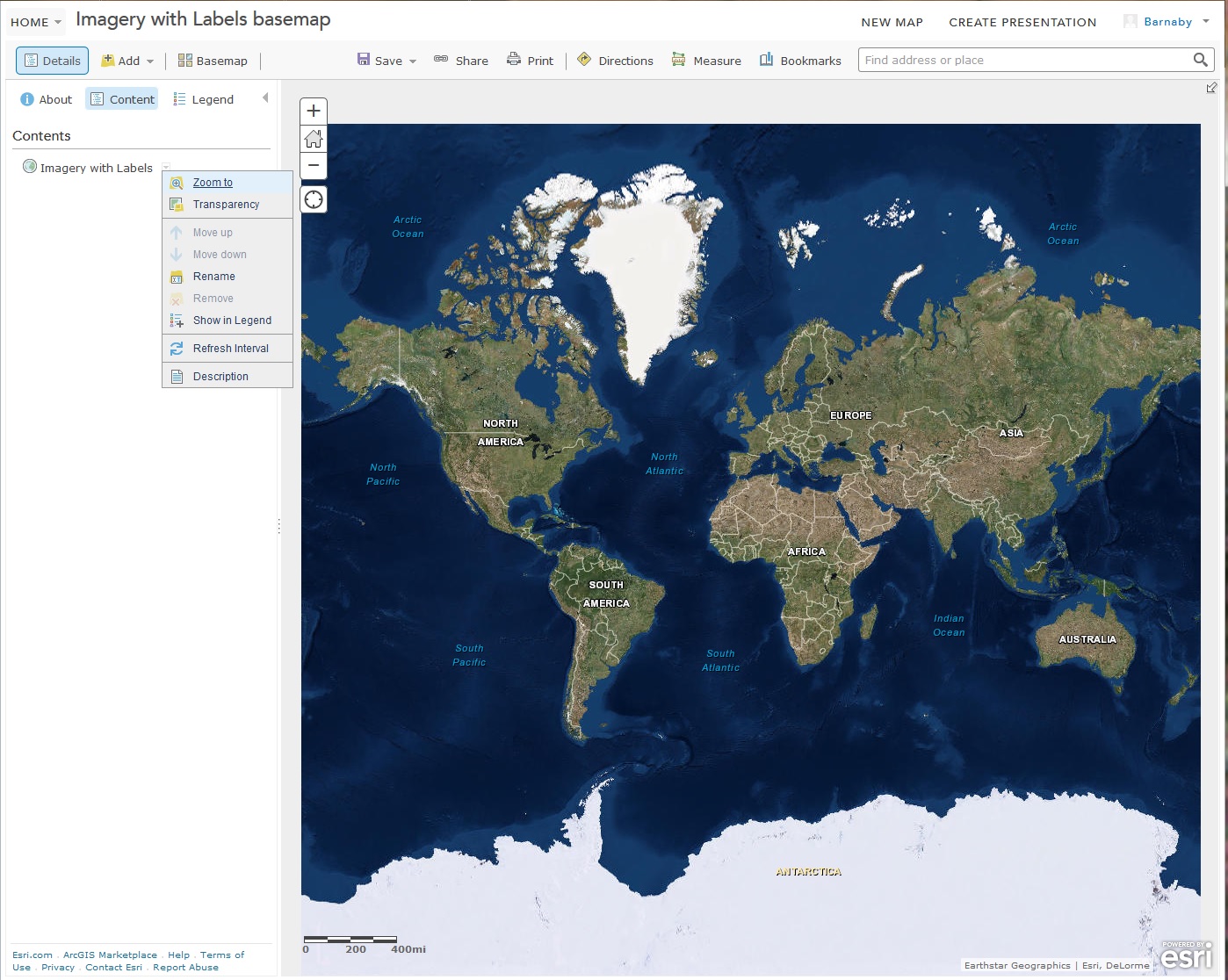
Should I add the Imagery with Labels basemap as a layer instead of as a basemap, and then remove the transpo layer? If so, how do I remove the underlying basemap? There appears to be no way to NOT have a basemap in a Web Map.
- Mark as New
- Bookmark
- Subscribe to RSS Feed
- Permalink
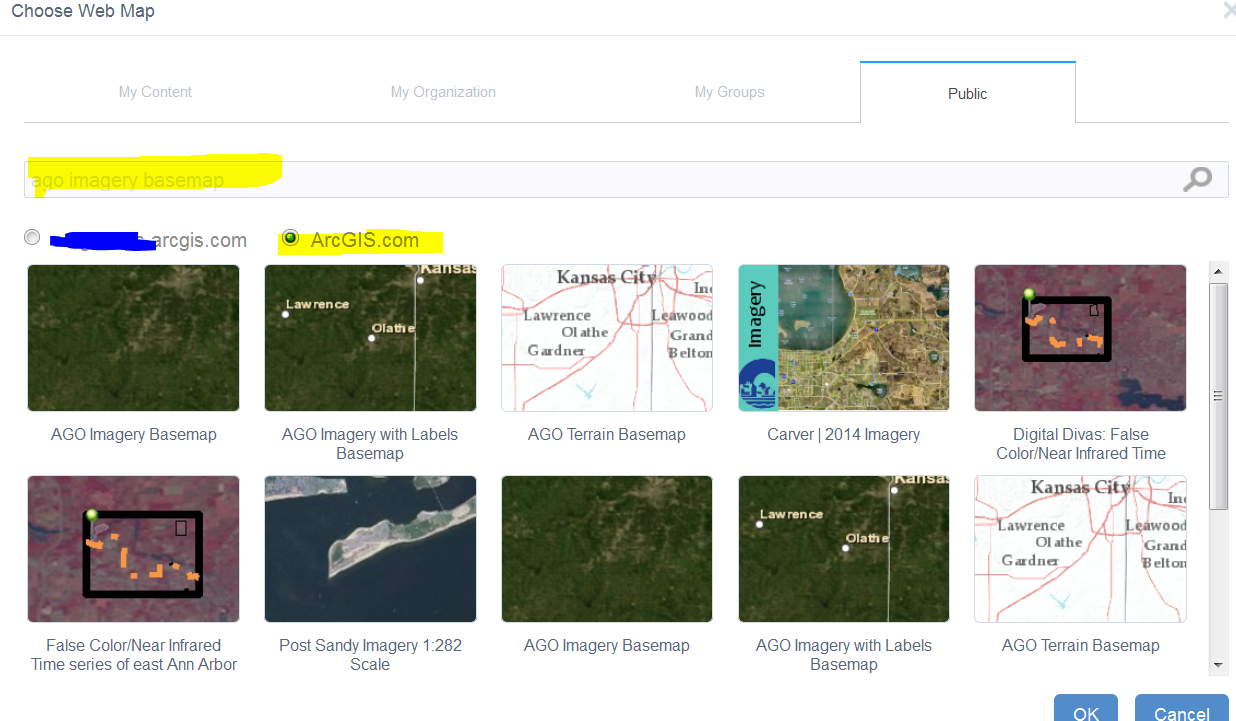
I think in that situation, the labels are cached as part of the basemap, that why I mentioned that you may be limited if using other maps. try searching for other base maps, e.g. "ago imagery basemap" is what I tried below.
- Mark as New
- Bookmark
- Subscribe to RSS Feed
- Permalink
Awesome. I'll use the AGO Imagery. Thanks!
- Mark as New
- Bookmark
- Subscribe to RSS Feed
- Permalink
Turns out AGO Imagery basemap adds a pesky bookmark to Kansas City that I can't get rid of no matter what I do. If I remove it, it just comes back. Very frustrating. I'll search for another simple Imagery basemap. Why the heck isn't the normal AGOL World Imagery (without labels or metadata) basemap available as a WAB Web Map? 
There's AGOL - Imagerie Mondiale, from ESRI France, which works but....

- Mark as New
- Bookmark
- Subscribe to RSS Feed
- Permalink
Barnaby,
I am really confused by this statement.
adds a pesky bookmark to Kansas City
Do you mean the default extent that comes up? If so then just zoom out to the desired extent and click the "Use Current Map View" button.
- Mark as New
- Bookmark
- Subscribe to RSS Feed
- Permalink
Robert,
The AGO Imagery Web Map contains a bookmark named "Basemap Extent" that shows up in the bookmark widget. That bookmark takes one to Kansas City. The bookmark cannot be deleted. It can be edited, but if its name is changed to anything other than "Basemap Extent" then a new bookmark having that name is created. Quite odd.
The French Imagery Web Map has no such annoying bookmark. I have no idea why the standard AGOL ESRI World Imagery is not available in the list of public AGOL Web Maps available to WAB, which is quite annoying.
Here is info on that basemap:
http://www.arcgis.com/home/item.html?id=42c9abbc95a7472eb17fc71ab16ae830
This map features satellite imagery for the world and high-resolution aerial imagery for many areas. The basemap’s extent is set to AIMS' service area.
Having such random, user-generated basemaps come up when one selects public ArcGIS.com maps in the WAB "Choose Web Map" GUI is ok, but the standard ESRI basemaps should be listed first, as most users will want to select from those.
AFAIK, all this has nothing to do with the LL widget.
Cheers,
Barnaby
