Turn on suggestions
Auto-suggest helps you quickly narrow down your search results by suggesting possible matches as you type.
Cancel
- Home
- :
- All Communities
- :
- User Groups
- :
- Web AppBuilder Custom Widgets
- :
- Questions
- :
- ListLayer MenuToggle - hide and Show layers with b...
Options
- Subscribe to RSS Feed
- Mark Topic as New
- Mark Topic as Read
- Float this Topic for Current User
- Bookmark
- Subscribe
- Mute
- Printer Friendly Page
ListLayer MenuToggle - hide and Show layers with button
Subscribe
3303
8
01-25-2019 10:31 AM

01-25-2019
10:31 AM
- Mark as New
- Bookmark
- Subscribe
- Mute
- Subscribe to RSS Feed
- Permalink
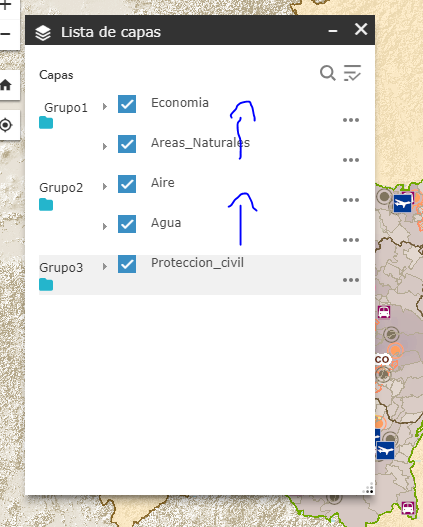
Robert Scheitlin, GISP Hi, Sorry I am new to web appbuilder and would like to create a menu in a ListLayer Widget, cres make this possible?
8 Replies


01-25-2019
11:06 AM
- Mark as New
- Bookmark
- Subscribe
- Mute
- Subscribe to RSS Feed
- Permalink
A menu?... Each layer in the layerlist already has the ... menu.
01-25-2019
11:19 AM
- Mark as New
- Bookmark
- Subscribe
- Mute
- Subscribe to RSS Feed
- Permalink
Yes, what I need is for Economy and Natural Areas to be a submenu, and that when deploying group1, economy and natural areas appear
01-25-2019
11:49 AM
- Mark as New
- Bookmark
- Subscribe
- Mute
- Subscribe to RSS Feed
- Permalink
Edder,
So it sounds like you are really wanting to group certain layers then?
01-25-2019
11:51 AM
- Mark as New
- Bookmark
- Subscribe
- Mute
- Subscribe to RSS Feed
- Permalink
exactly!!1
01-25-2019
11:55 AM
- Mark as New
- Bookmark
- Subscribe
- Mute
- Subscribe to RSS Feed
- Permalink
Well you are part of a long list of people that want the same... Sorry I don't have a solution for you.
01-25-2019
12:15 PM
- Mark as New
- Bookmark
- Subscribe
- Mute
- Subscribe to RSS Feed
- Permalink
Thank you very much Robert
01-25-2019
12:17 PM
- Mark as New
- Bookmark
- Subscribe
- Mute
- Subscribe to RSS Feed
- Permalink
and if for example I want to hide the natural areas layer and show when I press a button? That's possible?
01-25-2019
12:22 PM
- Mark as New
- Bookmark
- Subscribe
- Mute
- Subscribe to RSS Feed
- Permalink
There is the Layer Toggle Button widget that does that.
