- Home
- :
- All Communities
- :
- Industries
- :
- Water Utilities
- :
- Water Utilities Questions
- :
- Get Error 001487: Failed to update the published s...
- Subscribe to RSS Feed
- Mark Topic as New
- Mark Topic as Read
- Float this Topic for Current User
- Bookmark
- Printer Friendly Page
Get Error 001487: Failed to update the published service with the server-side data location, when publishing Utility Network data

- Mark as New
- Bookmark
- Subscribe to RSS Feed
- Permalink
I have tried many different things but still getting this error whenever I publish some utility network data. I was just trying out the ESRI sample Sewer Utility Network data (Naperville), followed the instructions to apply asset package, registered as branch versioned, enabled network topology, then tried to publish the map with utility network data from ArcGIS Pro, then got that error. My environment:
SQL Server Express 2019
ArcGIS Enterprise 10.7.1 (federated server with portal)
ArcGIS Pro 2.5
Weird thing is, I could publish another feature class from the same database just fine! I even tried publishing the Service Territory feature class within the utility network feature dataset and that was ok too! So ArcGIS Server can access that database fine, it somehow just doesn't like the utility network data.
The database is registered with ArcGIS Server, and seeing that I'm getting this error, I also created a data store item in Portal based on this: Create a data store item for an existing registered data store—Portal for ArcGIS (10.7 and 10.7.1) |... BUT, that did not help at all.
I also tried arcpy, created an SD file and attempted to publish it directly in ArcGIS Server Manager - and got the same error!
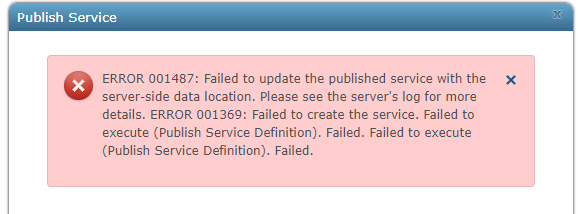
Feels like this error will haunt me forever... I'm all out of ideas now, any help is much much appreciated!


- Mark as New
- Bookmark
- Subscribe to RSS Feed
- Permalink
Did anyone find a resolution for this issue?
I am not even using the utility network. I am trying to publish three layers configured for branch editing and one of the three layers fails with the same error message as @JoelMa was getting. The layers are coming from the same enterprise geodatabase connection file, same user, and same owner. I turned on more detailed logging and the layer that is failing is trying to use a different encrypted password for the server side connection than what the other two layers are using when trying to publish. I tried changing the password for the database user and updating the data store connection string through the ArcGIS Server UI but publishing still fails at the SwizzleService because it does not like the encrypted password string and only for that one layer out of three.

- « Previous
-
- 1
- 2
- Next »
- « Previous
-
- 1
- 2
- Next »