Turn on suggestions
Auto-suggest helps you quickly narrow down your search results by suggesting possible matches as you type.
Cancel
- Home
- :
- All Communities
- :
- Industries
- :
- Transportation
- :
- Transportation Questions
- :
- Should be easy! Field Calculate Table using If/The...
Options
- Subscribe to RSS Feed
- Mark Topic as New
- Mark Topic as Read
- Float this Topic for Current User
- Bookmark
- Printer Friendly Page
Should be easy! Field Calculate Table using If/Then
2530
3
08-09-2012 01:22 PM

by
Anonymous User
Not applicable
08-09-2012
01:22 PM
- Mark as New
- Bookmark
- Subscribe to RSS Feed
- Permalink
Original User: sfmeyer
Hello all.
I need to make a very simple field calculation, in modelbuilder.
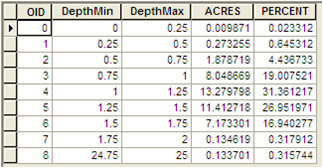
[ATTACH=CONFIG]16818[/ATTACH]
For the values in the [DepthMin] field above, I want to replace any value > 2 with a 2.
The current value above (24.75) could be any number between 2 and 25 so doing a standard !replace! (24.75 , 2) will not work.
Any ideas? Thanks VERY much.
Hello all.
I need to make a very simple field calculation, in modelbuilder.
[ATTACH=CONFIG]16818[/ATTACH]
For the values in the [DepthMin] field above, I want to replace any value > 2 with a 2.
The current value above (24.75) could be any number between 2 and 25 so doing a standard !replace! (24.75 , 2) will not work.
Any ideas? Thanks VERY much.
3 Replies
by
Anonymous User
Not applicable
08-09-2012
02:31 PM
- Mark as New
- Bookmark
- Subscribe to RSS Feed
- Permalink
Original User: sfmeyer
Nevermind. Used an alternative method.
Created a 2 step model first using the Make Table View tool with my selection expression " Value > 2"
Then performed the Calculate Field tool with "= 2"
I'm sure thereis a python logic that would plug right in but a fix is a fix. I'd still like to know the original answer if someone has it. Good day.
Nevermind. Used an alternative method.
Created a 2 step model first using the Make Table View tool with my selection expression " Value > 2"
Then performed the Calculate Field tool with "= 2"
I'm sure thereis a python logic that would plug right in but a fix is a fix. I'd still like to know the original answer if someone has it. Good day.


08-09-2012
02:57 PM
- Mark as New
- Bookmark
- Subscribe to RSS Feed
- Permalink
def calc(DepthMin):
  if DepthMin > 2:
    return 2
calc( !DepthMin! )
by
Anonymous User
Not applicable
08-09-2012
03:31 PM
- Mark as New
- Bookmark
- Subscribe to RSS Feed
- Permalink
Original User: jscheirer
Did you mean:
Did you mean:
def calc(DepthMin):
  if DepthMin > 2.0:
    return 2.0
  return DepthMin