- Home
- :
- All Communities
- :
- Developers
- :
- Native Maps SDKs
- :
- Swift Maps SDK Questions
- :
- Question about overlap or gap when clipping geomet...
- Subscribe to RSS Feed
- Mark Topic as New
- Mark Topic as Read
- Float this Topic for Current User
- Bookmark
- Printer Friendly Page
Question about overlap or gap when clipping geometries

- Mark as New
- Bookmark
- Subscribe to RSS Feed
- Permalink
Hi!
I am trying to debug a method we are using in order to clip a geometry with another. We have this feature in our app where when the user creates a new geometry, they have the option to clip the new one with an existing one so that there are no overlaps.
We are using something like this:
GeometryEngine.intersection(geometry, mainGeometry)
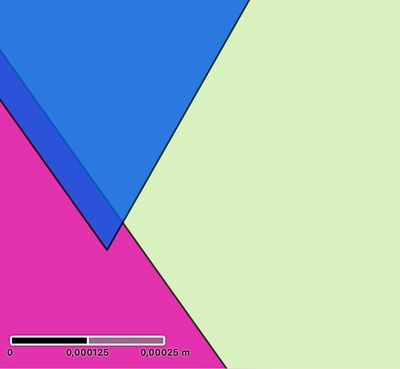
The resulting geometry we then save looks just what we wanted. However, when I zoom (a lot) on the intersection, I see there is either a small gap or an overlap.
As you can see, the overlap is quite small, and I just wonder if this is a precision issue, either with the projection or data?
We are using a WKID like this:
WKID 25833, which would be UTM Zone 33N, if I am not mistaken.
For very large geometries, this overlap accumulates and becomes a problem later on. It would be great if there was a way to address this. Any advice appreciated.


- Mark as New
- Bookmark
- Subscribe to RSS Feed
- Permalink
Loop back on this… I don't have a good answer on what exactly caused your problem. However, in 200.8, we introduced customizable precision for a spatial reference. Maybe you can try to set the tolerance to a smaller value and see if the GeometryEngine gives the result you want. Let us know the result if you have some time to try it out. 🙂
