- Home
- :
- All Communities
- :
- Products
- :
- Spatial Data Science
- :
- Spatial Data Science Questions
- :
- Re: Add Unique ID from one polygon layer to anothe...
- Subscribe to RSS Feed
- Mark Topic as New
- Mark Topic as Read
- Float this Topic for Current User
- Bookmark
- Printer Friendly Page
Add Unique ID from one polygon layer to another based on spatial relationship

- Mark as New
- Bookmark
- Subscribe to RSS Feed
- Permalink
Hello
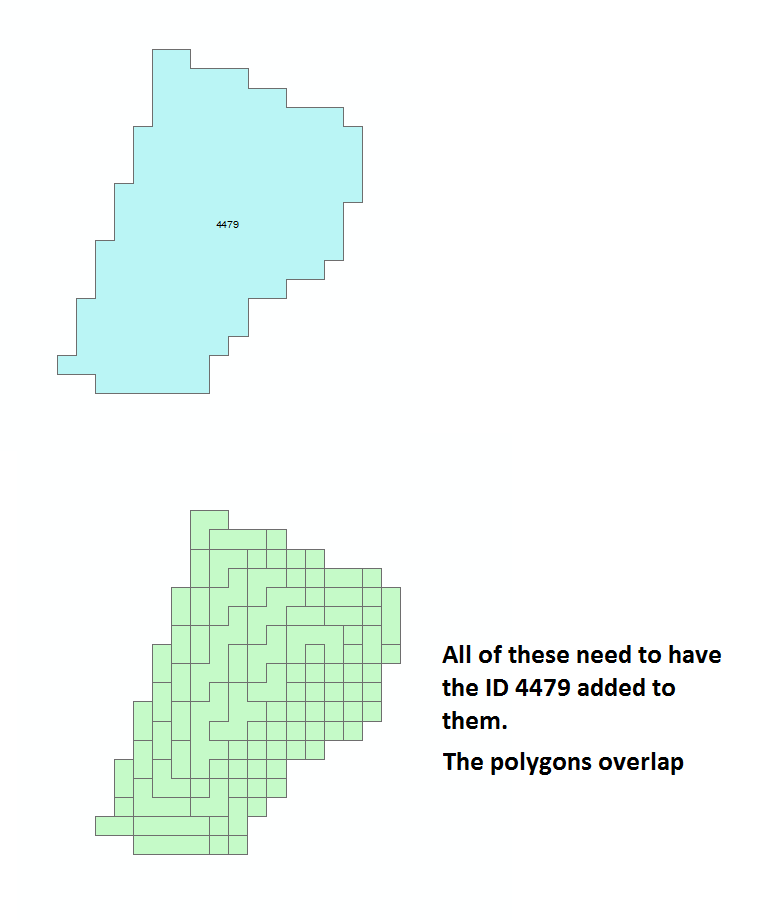
I'm have two polygon layers, one have been dissolved, the other is the original data with a lot of smaller polygons in it. The polygon layers overlap each other.
Each of the dissolved polygons have an unique id, that I would like to add to all the smaller polygons, so I can see where the smaller polygons belong.
I'm thinking some kind of join or similar based on the spatial relationship (overlap), but I can't get it too work. Tried adding a concept illustration:
| Input: | Wanted output | ||||
| Dissolved polygon ID | Size | Small polygon size | Small polygon ID | ||
| 4479 | 10 | 1 | 4479 | ||
| 1 | 4479 | ||||
| 1 | 4479 | ||||
| 1 | 4479 | ||||
| 1 | 4479 | ||||
| 1 | 4479 | ||||
| 1 | 4479 | ||||
| 1 | 4479 | ||||
| 1 | 4479 | ||||
| 1 | 4479 |
Solved! Go to Solution.
Accepted Solutions


- Mark as New
- Bookmark
- Subscribe to RSS Feed
- Permalink
Check the following steps
1. Convert the small polygons to points layer Feature To Point—Help | ArcGIS Desktop
2. Do a Spatial Join to migrate the data from the Dissolved Polygons to the Points.
3. Do a Spatial Join again to migrate the data from points to smaller polygons.
4. Delete the unwanted fields from the layer with smaller polygons. Delete Field—Help | ArcGIS Desktop
Think Location

- Mark as New
- Bookmark
- Subscribe to RSS Feed
- Permalink
You should be able to accomplish this with a Spatial Join: Spatial Join—Help | ArcGIS for Desktop
- Mark as New
- Bookmark
- Subscribe to RSS Feed
- Permalink
Had to do a few different version of this, but got it to work, thanks! 
I've added an extra credits question to Jayantas comment, feel free to weigh in, if you know the answer
- Mark as New
- Bookmark
- Subscribe to RSS Feed
- Permalink
Check the following steps
1. Convert the small polygons to points layer Feature To Point—Help | ArcGIS Desktop
2. Do a Spatial Join to migrate the data from the Dissolved Polygons to the Points.
3. Do a Spatial Join again to migrate the data from points to smaller polygons.
4. Delete the unwanted fields from the layer with smaller polygons. Delete Field—Help | ArcGIS Desktop
Think Location
- Mark as New
- Bookmark
- Subscribe to RSS Feed
- Permalink
Thank you, both of the suggestion works. Much appreciated.
Another question a bit different, can you convert a raster too vector, without it grouping raster cells, so that basically each raster cell becomes a polygon?
| Input raster | Unwanted output vector | Wanted output in vector | ||||||||
| No data | 1 | No data | No data | 1 | No data | No data | 1 | No data | ||
| 3 | 1 | 8 | 3 | 8 | 3 | 1 | 8 | |||
| 2 | 2 | 4 | 2 | 4 | 2 | 2 | 4 | |||
- Mark as New
- Bookmark
- Subscribe to RSS Feed
- Permalink
Check How To: Convert each pixel of a raster into a polygon
Think Location
- Mark as New
- Bookmark
- Subscribe to RSS Feed
- Permalink
That would work perfectly, just one little hiccup I only have an ArcGIS Standard license with Spatial Analyst. 
- Mark as New
- Bookmark
- Subscribe to RSS Feed
- Permalink
Alright.
While creating Fishnet, keep Geometry Type as Polygon.
Then do a Spatial Join to migrate the values of points to the polygons.
*No need to do Feature to Polygon step
Think Location
- Mark as New
- Bookmark
- Subscribe to RSS Feed
- Permalink
How did I miss that I could create polygons with the fishnet. Thank you very much, exactly what I needed!
