- Home
- :
- All Communities
- :
- User Groups
- :
- Python Snippets
- :
- Questions
- :
- Building a test environment
- Subscribe to RSS Feed
- Mark Topic as New
- Mark Topic as Read
- Float this Topic for Current User
- Bookmark
- Subscribe
- Mute
- Printer Friendly Page
Building a test environment

- Mark as New
- Bookmark
- Subscribe
- Mute
- Subscribe to RSS Feed
- Permalink
I am new to Python and have a few tasks that my team has been encouraging me to do.
So I am nervous and excited to get into this.
Background: 3 years of JavaScript work that was mainly freelance. This is my first Job in GIS.
First project is to build an automated "save edits" script to run after you start an edit session.
So I am wondering, when building my test environment can I just set my 'save path' to somewhere on my local desktop and not to the server? So when I can see that it's saving correctly I can just change the path to our mapping server and bada bing bada boom?
Also I believe a few packages need to be imported, and I am not sure If that will send a yellow or red flag to our IT dept. We are still new to using scripts and automating at my company.
What are best practices you have found when building test environments?
I feel silly, really, asking on here. I have spent a while searching for test environments specifically for ARCgis, and what we use is Futura, third party company that has some rebranded tools over ESRI software.
Thank you and any info is good info for me right now.


- Mark as New
- Bookmark
- Subscribe
- Mute
- Subscribe to RSS Feed
- Permalink
@WoodyUmstead wrote:First project is to build an automated "save edits" script to run after you start an edit session.
I hate to be the bearer of bad news, but Python scrips have no ability to hook into Pro events. You can manage edit sessions and apply edits once you've started a script, but the running script will lock you out of interaction with Pro until it completes.
You can write an extension in the C# SDK if you need more direct live access to the machinery of ArcPro though. That's a bit more involved however.
If you want the save edits to be run by the user, I'd start off by creating a simple script tool. That'll give the user a button they can click and allows passing parameters through the standard geoprocessing parameter interface. You'll need the data access (da) module and the management module to accomplish this.
As for the environment, you'll need access to an arcpy conda install. It's usually at:
"C:\Program Files\ArcGIS\Pro\bin\Python\envs\arcgispro-py3\python.exe"
Using this environment will make sure that you aren't writing anything that can't be run by a user that only has the default env installed. If you need to add packages, you can create a new env through Pro:
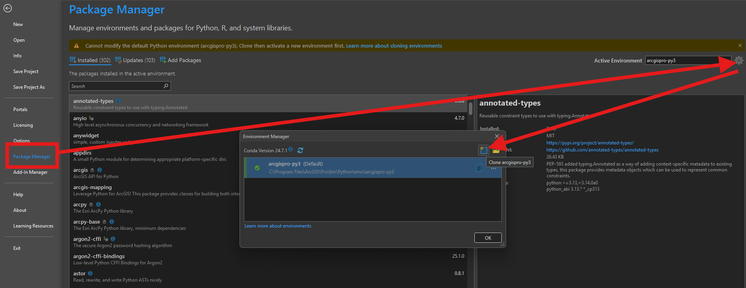
To get started, I'd look into the Editor docs:
https://pro.arcgis.com/en/pro-app/latest/arcpy/data-access/editor.htm
as well as the general da docs.
You'll also want to look into creating a ScriptTool:
You can have the tool reference a file on disk and package that file into the Toolbox when you need to move it around.
When I'm developing tools, I use my own library and pattern to get started. It's published here:
https://github.com/hwelch-fle/pytframe2
and I have a supplemental library that's more actively developed here:
https://github.com/hwelch-fle/arcpie
I write most of my code in VSCode and that toolbox system allows me to break tooling into submodules meaning a bug in one tool won't break all tools in the toolbox. This is incredibly useful once your tools hit a production flow and losing the whole system would be catastrophic.
- Mark as New
- Bookmark
- Subscribe
- Mute
- Subscribe to RSS Feed
- Permalink
Eye opening, thank you!
