Could someone show me how to make something like this in a python toolbox as well as explain to me what is going on here?
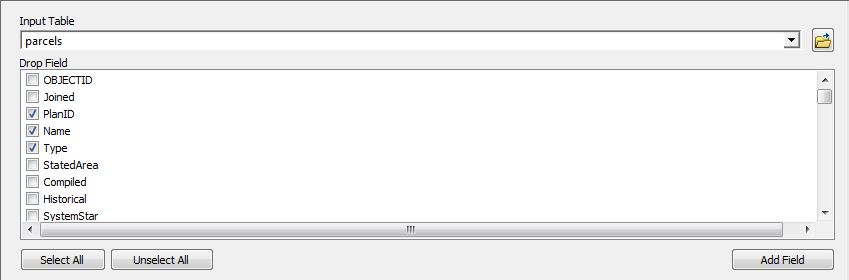
I know that the user can select either a table or a feature class and this dialog box will create a list of the fields with check boxes. One question I have is when the user checks the fields and clicks OK, does it make a list of the checked fields or does it do something else?
The code below is a close as I've gotten to the above image, even though I know all it does it let you select a single field from the list of fields. Any help would be much appreciated. Thanks!
        # Third parameter - User will select the parcel ID field
        parcelID = arcpy.Parameter(
            # Name that shows inside the tools dialog
            displayName = "Select the Paracel ID field",
            # This variable puts the displayName over the input
            name = "parcelID",
            # Accepts a field as input
            datatype = "Field",
            # Have to enter somthing before the tool can run
            parameterType = "Required",
            # It's an input to the tool
            direction = "Input")

            parcelID.parameterDependencies = [existingData.name]

