- Home
- :
- All Communities
- :
- Developers
- :
- Python
- :
- Python Documents
- :
- Python in ArcGIS Pro 3.6 FAQ
- Subscribe to RSS Feed
- Mark as New
- Mark as Read
- Bookmark
- Subscribe
- Printer Friendly Page
Python in ArcGIS Pro 3.6 FAQ
Python in ArcGIS Pro 3.6 FAQ
Frequently Asked Questions
ArcPy
Q: Is there an Object Model Diagram or Cheatsheet for ArcPy?
A: While we have decided against producing an Object Model Diagram for reasons outlined here, we do offer an ArcPy Cheatsheet.
Python Distribution
Q: What version of Python and/or <insert package name> are currently installed with the default Python environment in ArcGIS Pro (arcgispro-py3)?
A: See Available Python libraries—ArcGIS Pro | Documentation
Q: The repair and/or upgrade buttons on the environment manager fail to repair/upgrade my custom environment.
A: One possible cause of this, is due to how the environment that is failing to repair/upgrade was originally created. When cloning arcgispro-py3, be sure to use the package manager to create the clone. If you are making a clone using the Python Command Prompt, be sure to include the --pinned flag with the conda create --clone command. Use this flag to ensure that the integrity of the cloned environment is maintained when upgrading or installing packages.
Example:
conda create --clone arcgispro-py3 --prefix %localappdata%\esri\conda\envs\arcgispro-py3-clone --pinned
The --pinned flag, introduced by Esri, carries over the pinned file from the source environment to the cloned environment.
Q: My default arcgispro-py3 environment is broken and now ArcGIS Pro has issues.
A: The default arcgispro-py3 environment is not meant to be customized as making changes to it can cause issues in ArcGIS Pro as it relies on specific versions of packages. In the event that you need to repair the default python environment back to it's original state, you can delete the environment folder located at
C:\Program Files\ArcGIS\Pro\bin\Python\envs\arcgispro-py3
or if you are on a per user install it will be located at
%localappdata%\Programs\ArcGIS\Pro\bin\Python\envs\arcgispro-py3
and then using the ArcGIS Pro setup files run a repair installation. If you are still experiencing issues, you can delete the entire Python folder and run the repair installation to regenerate all the locally cached packages. If you delete the entire folder, be sure to preserve any cloned environments you may have made in this folder first.
Q: Why is my NumPy code broken after I upgraded ArcGIS Pro to 3.6?
A: At ArcGIS Pro 3.6, the NumPy version was upgraded from 1.26.4 to 2.2.0 - and with that major version change, there are some breaking changes. Please refer to NumPy's official migration guide for more information.
Python Scripts & Script Tools
Q: My custom ATBX script tool that uses dunder file (__file__) no longer works after I upgraded from an earlier version ArcGIS Pro to 3.2 or greater, why?
At Pro 3.2, the value in the __file__ variable was changed for embedded scripts (for both validate and execute) inside .atbx files.
Normally this __file__ variable is used to reference external resources that are deployed in a folder relative to the .atbx.
At 3.1 the value in __file__ was:
- During validate : C:\Path\MyToolbox.atbx#MyTool_MyToolbox.UpdateParameters.py
- During execute : C:\Path\MyToolbox.atbx#MyTool_MyToolbox.py
At 3.2 the value in __file__ is:
- During validate : C:\Path\MyToolbox.atbx\MyTool.tool\tool.script.validate.py
- During execute : C:\Path\MyToolbox.atbx\MyTool.tool\tool.script.execute.py
Note: this only affects validate and execute scripts inside a .atbx file. Validate and execute scripts stored outside the .atbx (as a .py file on disk) are unaffected. Additionally, embedded scripts in a .tbx file are unaffected.
Updating the affected code:
The affected code we typically see is os.path.dirname(__file__).
The proposed replacement code is os.path.dirname(__file__.split(".atbx")[0]).
This proposed replacement code will work in embedded validate as well as embedded execute scripts. This code will produce desired and consistent result with the __file__ in Pro 3.2 as well as earlier releases.
import os

# Show how various mock __file__ values from 3.1 & 3.2 are processed
# using the proposed method:
for __file__ in [
    r"C:\Path\MyToolbox.atbx#MyTool_MyToolbox.py", # execute Pro 3.1
    r"C:\Path\MyToolbox.atbx#MyTool_MyToolbox.UpdateParameters.py", # validate Pro 3.1
    r"C:\Path\MyToolbox.atbx\MyTool.tool\tool.script.execute.py", # execute Pro 3.2
    r"C:\Path\MyToolbox.atbx\MyTool.tool\tool.script.validate.py", # validate Pro 3.2
]:

    print(os.path.dirname(__file__.split(".atbx")[0]))
Q: I would like to schedule my script to run often (every day, every week, etc.), but after 15 days my scheduled script fails because ArcPy fails to import, why?
Python scripts and script tools can be scheduled to run automatically, see Schedule geoprocessing tools—ArcGIS Pro | Documentation.
When using the Named User license to authenticate ArcGIS Pro, the license token expires every 15 days, which causes import arcpy to fail once the token expires. There are two workarounds to avoid this:
A. If possible, switch to a Single Use license.
B. If using a Named User license, your administrator may allow checking out the license offline for a maximum of 365 days, see details here.
Please note that in both cases, the license can be used to run ArcGIS Pro only on the single machine on which it was licensed/checked out.
Notebooks in ArcGIS Pro
Since their integration into ArcGIS Pro 2.5, Notebooks in ArcGIS Pro have been based on the open-source IPython Jupyter Notebook. The classic IPython Jupyter Notebook has since been deprecated by the community in favor of a significant redesign with JupyterLab. This major redesign breaks backwards compatibility with extensions and many classic notebook features and customizations. At the ArcGIS Pro 3.4 release, notebooks have been upgraded and are now backed by JupyterLab 4.2.4 and Notebooks 7.2.1. This transition ensures continued updates with latest features, maintenance, and security patches.
Q: How does the experience of running a notebook in ArcGIS Pro compare with running a Jupyter Notebook outside of ArcGIS Pro?
A: With notebooks in ArcGIS Pro, you can open a map view and a notebook view side-by-side, allowing you to visualize and directly interact with the data.
- Layers and other contents of your map can be accessed in your notebook by name. To access data that is not currently in your table of contents, use the full path to the data. You can drag and drop an item from the contents pane or the catalog directly into the notebook.
- If you have selected data in the map view, geoprocessing tools running from the notebook honor the selections.
- Global geoprocessing environment settings are respected and can be overridden by environment settings set from the notebook.
- The output of geoprocessing tools is added to the active map by default.
- When a notebook view is active, the Notebook ribbon will appear. From here, you can create a new notebook, save the current notebook, export the current notebook to a different format, or interrupt the kernel.
- The result of running a geoprocessing tool from the notebook will be logged in the geoprocessing history.
- Geoprocessing workflows can occur during an ongoing editing session. If a geoprocessing tool modifies a feature being edited in an edit session (it does not save the result of geoprocessing as another feature class), you can save or discard the modifications from the Edit ribbon. Note that the Map view must be active in order for the Edit ribbon to be accessible.
Q: Can I use the standard Jupyter Notebook keyboard shortcuts?
A: Keyboard shortcuts work just like they do in Jupyter Notebook.
Starting at 3.0 we intentionally disabled the print, browse forward, and browse backward shortcuts, and enabled the zoom and find shortcuts. At 3.4 we have also disabled the Command Palette shortcut CTRL+SHIFT+C, but will assess bringing it back in a later release.
Q: Why are ipywidget interactive widgets not animating in the cell output of my notebook?
A: With ArcGIS Pro 3.5, you no longer need to use the %matplotlib inline magic command. However, if using %matplotlib inline, it is still recommended that you use the matplotlib.pyplot.show method to ensure the plot is refreshed. For example:
%matplotlib inline

import ipywidgets as widget
import matplotlib.pyplot as plt

import numpy as np

colors=['red', 'green', 'blue']
powers={'one':1, 'two':2, 'three':3, 'four':4, 'five':5}
def f(x, power, color):
    plt.plot(np.arange(0,11), x*np.power(np.arange(0,11), power), c= color)
    plt.ylim(-100,100)
    plt.xlim(0, 10)
    plt.title("Power Law: $x={}y^{}$".format(x, power))
    plt.show() #<-- Needed to make sure the plot draws (updates) each time a value changes

widget.interact(f, x=(-5, 5, 0.1), power=powers, color = colors)
This isn't needed if %matplotlib inline is omitted.
Q: Why does the matplotlib.pyplot.show method no longer display a figure pop-up with an interactive chart?
A: At ArcGIS Pro 3.5 we switched the default backend away from the TkAgg backend. We made this change as a trade-off for stability, as the TkAgg backend was causing many crashes when running in the context of ArcGIS Pro. The behavior outside of ArcGIS Pro remains unchanged. To display a figure pop-up with an interactive chart from ArcGIS Pro, run matplotlib.use("TkAgg") prior to displaying the plot. Please be aware that this may result in a crash in some circumstances.
Q: Why don't local images display in markdown cells
A: This is being investigated as a bug, currently only web-hosted (or embedded) images display in markdown cells.
Q: Why does a new instance of ArcGIS Pro launch when I run %pip from a notebook cell?
A: This is a known issue with embedded Python interpreters (such as what is running in ArcGIS Pro). Magic commands use the output of sys.executable to determine the host process, which in this case launches ArcGISPro.exe and not pythone.exe. You can avoid this by prefixing the pip command with ! instead of %. Note that we recommend using conda over pip.
Q: Where can I find the option for restarting the kernel?
A: You currently cannot restart the kernel unless you close and reopen ArcGIS Pro. You can, however, interrupt the kernel using the Interrupt Kernel button on the Notebook ribbon. While not a complete workaround, you can also use the %reset -f magic command to clear all variables in the namespace.
Q: Can I use R or C# in my notebook instead of Python?
A: You can only open a Python kernel in notebooks running in ArcGIS Pro, other languages are not supported.
Q: I'd like to export my notebook (.ipynb) to a Python script (.py), is that possible?
A: Yes, you can export a notebook to a Python (.py) or HTML (.html) file from the Notebook ribbon’s Export button.
You can also use the Jupyter command nbconvert from the command prompt, or you can run the command directly from your notebook by preceding the command with an exclamation mark (!).
!jupyter nbconvert --to script "Path\To\Your_Notebook.ipynb"
The resulting Your_Notebook.py file will be in the same directory as your notebook, Your_Notebook.ipynb.
Additionally, %%writefile filename.py written on the first line of any cell will write only that cell to filename.py.
Q: Can I open a Jupyter notebook in ArcGIS Pro that I have previously created outside of Pro?
A: Yes, notebooks in ArcGIS Pro are simply Jupyter Notebooks (.ipynb) and any notebook created elsewhere (such as stand-alone in the browser, in some external IDEs, and hosted notebooks in ArcGIS Enterprise or ArcGIS Online) can be run in ArcGIS Pro. However, it is your responsibility to ensure any libraries used in these other environments are available in the active environment of ArcGIS Pro.
Q: Can I use my notebook created in ArcGIS Pro across other platforms?
A: Notebooks in ArcGIS Pro are simply Jupyter Notebooks (.ipynb) and can be run by any applications that support them, including stand-alone in the browser, in some external IDEs, and hosted notebooks in ArcGIS Enterprise or ArcGIS Online. However, it is your responsibility to make sure that any libraries used in the notebook are available in these other environments.
- Using notebooks hosted on Enterprise Portal in ArcGIS Pro: There are several options for moving a hosted notebook to your local machine.
- igned into a portal within ArcGIS Pro. From the Catalog pane in ArcGIS Pro, go to Portal > My Content, right-click a notebook item, and select Download and Open.
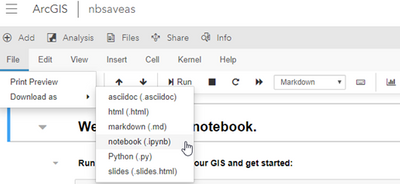
- Signed into Portal on the web browser. From the Notebook Editor in Portal, on notebook menu ribbon, click File> Download as > notebook (.ipynb).
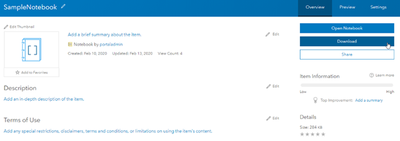
- Signed into Portal on the web browser. From the notebook's Item Details page (accessible from the Content tab by clicking on a notebook item), click Download to download the notebook in .ipynb format.
- Using Notebooks created in Pro on my Enterprise Portal:
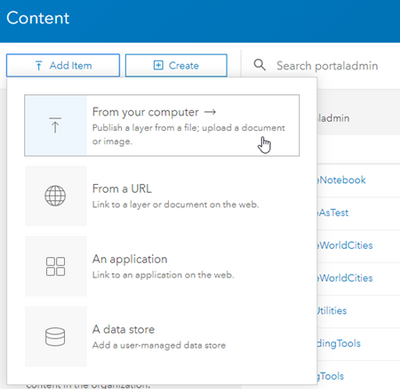
- You can upload any notebook file (.ipynb) to your portal. Sign into your organization's Portal from the browser, go to the Content tab of the contents page, click Add Item > From your computer and choose From my computer. From the Add an item from my computer dialog, click Choose File and browse to a notebook file on your computer, provide a title and tags, and then click Add Item.
- You can upload any notebook file (.ipynb) to your portal. Sign into your organization's Portal from the browser, go to the Content tab of the contents page, click Add Item > From your computer and choose From my computer. From the Add an item from my computer dialog, click Choose File and browse to a notebook file on your computer, provide a title and tags, and then click Add Item.

Q: When opening a notebook in ArcGIS Pro, why did I receive a "Failed to load notebook" error?
A: Notebooks in Pro leverage a webserver run as localhost on port 8778. If it cannot be reached or is otherwise interfered with, notebooks will fail to load. Known causes and solutions:
- Bad Jupyter configuration (jupyter_notebook_config.py): Modifying the c.NotebookApp.ip or c.NotebookApp.port configuration options will prevent ArcGIS Pro from opening notebooks. To resolve, comment out or reset these values.
- Using a proxy server: If using a proxy server, set an exclusion on your proxy settings to prevent localhost:8778 (or 127.0.0.1:8778) from going through the proxy. You'll need to work with your IT group to add this exclusion, depending on the proxy you use and how it is implemented.
- Paths with special characters may cause issues. Avoid special characters, specifically the apostrophe (') is known to cause issues when opening and saving notebooks in ArcGIS Pro.
Q: Can I open a notebook in Pro from a UNC path?
A: UNC paths are supported as of ArcGIS Pro 3.0 - just be careful about collisions as this opens up the possibility of multiple users editing the same file. If you are still on an earlier version of ArcGIS Pro and unable to upgrade, the best workaround is mapping the UNC path to a drive or alternatively creating a symbolic link.
Q: I keep clobbering variables when I have multiple notebooks open in Pro. Why are variable names being shared across multiple notebooks?
A: ArcGIS Pro runs a single Python instance. This execution context is shared by each notebook opened in a single instance of ArcGIS Pro. Depending on the contents of concurrently open notebooks, this could potentially result in variable name collisions. To avoid potential issues you may consider:
- Using unique variable names across all concurrently running notebooks
- Running the %reset -f magic command as needed to delete all the variables in the namespace
Q: Why are the environment variables I set in Notebooks (or Python Window) not being honored by Geoprocessing tools I run from the Geoprocessing pane?
A: This behavior is due to the environment levels hierarchy.
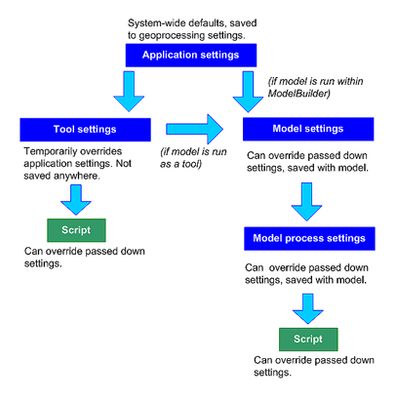
When setting an environment variable using arcpy.env, you are setting it at the Script level. Since this is the lowest level in the hierarchy, the setting will not be honored at any of the above levels. In order for your environment variables to be honored by both Script and Geoprocessing tools, you must set the environment variables using the Application settings from your project.
Other
Q: Can I use Powershell 7 as my terminal session for Python?
A: ArcGIS Pro's Python Command Prompt (based off Microsoft's Command Prompt) is the standard way to run ArcGIS Pro Python scripts from a terminal session.
With ArcGIS Pro 3.6 it now is possible to use PowerShell 7 as an alternative to the Python Command Prompt. PowerShell 7 is Microsoft's latest command-line and scripting language.
Here are the one-time steps to set up to use PowerShell 7 with ArcGIS Pro's python environment
- Install PowerShell 7 from the Microsoft Store or from Windows PowerShell run winget --id Microsoft.PowerShell --source winget
- From the Windows start menu launch the Python Command Prompt and run conda init powershell
- This step requires admin credentials
Your machine should now be setup.
From the Windows start menu you can now launch PowerShell 7 and then type activate arcgispro-py3 to activate the ArcGIS Pro python environment. Then:
- Run python -c "import arcpy;print(arcpy.version)" to confirm you're setup correctly (should print ArcGIS Pro's version)
- Run python to launch an interactive REPL session
- Run python c:\myproject\myscript.py to run a script
Server 12.0:
PowerShell 7 can also be used with Server 12.0 deployment, simply use Python 3 Command Prompt instead of Python Command Prompt in the instructions above.
Known issue and limitations:
At this time the following commands (.bat files) commonly used with ArcGIS Pro are not supported in PowerShell: proenv, propy, proswap.


I ran into a highly confusing issue with one of my main custom build Python scripts after the ArcGIS Pro 3.6 / Python 3.13 upgrade.
When I attempted to run the script, which runs perfectly fine in Pro 3.5 / Python 3.11, the script immediately errored out with an "indentation error". However, there are none. Visual Studio Code, and PyScripter show the code as fine with their internal syntax checks.
One thing I finally noticed, was that the error seemed related to a commented out code section:
        for renderRule in renderRulesInit:
            renderRules.append(renderRule.split('|')[0].rstrip(' '))
##        for layeredRenderRule in layeredRenderRulesInit:
##            layeredRenderRules.append(layeredRenderRule.split('|')[0].rstrip(' '))
This code section lived directly under an:
if __name__ == '__main__':

    styleFolder = arcpy.GetParameterAsText(0)
    styleName = arcpy.GetParameterAsText(1)
code section.
Having such commented out section there, was never a problem with Pro <3.6 and Python <3.13.
As a test, I changed the code with comment to this, so with comment lined out with the rest of the code:
        for renderRule in renderRulesInit:
            renderRules.append(renderRule.split('|')[0].rstrip(' '))
        #for layeredRenderRule in layeredRenderRulesInit:
        #    layeredRenderRules.append(layeredRenderRule.split('|')[0].rstrip(' '))
and then the script ran!
Note that having similar comments lined out to the entire left of a code line in other functions is *no* problem, it is just those sections directly under '__main__' that now in Python 3.13 seem to cause these false "indentation errors", blocking execution of the script in Pro.
Not sure if this is a bug in Pro 3.6, or more likely in Python 3.13.
Can you confirm this? At least it would be good to document this behavioral change in the Pro Help if this is a deliberate and intended change in e.g. Python 3.13.
Marco
Hi @HannesZiegler ,
I unfortunately have identified two other issues in Pro 3.6:
1) - The Get Count geoprocessing tool now fails with a non(!) enterprise geodatabase enabled ordinary PostgreSQL enterprise database feature class. This used to work in Pro 3.5 and below. According to the "What's new in Pro 3.6", the Get Count tool had changes applied for Pro 3.6, that seems to break this option. See the images entirely below.
2) - Using a Python "concurrent.futures.ThreadPoolExecutor" seems to make the geoprocessing in Pro 3.6 hang at the end of the thread pool processing if the processing is run in the Pro Foreground Thread. I do not see these hangs if Pro 3.6 is set to run in the background Geoprocessing Thread, which is the default.


@HannesZiegler and @Kimberly-Saballett
Just to clarify a bit more: regarding the detected issue with Python "concurrent.futures.ThreadPoolExecutor" hanging when run in the ArcGIS Pro 3.6 Foreground Thread, when I say "hangs" I literally mean hangs, the application does not crash nor does it throw open the ArcGIS Pro error reporter, but it simply becomes unresponsive at the end of the ThreadPoolExecutor execution, and doesn't continue processing. I need to kill Pro from the Windows Task Manager to stop the application.
I have now reported these issues to the Dutch branch of ESRI, so hopefuly they get reproduced and logged as bugs. Unsurprisingly, for the Get Count tool issue, a bug was already logged.

Hi @MarcoBoeringa, thank you for reporting these issues, this is very helpful feedback. I did spend a few minutes Friday and was able to reproduce the syntax issue of certain comments under the "__main__" conditional block. It is now in our queue.
Thank you also for reporting the bugs through Support as well - there are some big benefits to reporting bugs and crashes with Technical Support because they will help establish a reproducible workflow that will then help us debug and address the issue more efficiently. This way, there will also be a support ticket for you to track the status of the bug you reported.
Note: For others reading this, to contact Technical Support, you need to be an authorized caller. See Why can't I submit cases? (Or, How I became an authorized caller and reported my issue) for more information.
Hi @HannesZiegler ,
I have unfortunately identified a few more issues that I want to report here. I honestly do not have the time and energy now to go through the whole process of getting them logged as bugs. I already wasted a whole week trying to wade through issues getting my main geoprocessing workflow to fully work again in Pro 3.6, at least on the Background Thread for now (which now works). This is to much.
The issues:
- With Foreground Thread processing, if I use a Python 'concurrent.futures.ThreadPoolExecutor' with a function similar to the one below as input to the executor, where there is a gc.collect() in the 'finally' except construct, it will hang / stall Pro. Removing the gc.collect() from the 'finally' construct, lets the script continue. This does not happen with Background Thread processing, the gc.collect() call does not cause issues in that mode in combination with usage of 'concurrent.futures.ThreadPoolExecutor'. I do not know if this is actually a Pro bug, or a bug in Python 3.13. There are several references to (fixed) issues related to gc.collect in the Python 3.13 release notes, see the linked full release notes for the references to gc.collect() in relation to these issues:
- Add sys.unraisablehook() to customize how "unraisable exceptions" are logged python/cpython#81010
- C implementation of functools.lru_cache python/cpython#58581
At least one of them seems to have quite a bit of history, and may have seen changes in e.g. 3.11 as well, but I didn't check.
def some_function():
    try:
        blabla
    except:
        blabla
    finally:
        some_clean_up
        gc.collect()
- With Foreground Thread set, CIM edits seem to cause Python exceptions. Please note I haven't checked this extensively, I just noticed it in one particular case that is present in my workflow. I have not tested whether this applies to all CIM edits on a Foreground Thread, or just the specific one I happen to use in my workflow, which is the setting of the label classes' Maplex label priority ranking. E.g. see the script example below, where the exception will be raised on a Foreground Thread but not when running the same code as Background Thread.
cimLyr = lyr.getDefinition("V3")

i = 1

# Change the label class "label priority ranking" 'priority' value
for cimLabelClass in cimLyr.labelClasses:

    # Double check we got a label class
    if type(cimLabelClass).__name__ == "CIMLabelClass":

        try:
            cimLabelClass.priority = i
        except:
            arcpy.AddWarning("*** WARNING ***: Failed to set the 'Label Priority Ranking' Maplex label engine setting of layer '{}'!".format(lyrToAdd.name))
            pass

    i += 1
Hi @MarcoBoeringa, I'm sorry to hear that you are running into issues with 3.6. The issue with comments under "__main__" and GetCount are logged with the appropriate teams. However, a colleague investigating the threading issue has been unable to reproduce it. Would you be willing to provide (a) reproducible case(s)? If it's not asking too much, please private message (PM) me with the details. Sorry again to hear about the bad experience you had upgrading to 3.6 and thank you for taking the time to report these issues to us.
No, unfortunately I will not be providing a reproducible case for you regarding the threading issue.
My tool, and the multi-threaded parts of the code, is part of a major sophisticated geoprocessing workflow coded in Python that has some 20k lines of Python code over a few dozen modules. To demonstrate other issues, I have in the past made available earlier versions of the tool to the Dutch branch of ESRI, but each time this turns out into a nightmare in terms of the amount of work for me to get anything logged. I won't be doing that again based on these past experiences. Sorry.
I do think you should look at the CIM issues and the Python exception I saw happening when run on the Foreground Thread. This issue is unrelated to the 'concurrent.futures.ThreadPoolExecutor' and threading issues I saw, and should be relatively easy to test in trying to reproduce it. I already supplied part of the needed code as you know.
By the way, I don't know if it has any relevance, but please take note that I am still on Windows 10 (now with ESU extension), so it would be good to test anything on that version of Windows if possible.
@MarcoBoeringa Understandable, thank you for the reply, we'll continue to investigate the CIM & foreground thread issues
Based on my experiences, this ArcGIS Pro Idea may also be something to have a look at for a future version of Pro:


@MarcoBoeringa , I'm on the arcpy.mp team and tested your label class CIM edits / Foreground scenario and was NOT able to reproduce on Win 11. I even tried in on a Win10 machine this morning. I tried old projects that had tbx files and a new 3.6 project with atbx files.
Each project has a map with a feature layer with multiple label classes. Each label class had a SQL Query that shows state names for different regions. The following code is part of a script tool and ran fine in all cases in the background and in the foreground. I think its identical to your script unless you have more lines that might be part of the issue.
import arcpy

if __name__ == "__main__":

    p = arcpy.mp.ArcGISProject('current')
    m = p.listMaps('Map')[0]
    l = m.listLayers('States_WithRegions')[0]
    l_cim = l.getDefinition('V3')

    i = 1

    for cimLabelClass in l_cim.labelClasses:
        if type(cimLabelClass).__name__ == "CIMLabelClass":
            try:
                #cimLabelClass.priority = i
                arcpy.AddMessage(cimLabelClass.priority)
            except:
                arcpy.AddWarning("*** WARNING ***: Failed to set label ranking")
                pass
        i += 1

    l.setDefinition(l_cim)
If you run exactly this code, you still see the issue?
Can you think of anything special about your layer, the label classes, etc, that could be unique.
Jeff - arcpy.mp team
@JeffBarrette and @HannesZiegler ,
I have been digging a bit deeper:
The example code I showed you regaring the CIM issue was a slightly modifed version of the original. The original is below:
# Change the label class "label priority ranking" 'priority' value
for cimLabelClass in cimLyr.labelClasses:

    # Double check we got a label class
    if type(cimLabelClass).__name__ == "CIMLabelClass":

        try:
            if missingLabelPriority == False:
                arcpy.AddWarning("labelPriorityByLayerDict: {}".format(labelPriorityByLayerDict))
                cimLabelClass.priority = labelPriorityByLayerDict[cimLabelClass.name]
                arcpy.AddWarning("CIM LabelClass priority: {}".format(cimLabelClass.priority))
            else:
                maxLabelPriority += 1
                cimLabelClass.priority = maxLabelPriority
                arcpy.AddWarning("CIM LabelClass priority: {}".format(cimLabelClass.priority))
        except:
            arcpy.AddWarning("*** WARNING ***: Failed to set the 'Label Priority Ranking' Maplex label engine setting of layer '{}'!".format(lyrToAdd.name))
            pass
Now, obviously, I am getting an exception on the Foreground Thread. But besides the CIM edit, there is also a dictionary lookup going on ('labelPriorityByLayerDict'). Now technically and programatically, that dictionary is guaranteed to contain the key being requested, so shouldn't error out, as it is in fact based on reading the exact same set of layer files being modified here.
However, to get further insight, I first re-tested my previous observations, confirming what I saw before:


This again shows the Foreground Thread throwing an exception during the CIM edit, but not the Geoprocessing Thread.
I then decided to also test the contents of the dictionary:


As you can see from the last two images, the dictionary is SUCCESSFULLY created in BOTH cases and contains the value 1 to set as label priority. This now unequivocally tells me the issue is with the actual CIM edit. I see no other way based on these results:
cimLabelClass.priority = labelPriorityByLayerDict[cimLabelClass.name]
By the way, I installed the official first release of .NET10 next to the existing .NET8. This was under the assumption that Pro 3.6, as previously hinted by ESRI, might switch to .NET10, which is postponed to 3.7.
So, unless there are parts of ArcGIS that already switched to .NET10, I assume the .NET10 installation shouldn't interfere. But if I understood it well (I am not a .NET developer), you target a single version with an app, not multiple, so this is again unlikely to play any role.
As a last thought, I replaced the bare excepts with "except Exception:". This did not make any difference, still an exception raised on the Foreground Thread, so the exception raised by the CIM edit is not a system-exiting exception.
@JeffBarrette and @HannesZiegler ,
I found the culprit. It is not the setting of the priority, but getting the CIMLabelClass.name property that fails on the Foreground Thread, since that is used as lookup key in the dictionary, it raises a KeyError:


@MarcoBoeringa I appreciate your effort reporting your findings but I don't have enough to reproduce. The snippet of code you most recently provided is not complete. I prefer not to guess. I modified the original code you provided to GET the labelclass.name and it is returning values as expected. The regression could be caused by a combination of events. Is there any way you can provide a more complete, simplified and reproducible ppkx with the script tool. My email is [email protected]
Jeff - arcpy.mp Team
Some more complete code sections from my workflow. The second one shows everything happening from the moment the CIM layer object is requested with 'getDefinition' until the modified version is written with 'setDefinition'. Nothing else is happening here.
But to be honest, I think you have one big smoking gun right in front of you with my observation of the labelclass name being set to some "auto-generated" "Class 1" name. Some developer at ESRI baked that behavior into ArcGIS Pro, it shouldn't be to hard to find out where it is happening in the Pro code base, and that code section will likely tell you a lot about what may go wrong in the Foreground Thread.
To be honest, I even have a, now rather vague, recollection of having seen a very similar issue with these label class names pop-up in an earlier version of Pro, maybe at the time Python CIM editing was first introduced (Pro 2.4??? or so???). This issue with label class names really rings a bell to me in terms of previous ArcGIS Pro issues / bugs I had to deal with.
    if removeAmbiguousLabels == "Do not remove":
        removeAmbiguousLabelsSetting = 'None'
    elif removeAmbiguousLabels == "Remove within same label class":
        removeAmbiguousLabelsSetting = 'WithinLabelClass'
    if removeAmbiguousLabels == "Remove all":
        removeAmbiguousLabelsSetting = 'All'
cimLyr = lyrToAdd.getDefinition("V3")
# Change the 'removeAmbiguousLabels' Maplex setting
# NOTE(!): This setting only became available from ArcGIS Pro 3.1 onwards,
# and is currently only applicable to feature classes of type 'Point'.
if gType == 'Point':
for cimLabelClass in cimLyr.labelClasses:
# Double check we got a label class
if type(cimLabelClass).__name__ == "CIMLabelClass":
try:
cimLabelClass.maplexLabelPlacementProperties.removeAmbiguousLabels = removeAmbiguousLabelsSetting
except Exception:
arcpy.AddWarning("*** WARNING ***: Failed to set the 'Remove ambiguous labels' Maplex label engine setting of layer '{}'!".format(lyrToAdd.name))
pass
# Change the 'ligatures' label class text symbol setting to false
if gType in ['Line','Polygon']:
for cimLabelClass in cimLyr.labelClasses:
# Double check we got a label class
if type(cimLabelClass).__name__ == "CIMLabelClass":
try:
if cimLabelClass.maplexLabelPlacementProperties.spreadCharacters == True:
cimLabelClass.textSymbol.symbol.ligatures = False
except Exception:
arcpy.AddWarning("*** WARNING ***: Failed to set the label class text symbol's 'ligatures' setting to 'false' for layer '{}'!".format(lyrToAdd.name))
pass
# Change the label class "label priority ranking" 'priority' value
for cimLabelClass in cimLyr.labelClasses:
# Double check we got a label class
if type(cimLabelClass).__name__ == "CIMLabelClass":
try:
if missingLabelPriority == False:
cimLabelClass.priority = labelPriorityByLayerDict[cimLabelClass.name]
else:
maxLabelPriority += 1
cimLabelClass.priority = maxLabelPriority
except Exception:
arcpy.AddWarning("*** WARNING ***: Failed to set the 'Label Priority Ranking' Maplex label engine setting of layer '{}'!".format(lyrToAdd.name))
pass
lyrToAdd.setDefinition(cimLyr)
The layer that failed in the screenshot examples I showed, was of type Polygon by the way.
@MarcoBoeringa I did the best I could to simulate your scenario without having your data or complete scripts. I can NOT reproduce. Everything works on the background or foreground threads. I can talk with the labeling team to see if the smoking gun you suggest could have been caused by changes made during 3.6 development.
Here is the script ran from a script tool. It ran against a single polygon feature layer with 10 label classes. I only set the priorities for half of them and set the other half using an incremented value.
import arcpy

if __name__ == "__main__":

    p = arcpy.mp.ArcGISProject('current')
    m = p.listMaps('Map')[0]
    l = m.listLayers('States_WithRegions')[0]
    l_cim = l.getDefinition('V3')

    labelPriorityByLayerDict = {'New England' : 1, 'Pacific': 2, 'Mountain' : 3, 'South Atlantic' : 4, 'West North Central' :5}

    i = 6

    for cimLabelClass in l_cim.labelClasses:
        if type(cimLabelClass).__name__ == "CIMLabelClass":
            try:
                if cimLabelClass.priority == -1:
                    if cimLabelClass.name in labelPriorityByLayerDict:
                        before = cimLabelClass.priority
                        cimLabelClass.priority = labelPriorityByLayerDict[cimLabelClass.name]
                        arcpy.AddMessage(f'Changing {cimLabelClass.name} from {str(before)} to {cimLabelClass.priority}')
                    else:
                        before = cimLabelClass.priority
                        cimLabelClass.priority = i
                        arcpy.AddMessage(f'Changing {cimLabelClass.name} from {str(before)} to {cimLabelClass.priority}')
                        i += 1
            except:
                arcpy.AddWarning("*** WARNING ***: Failed to set label ranking")
                pass

    l.setDefinition(l_cim)
It would be really helpful to know if the script above fails for you against your data after making the necessary changes.
Jeff - arcpy.mp Team
Although you say you tried to reproduce my workflow based on my script sample, your script is missing the setting of the disabling of ligatures in case Maplex spread characters is set on a label class, that I included in my last code snippets.
(Background for this: these settings in Maplex are incompatible from a cartographic point of view, and cause garbled incorrectly rendered labels with two ligature characters in Latin grouped together, while the rest spread, e.g. "a...bc...d...e...f" instead of cartographically correct "a...b...c...d...e...f", unfortunately, ArcGIS Pro by default activates ligatures since it introduced support for them in Maplex).
# Change the 'ligatures' label class text symbol setting to false
if gType in ['Line','Polygon']:

    for cimLabelClass in cimLyr.labelClasses:

        # Double check we got a label class
        if type(cimLabelClass).__name__ == "CIMLabelClass":

            try:
                if cimLabelClass.maplexLabelPlacementProperties.spreadCharacters == True:
                    cimLabelClass.textSymbol.symbol.ligatures = False
            except Exception:
                arcpy.AddWarning("*** WARNING ***: Failed to set the label class text symbol's 'ligatures' setting to 'false' for layer '{}'!".format(lyrToAdd.name))
                pass
@JeffBarrette Another thing I intend to do is to try to run ArcGIS Pro attached to the ESRI Visual Studio Code debugger. Maybe that will give some new insights.
There is not much more I can and will do. Honestly, I do not want to sound to cynical here and I understand your frustration regarding the reproducibility, but I as an ESRI client, am not the one getting paid for debugging Pro, and believe me, there is a bug lurking here. After 25 years in IT and working with ESRI software, I can smell them from a mile's distance.
And remember, my code runs perfectly fine on the Geoprocessing Thread...
I can talk with the labeling team to see if the smoking gun you suggest could have been caused by changes made during 3.6 development.
Yes, I think you should.
I now ran the workflow with ArcGIS Pro attached to the Visual Studio Code debugger using the ESRI debugger extension. I don't think it turns up much new information, but as you can see, it is not just the label class name that got reset to 'Class 1', but all label class properties seem to have been reset to defaults in the CIM object.


Part of the CIM layer object properties:

One other thing that may be highly relevant to the issue and that I didn't mention yet, is that my tool does NOT use layers from the ArcGIS TOC, but first loads them from ArcGIS *.lyrx files stored on disk, modifies the Maplex settings per e.g. the code I showed you (in reality there is a *lot* more going on), and then finally adds them to the TOC.
Maybe this is part of the issue why you can't reproduce.
@MarcoBoeringa I jumped on this as soon as it was brought to my attention. I didn't try the other blocks of code but they were using variables and settings that had missing context, therefore, I focused on your comment concerning the use of a dict to set label class CIM properties.
Testing layer files is easy enough and I will try that but your comment "there is a *lot* more going on" could be the missing pieces. We can't debug until we can reproduce the issue.
Please note I do appreciate your efforts to try to reproduce it. I just think it needs a bit more digging and effort from the ESRI side.
As I already explained to @HannesZiegler , this particular piece of code is part of larger toolbox with some 20k lines of Python code, with a few dozen Python modules. I honestly cannot transfer the whole thing.
And that is what I mean with "there is a *lot* more going on".
However, I am almost 100% sure we can safely ignore that fact in relation to this is issue.
Why?: What it basically does is implement a sophisticated generalization workflow that generates a 150+ feature classes in PostgreSQL database. At the end of that processing, so when all the true geoprocessing work is done, the script from which I extracted the snippets, is called. It loads layer files from a custom style I developed (just an ordinary folder with *.lyrx files managed by the code, nothing special), and uses the symbology of those style layers in combination with the
symbolizedLayer = arcpy.ApplySymbologyFromLayer_management(featureLayer,symbologyLayerFile,inputSymbologyFields,update_symbology="MAINTAIN")[0]
tool to update the symbology of Query Layers that were created during the previous generalization geoprocessing workflow and that point to the feature classes in the PostgreSQL database. It also transfers any label classes from the style layer to the Query Layers.
Granted, the transfer of all of theses attributes / settings of one layer to another I think has become easier in Pro 3.6 with new options if I remember it well from the release notes, but my current code is based on what was possible in the past.
That said, as you may now understand, by far the majority of "there is a *lot* more going on", is really unrelated to anything to do with actual feature layer objects in the TOC. It is database work and processing. Only a fraction of the code touches upon the parts that might be relevant to this issue.
By the way, if by now you are wondering what the output of this whole workflow is, it is the below: topographic maps based on OpenStreetMap data...


Few more observations that also exclude other stuff:
- I have now realized the entire updating of the symbology fails. I should have noticed before, but due to a mix of issues (e.g. the full hangs caused by 'gc.collect'), I never really got to the point where the final output layers are added in their symbolized form on Foreground Thread.
- The fact the symbology of the layer is not applied, also likely means the transfer of label classes fails, hence the default symbology and generic "Class 1" label class name.
- I have checked that the "Apply Symbology From Layer" tool runs fine on the Foreground Thread when run as stand alone tool simply from Pro interface. It applies the symbology OK.
- So somehow it fails in my current coding using it on the Foreground Thread, even though it succeeds on the Geoprocessing Thread. Still baffles me.
I need to do more testing to see if can pinpoint a culprit in my coding that might point to a Pro issue (or just some weird Python related thing, or the way my Python code in these particular modules involved is setup that causes the issue).


This is the full code of the 'updateSymbology' function. Note that I call it with 'aprxMap=None', see in the debugger.
Also note that in the particular example shown in the screenshots above, the 'len(inputSymbologyFields)=0' because it is a single symbol legend type.
Lastly, note that it is actually a string file path to the layer file stored on disk that is input to the actual call to the "Apply Symbology From Layer" tool, NOT the 'symbologyLayer' (which is however based on it, and was added to the TOC for technical reasons), which is in this function just used to check for symbology fields.
def updateSymbology(featureLayer,symbologyLayer,symbologyLayerFile,aprxMap):

    try:

        inputSymbologyFields = []

            symb = symbologyLayer.symbology

            if hasattr(symb, 'renderer'):

                for fieldNamePrefix in ['osm_','tgc_']:

                    if symb.renderer.type in ['UniqueValueRenderer']:

                        # Loop through all value fields, there can be multiple in case of a unique value renderer
                        for valF in symb.renderer.fields:

                            if valF is not None and valF.find(fieldNamePrefix) != -1:
                                inputSymbologyFields.append(['VALUE_FIELD',valF,valF])

                    elif symb.renderer.type in ['GraduatedColorsRenderer','GraduatedSymbolsRenderer']:

                        valF = symb.renderer.classificationField

                        for symF in [valF]:

                            if symF is not None and symF.find(fieldNamePrefix) != -1:
                                inputSymbologyFields.append(['VALUE_FIELD',symF,symF])

                        norF = symb.renderer.normalizationField

                        for symF in [norF]:

                            if symF is not None and symF.find(fieldNamePrefix) != -1:
                                inputSymbologyFields.append(['NORMALIZATION_FIELD',symF,symF])

        if len(inputSymbologyFields) > 0:
            symbolizedLayer = arcpy.ApplySymbologyFromLayer_management(featureLayer,symbologyLayerFile,inputSymbologyFields,update_symbology="MAINTAIN")[0]
        else:
            symbolizedLayer = arcpy.ApplySymbologyFromLayer_management(featureLayer,symbologyLayerFile,update_symbology="MAINTAIN")[0]

        if StyleSupportingFunctions.getCanSetLayerVisibility(symbolizedLayer) == True:
            try:
                symbolizedLayer.visible = False
            except:
                pass

        if aprxMap is not None:
            aprxMap.addLayer(symbolizedLayer, "AUTO_ARRANGE")
            symbolizedLayer = aprxMap.listLayers(symbolizedLayer.name)[0]

        return [True,symbolizedLayer]

    except Exception as e:

        # If an error occurred, print line number and error message
        import sys
        tb = sys.exc_info()[2]

        errorMsg = "Line %i" % tb.tb_lineno
        errorMsg += '\n' + e.args[0]
        if len(e.args) > 1:
            errorMsg += '\n' + e.args[1]
        if len(e.args) > 2:
            errorMsg += '\n' + e.args[2]

        return [False,errorMsg]
By the way, the reason I am not simply using the 'symbologyLayer' input variable of my 'updateSymbology' function as in the code section below as input to the "Apply Symbology From Layer" geoprocessing tool - but instead a reference to a layer file ('symbologyLayerFile') that was originally used to create the 'symbologyLayer' in the TOC - is that when in the past I switched from ArcMap to ArcGIS Pro, I discovered the original code would not update the symbology if fed the layer object, but that it would if I switched to the layer file as input, if I remember it all well.
I have now also tested if switching back to layer object 'symbologyLayer' makes any difference for the Foreground Thread processing, but to no avail, the updating of the symbology still fails on the Foreground Thread, while succeeding on the Geoprocessing Thread.
        if len(inputSymbologyFields) > 0:
            symbolizedLayer = arcpy.ApplySymbologyFromLayer_management(featureLayer,symbologyLayerFile,inputSymbologyFields,update_symbology="MAINTAIN")[0]
        else:
            symbolizedLayer = arcpy.ApplySymbologyFromLayer_management(featureLayer,symbologyLayerFile,update_symbology="MAINTAIN")[0]
