- Home
- :
- All Communities
- :
- Developers
- :
- Python
- :
- Python Blog
- :
- "Hey did you know this?" Tool Results on steroids...
"Hey did you know this?" Tool Results on steroids...


- Subscribe to RSS Feed
- Mark as New
- Mark as Read
- Bookmark
- Subscribe
- Printer Friendly Page
This blog is inspired by this thread https://community.esri.com/docs/DOC-2436#comment-9031 by Steve Offermann (Esri). He suggested a very simple way to extend the capabilities of tool results and how to parse arguments for them. I recommended the use of the Results window outputs in a previous blog. Hats off to Steve.
I am only going to scratch the surface by presenting a fairly simple script...which could easily be turned into a tool.
In this example, a simple shapefile of hexagons, (presented in another blog post) was processed to yield:
- an extent file, giving the bounds of each of the input hexagons,
- the hexagon corners as points and sent to a shapefile, and,
- the centroids of each hexagon was treated in a similar fashion
The whole trick is to parse your processes down into parameters that can be shared amongst tools. In this case, tools that can be categorized as:
- one parameter tools like: AddXY_management and CopyFeatures_management
- two parameter tools like:
- FeatureEnvelopeToPolygon_management,
- FeatureToPoint_management and
- FeatureVerticesToPoints_management
This can then be amended by, or supplemented with, information on the input/output shape geometries. I demonstrate this by calculating the X,Y coordinates for the point files.
So you are saying ... I don't do that stuff ... well remember, I don't do that webby stuff either. Everyone has a different workflow and if my students are reading this, just think how you could batch project a bunch of files whilst simultaneously renaming them etc etc. The imagination is only limited by its owner...
First the output....
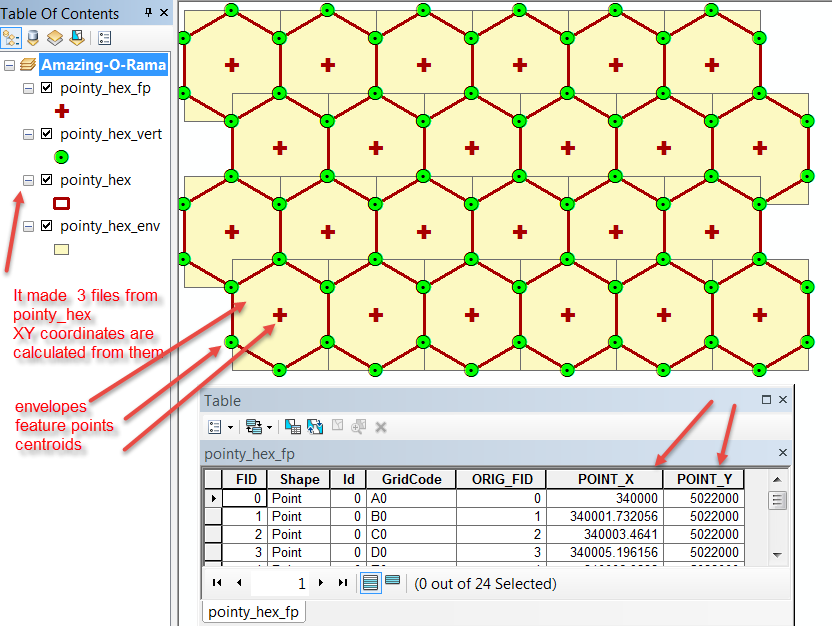
And now the script....
"""
Script: run_tools_demo.py
Author: [email protected]
Source: Stefan Offermann
Thread: https://community.esri.com/docs/DOC-2436
Purpose: Results window on steroids
- take a polygon shapefile, determine its envelop,
- convert the feature to centroids,
- convert to feature points
- calculate X,Y for all of the above
- then make a back of everything
Requires:
- a source file
- an output folder
- a list of tools to run
"""
import os
import arcpy
arcpy.env.overwriteOutput = True
in_FC = "c:/!BlogPosts/Runtools_Demo/Shapefiles/pointy_hex.shp"
path,in_File = os.path.split(in_FC)
path += "/"
backup = "c:/temp/shapefiles/" # some output folder
# file endings
end = ["_env","_fp","_vert"] # envelop, feature to point, feature vertices
# two argument tools
two_arg = ["FeatureEnvelopeToPolygon_management",
"FeatureToPoint_management",
"FeatureVerticesToPoints_management"
]
# one argument tools
one_arg =["AddXY_management", "CopyFeatures_management"]
#
outputs = [in_FC.replace(".shp", end+".shp") for i in range(len(end))]
backups = [outputs.replace(path, backup) for i in range(len(end))]
#
polygons = []
points = []
for i in range(len(two_arg)): # run the two argument tools
args = [in_FC, outputs] # select the output file
result = getattr(arcpy, two_arg)(*args) # run the tool...and pray
frmt = '\Processing tool: {}\n Input: {}\n Output: {}'
print(frmt.format(tools, args[0], args[1]))
#
for i in range(len(outputs)):
args = [outputs]
print(outputs, arcpy.Describe(outputs).shapeType)
if arcpy.Describe(outputs).shapeType == 'Point':
result = getattr(arcpy, one_arg[0])(*args) # calculate XY
result_bak = getattr(arcpy, one_arg[1])(result, backups) # backup
print('Calculate XY for: {}'.format(result))
print('Create Backups: {}\n Output: {}'.format(result,result_bak))
Enjoy and experiment with your workflows.
You must be a registered user to add a comment. If you've already registered, sign in. Otherwise, register and sign in.