- Home
- :
- All Communities
- :
- Developers
- :
- Python
- :
- Python Blog
- :
- Numpy Snippets # 3 ... Phish_Nyet ... creating sam...
Numpy Snippets # 3 ... Phish_Nyet ... creating sampling grids using numpy and arcpy


- Subscribe to RSS Feed
- Mark as New
- Mark as Read
- Bookmark
- Subscribe
- Printer Friendly Page
Numpy Snippets
Updated: 2016-09-09
The purpose of this post is to show how numpy can play nicely with arcpy to produce geometry and perform tasks like shape translation, rotation and scaling which are not readily available in arcpy's available functions.
To pay homage to ArcMap's ... Fish Net ... I propose a very scaled down version aptly named Phish_Nyet. A fuller version will appear when ArcScript 2.0 opens. This is a demo script. All you do is vary the parameters in the demo() function within the script.
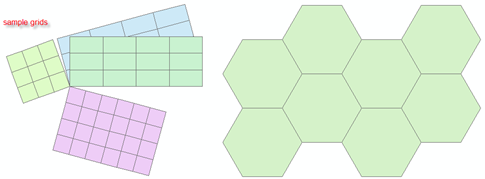
Only the rectangular option will be presented here, however, it is possible to make all kinds of sampling grids, including hexagonal ones as shown above.
The following points apply:
- Output is to a shapefile.
- The output file must have a projected coordinate system. To create grids in Geographic coordinates, use Fishnet in ArcMap. Why? because invariably people create grids in Geographic coordinates, then project them without densifying the grid blocks. This results in shapes which are in error because the curvature associated with lines of latitude are not accounted for.
- A corner point is specified as the origin of the net. One can determine which corner to use by specifying a dX and dY with positive and/or negative values. In this fashion, you can get your corner to be the top or bottom, left or right of the output. If you want the middle to be the origin...do the math and get a corner.
- The output is controlled by the cell widths (dX and dY), the number of columns and rows an (i.e. the X and Y directions) and a rotation angle, which is positive for clockwise rotation.
Notes:
- grid_array - does the numpy magic of generating the grid shapes. I have tried to be as verbose as possible. In short, I generate a
seed shape and propagate it. I have intentionally kept rotate and output_polygons as visible function so you can see how they work.
A fuller version will surface as I stated when ArcScripts 2.0 appears. Change the parameters in the demo() function and run it.
"""
Phish_Nyet.py
Author: [email protected]
Purpose: Produce a sampling grid with user defined parameters.
"""
import arcpy
import numpy as np
def demo():
"""Generate the grid using the following parameter"""
output_shp = r'C:\temp\Phish_Nyet.shp'
SR = arcpy.SpatialReference(2951) # u'NAD_1983_CSRS_MTM_9' YOU NEED ONE!!!
corner = [340000.0, 5022000.0] # corner of grid
dX = 1000.0; dY = 1000.0 # X and Y cell widths
cols = 3; rows = 3 # columns/rows...grids in X and Y direction
angle = 0 # rotation angle, clockwise +ve
# create the grid
pnts = grid_array(corner,dX,dY,cols,rows,angle)
output_polygons(output_shp,SR,pnts)
print('\nPhish_Nyet has created... {}'.format(output_shp))
def grid_array(corner=[0,0],dX=1,dY=1,cols=1,rows=1,angle=0):
"""create the array of pnts to pass on to arcpy using numpy magic"""
X = [0.0,0.0,1.0,1.0,0.0] # X,Y values for a unit square
Y = [0.0,1.0,1.0,0.0,0.0] #
seed = np.column_stack((X,Y)) * [dX,dY] # first array corner values scaled
u = [seed + [j*dX,i*dY] for i in range(0,rows) for j in range(0,cols)]
pnts = np.array(u) #
x = [rotate(p,angle) for p in pnts] # rotate the scaled points
pnts = [ p + corner for p in x] # translate them
return pnts
def rotate(pnts,angle=0):
"""rotate points about the origin in degrees, (+ve for clockwise) """
angle = np.deg2rad(angle) # convert to radians
s = np.sin(angle); c = np.cos(angle) # rotation terms
aff_matrix = np.array([[c, -s],[s, c]]) # rotation matrix
XY_r = np.dot(pnts, aff_matrix) # numpy magic to rotate pnts
return XY_r
def output_polygons(output_shp,SR,pnts):
"""produce the output polygon shapefile"""
msg = '\nRead the script header... A projected coordinate system required'
assert (SR != None) and (SR.type=='Projected'), msg
polygons = []
for pnt in pnts: # create the polygon geometry
polygons.append(arcpy.Polygon(arcpy.Array([arcpy.Point(*xy) for xy in pnt]),SR))
if arcpy.Exists(output_shp): # overwrite any existing versions
arcpy.Delete_management(output_shp)
arcpy.CopyFeatures_management(polygons, output_shp)
if __name__ == '__main__':
"""Generate the grid using the listed parameters"""
demo() # modify the parameters in demo to run
Of course other regular geometric shapes can be generated in a similar fashion, but not all may pack like rectangles and others do.
You must be a registered user to add a comment. If you've already registered, sign in. Otherwise, register and sign in.