Select to view content in your preferred language

Capturing Map Coordinates Simultaneously In Both Microsoft Access and ArcMap

1639
2
01-09-2020 09:40 PM
RichardFairhurst
MVP Alum
1 2 1,639

It is possible to create an ArcMap Python Addin tool that simultaneously captures clicked map coordinates stamped with a user name and date time in an ArcMap layer displayed on a map and collect them into a table in a Microsoft Access database housed on a shared network drive.  The tool outlined in this blog only keeps track of the last coordinate clicked by each user in the Access coordinate table with the expectation that these records would be used like a clipboard by custom Access forms that control the creation or editing of records within Access.  However, the tool code presented here could be modified to directly update any Access table from within ArcMap if prompts are added to the tool that let the user choose the Access records they want to create or edit as a result of each mouse click.

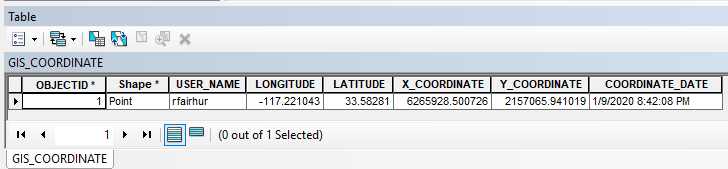
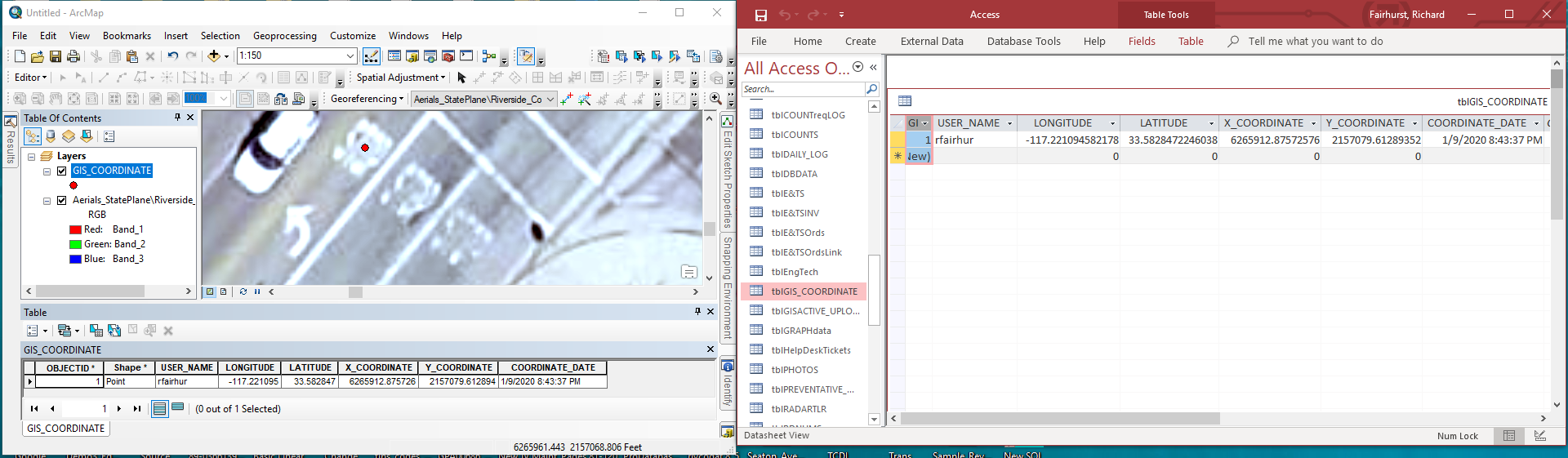
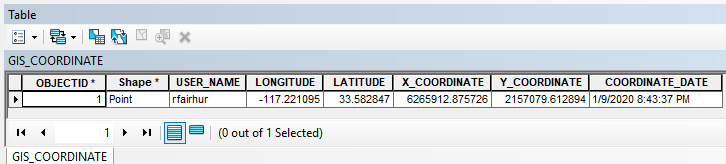
The pictures below shows the result of using the tool to capture the location of two different STOP markings on a road.  The table records in ArcMap and Access match completely after simply activating the tool and clicking on each marking.
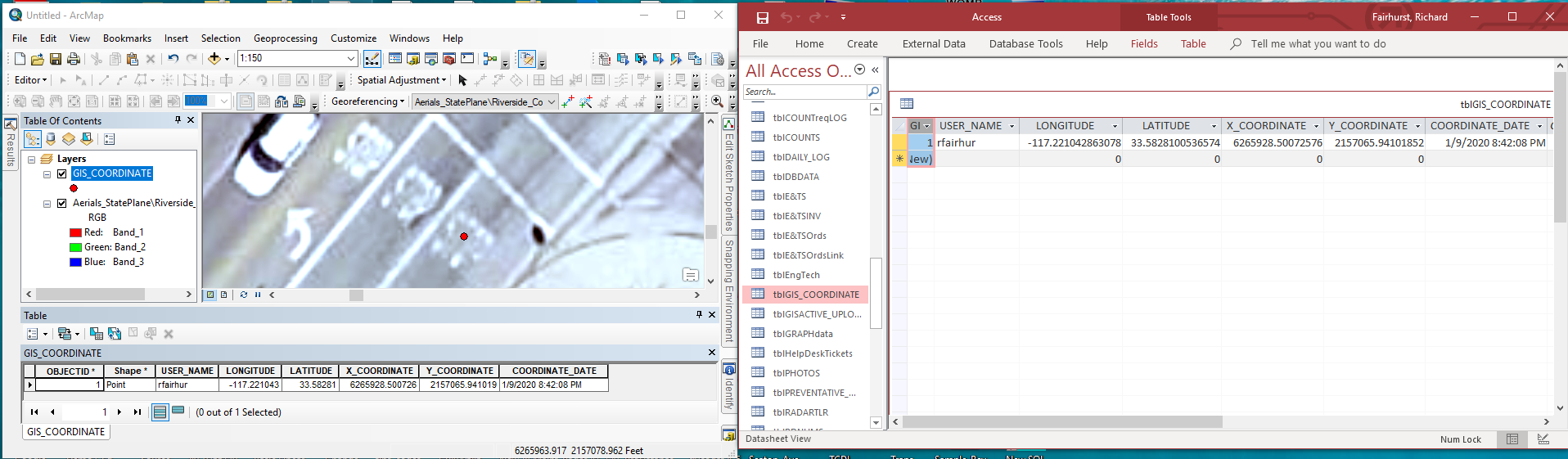
The tool only activates when the left mouse button is clicked within a map and the Alt, Ctrl and Shift keys are not being pressed.  I created the Access tblGIS_COORDINATE table manually, but the ArcMap GIS_COORDINATE feature class will automatically be created by the tool if it doesn't exist in the default database and be added to the map as a layer and made visible if it is not currently a layer in the map or visible when the mouse is clicked.  The tool ensures that the cache is cleared if the GIS_COORDINATE table view is open so that it will refresh to match the point location on the map and you may have to make Access the currently active program to see its table refresh if it is open.

Technical Notes:

To build this tool you should download the addin_assistant tool from https://www.arcgis.com/home/item.html?id=5f3aefe77f6b4f61ad3e4c62f30bff3b.  If you are running Python 3 or higher you will have to fix one line of code in the makeaddin.py file created by the addin assistant by changing it from:

print archive_file

to

print(archive_file)

to build the tool use the wizard to first create a toolbar and then create a tool under it.

For the tool icon I used the EditingRemoteEditSynchronize32.png file in the C:\Program Files (x86)\ArcGIS\Desktop10.6\bin\Icons directory, but you are welcome to design your own.

.

To install pyodbc you can do the following:

  1. pyodbc list here is a list of whl files. Download the right one for you.
  2. Open cmd as administrator and go to the directory containing the file.
  3. Run pip install pyodbc-xxxxx.whl.

If you get an error about the odbcji32.dll required to use the {Microsoft Access Driver (*.mdb, *.accdb)} you can follow the instructions at Unable to load odbcji32.dll (MS Access ODBC driver) 

The tool captures coordinates in both the State Plane Spatial Reference preferred by my jurisdiction and in the GCS WGS 1984 Spatial Reference used by Google maps.  You should change the State Plane Spatial Reference to your own preferred Spatial Reference.  You can find the WKID of your preferred Spatial Reference by adding a layer that uses that Spatial Reference to your map and opening the Data Frame Properties dialog, choosing the Coordinate System tab and choosing the Spatial Reference under the Layers group at the bottom of the list.

I am not an ArcGIS Pro user, so I have not explored whether or not a similar addin can be built for use in ArcGIS Pro, but the development of a tool for Pro shouldn't affect the pyodbc code that makes communication with Microsoft Access possible.

I hope many of you will find this useful and intriguing.  I am also open to suggestions for other ways that pyodbc and python code might be used to create tools that may integrate Access and ArcMap more fully.

import arcpy
import pythonaddins
import getpass
from datetime import datetime
import pyodbc

class CaptureCoordinateTool(object):
    """Implementation for Capture_Coordinate2_addin.tool (Tool)"""
    def __init__(self):
        self.enabled = True
        self.shape = "NONE" # Can set to "Line", "Circle" or "Rectangle" for interactive shape drawing and to activate the onLine/Polygon/Circle event sinks.
    def onMouseDownMap(self, x, y, button, shift):

        # Determine if the button and shift states are correct for activating the tool
        if button != 1 or shift != 0: # The left mouse button was not pressed or the Alt, Ctrl and/or Shift keys were pressed
            pass # Do default ArcMap behavior and exit

        else: # The left mouse button was pressed and the Alt, Ctrl and Shift keys were not pressed

            # Get information about the settings of the map clicked
            mxd = arcpy.mapping.MapDocument("CURRENT") # get the current map where the mouse was pressed
            df = arcpy.mapping.ListDataFrames(mxd)[0] # Assume the first data frame in the map was clicked
            sr = df.spatialReference # get the spatial reference of the data frame

            if sr.factoryCode != 2230 and sr.factoryCode != 4326: # Spatial Reference is invalid if it is not 2230 (NAD_1983_StatePlane_California_VI_FIPS_0406_Feet) or 4326 (GCS_WGS_1984)
                message = "Invalid Spatial Reference " + str(sr.factoryCode) + " - " + sr.name + " detected.\nPlease set the Spatial Reference to\n2230 (NAD_1983_StatePlane_California_VI_FIPS_0406_Feet)\nor 4326 (GSC_WGS_1984)"
                pythonaddins.MessageBox(message, "Map Spatial Reference Is Invalid") # Display a message alerting user that the map has an invalid spatial reference and exit

            else: # Spatial Reference is either 2230 (NAD_1983_StatePlane_California_VI_FIPS_0406_Feet) or 4326 (GCS_WGS_1984) and therefore valid
                try:
                    # Get the GIS_COORDINATE layer and if necessary Create the feature class or add the layer to the map
                    user_name = getpass.getuser() # get the login name of the user
                    out_path = "C:\Users\{}\Documents\ArcGIS\Default.gdb".format(user_name) # ArcMap Default geodartbase
                    out_name = "GIS_COORDINATE" # FC name
                    coordinate_fc = out_path + "\\" + out_name # Full path and name of FC
                    geometry_type = "POINT" # Features will be points
                    template = ""
                    has_m = "DISABLED"
                    has_z = "DISABLED"
                    spatial_ref = arcpy.SpatialReference(2230) # Set Spatial Reference to 2230 (NAD_1983_StatePlane_California_VI_FIPS_0406_Feet) preferred by Riverside County
                    if not arcpy.Exists(coordinate_fc):
                        # Create an FC for displaying the clicked point in the preferred spatial reference and add fields to match the Access table schema
                        arcpy.CreateFeatureclass_management(out_path, out_name, geometry_type, template, has_m, has_z, spatial_ref)
                        arcpy.AddField_management(coordinate_fc, "USER_NAME", "TEXT", field_length=50)
                        arcpy.AddField_management(coordinate_fc, "LONGITUDE", "DOUBLE")
                        arcpy.AddField_management(coordinate_fc, "LATITUDE", "DOUBLE")
                        arcpy.AddField_management(coordinate_fc, "X_COORDINATE", "DOUBLE")
                        arcpy.AddField_management(coordinate_fc, "Y_COORDINATE", "DOUBLE")
                        arcpy.AddField_management(coordinate_fc, "COORDINATE_DATE", "DATE")
                    coordinate_lyr = None # Create an unassigned variable for a layer that will display the coordinate
                    for lyr in arcpy.mapping.ListLayers(mxd, "", df): # Check all existing layers in the dataframe clicked
                        if lyr.dataSource.lower() == coordinate_fc.lower(): # Check if any layer has the coordinate fc as its datasource
                            coordinate_lyr = lyr # set the coordinate layer variable to the map layer that has the coordinate feature class
                            coordinate_lyr.visible = True # make sure the layer is visible
                    if coordinate_lyr == None: # Check if no layer was found in the map
                        arcpy.MakeFeatureLayer_management(coordinate_fc, out_name) # Make a layer from the map, which should automatically be added to the map
                        for lyr in arcpy.mapping.ListLayers(mxd, "", df): # Recheck all existing layers in the dataframe clicked
                            if lyr.dataSource.lower() == coordinate_fc.lower(): # Find the created layer that has the coordinate fc as its datasource
                                coordinate_lyr = lyr # set the coordinate layer variable to the map layer that has the coordinate feature class
                                coordinate_lyr.visible = True # make sure the layer is visible
                        
                    # Capture date for the point geometries and coordinates of both spatial references, the user name and the date time when the data was captured
                    x_stateplane, y_stateplane, longitude, latitude, state_plane_PtGeom, wgs_1984_PtGeom = 0, 0, 0, 0, None, None # Initialize variables for state plain and wgs 1984 coordinates and points
                    point = arcpy.Point() # Create a point object
                    point.X, point.Y = x, y # Set the x, y of the point object to the coordinates clicked
                    pointGeom = arcpy.PointGeometry(point, sr) # create a PointGeometry based on the point coordinates and spatial reference of the map click

                    if sr.factoryCode == 2230: # Spatial Reference is 2230 (NAD_1983_StatePlane_California_VI_FIPS_0406_Feet)
                        state_plane_PtGeom = pointGeom # set state_plane_PtGeom to pointGeom clicked
                        x_stateplane, y_stateplane = x, y # x_stateplane and y_stateplane to x and y clicked
                        srOut = arcpy.SpatialReference(4326) # Create a 4326 (GCS_WGS_1984) Spatial Reference
                        wgs_1984_PtGeom = pointGeom.projectAs(srOut) # Project the point clicked to 4326 (GCS_WGS_1984) spatial reference
                        longitude, latitude = wgs_1984_PtGeom.centroid.X, wgs_1984_PtGeom.centroid.Y # set longitude and latitude to projected X and Y

                    elif sr.factoryCode == 4326: # Spatial Reference is 4326 (GCS_WGS_1984) 
                        wgs_1984_PtGeom = pointGeom # set wgs_1984_PtGeom to pointGeom clicked
                        longitude, latitude = x, y # set longitude to latitude to x and y clicked
                        srOut = arcpy.SpatialReference(2230) # Create a 2230 (NAD_1983_StatePlane_California_VI_FIPS_0406_Feet) Spatial Reference
                        state_plane_PtGeom = pointGeom.projectAs(srOut) # Project the point clicked to 2230 (NAD_1983_StatePlane_California_VI_FIPS_0406_Feet) spatial reference
                        x_stateplane, y_stateplane = state_plane_PtGeom.centroid.X, state_plane_PtGeom.centroid.Y # set x_stateplane and y_stateplane to projected X and Y

                    dtnow = datetime.now() # Capture the current datetime

                    # Cutput the captured data
                    conn_str = (
                        r'DRIVER={Microsoft Access Driver (*.mdb, *.accdb)};'
                        r'DBQ=\\agency\agencydfs\Annex\Files\TRAFFIC\TRAFFICDB\TRAFFICDB\TRAFFICDB.accdb;'
                        ) # set up a connection string for connecting to an Access accdb database
                    cnxn = pyodbc.connect(conn_str) # connect to the Access accdb database
                    crsr = cnxn.cursor() # create a cursor from the connection
                    crsr.execute("SELECT USER_NAME FROM tblGIS_COORDINATE WHERE USER_NAME = ?", user_name) # Execute a query to find any records that match the user_name that clicked the point
                    row = crsr.fetchone() # fetch the first record (there should only be none or one record)
                    if row: # If a row was found update the record with the coordinates and date time of the user click
                        crsr.execute("UPDATE tblGIS_COORDINATE SET LONGITUDE = ?, LATITUDE = ?, X_COORDINATE = ?, Y_COORDINATE = ?, COORDINATE_DATE = ? WHERE USER_NAME = ?", longitude, latitude, x_stateplane, y_stateplane, dtnow, user_name)
                        cnxn.commit()
                    else: # If no row was found insert a record for the current user_name with the coordinates and date time of the user click
                        crsr.execute("INSERT INTO tblGIS_COORDINATE(USER_NAME, LONGITUDE, LATITUDE, X_COORDINATE, Y_COORDINATE, COORDINATE_DATE) values (?, ?, ?, ?, ?, ?)", user_name, longitude, latitude, x_stateplane, y_stateplane, dtnow)
                        cnxn.commit()
                    crsr.close() # close the accdb cursor
                    cnxn.close() # close the accdb connection
                    
                    arcpy.SelectLayerByAttribute_management(coordinate_lyr.name, "CLEAR_SELECTION") # Make sure no records are selected in the layer displaying the clicked coordinate
                    fields = ['SHAPE@', 'USER_NAME', 'LONGITUDE', 'LATITUDE', 'X_COORDINATE', 'Y_COORDINATE', 'COORDINATE_DATE'] # create a list of fields for the layer to be updated or inserted
                    count = 0 # Create a counter to determine if a record exists already or needs to be inserted
                    with arcpy.da.UpdateCursor(coordinate_lyr.name, fields) as cursor: # process an update cursor on the layer
                        for row in cursor: # iterate through all records
                            if row[1] == user_name: # only update a record if it matches the user_name of the the user that clicked the map
                                row[0] = state_plane_PtGeom # create the point shape using the point geomtery with preferred spatial reference
                                row[2] = longitude # update the longitude
                                row[3] = latitude # update the latitude
                                row[4] = x_stateplane # update the x coordinate in the preferred spatial reference
                                row[5] = y_stateplane # update the y coordinate in the preferred spatial reference
                                row[6] = dtnow # update the coordinatte date to the datetime of the map click
                                cursor.updateRow(row) # post the update to the row
                                count += 1 # increment the counter to so that another record will not be inserted
                    if count == 0: # determine if no feature with the user name exists
                        cursor = arcpy.da.InsertCursor(coordinate_lyr.name, fields) # if none exists create an insert cursor
                        cursor.insertRow((state_plane_PtGeom, user_name, longitude, latitude, x_stateplane, y_stateplane, dtnow)) # insert a new feature for the user with the coordinate and date time of the click
                        del cursor # delete the insert cursor
                    arcpy.RefreshActiveView() # refresh the active dataframe to show the point located at the position the user just clicked
                    
                except Exception as e: # catch any errors generated by the tool
                    pythonaddins.MessageBox("An Error Occurred Attempting to Capture a Coordinate\n" + str(e), "Error Capturing Coordinate") # Display a message showing that an error occurred executing the tool
‍‍‍‍‍‍‍‍‍‍‍‍‍‍‍‍‍‍‍‍‍‍‍‍‍‍‍‍‍‍‍‍‍‍‍‍‍‍‍‍‍‍‍‍‍‍‍‍‍‍‍‍‍‍‍‍‍‍‍‍‍‍‍‍‍‍‍‍‍‍‍‍‍‍‍‍‍‍‍‍‍‍‍‍‍‍‍‍‍‍‍‍‍‍‍‍‍‍‍‍‍‍‍‍‍‍‍‍‍‍‍‍‍‍‍‍‍‍‍‍‍‍‍‍‍‍‍‍‍‍‍‍‍‍‍‍‍‍‍‍‍‍‍‍‍‍‍‍‍‍‍‍‍‍‍‍‍‍‍‍‍‍‍‍‍‍‍‍‍‍‍‍‍‍‍‍‍‍‍‍‍‍‍‍‍‍‍‍‍‍‍‍‍‍‍‍‍‍‍‍‍‍‍‍‍‍‍‍‍‍‍‍‍‍‍‍‍‍‍‍‍‍‍‍‍‍‍‍‍‍‍‍‍‍‍‍‍‍‍‍‍‍‍‍‍‍‍‍‍‍‍‍‍‍‍‍‍‍‍‍‍‍‍‍‍‍‍‍‍‍‍‍‍‍‍‍‍‍‍‍‍‍‍‍‍‍‍‍‍‍‍‍‍‍‍‍‍‍‍‍‍‍‍‍‍‍‍‍‍‍‍‍‍‍‍‍‍‍‍‍‍‍‍‍‍‍‍‍‍‍‍‍‍‍‍‍‍‍‍‍‍‍‍‍‍‍‍‍‍‍‍‍‍‍‍‍‍‍‍‍‍‍‍‍‍‍‍‍‍‍‍‍‍‍‍‍‍‍‍‍‍‍‍‍‍‍‍‍‍‍‍‍‍‍‍‍‍‍‍‍‍‍‍‍‍‍‍‍‍‍‍‍‍‍‍‍‍‍‍‍‍‍‍‍‍‍‍‍‍‍‍‍‍‍‍‍‍‍‍‍‍‍‍‍‍‍‍‍‍‍‍‍‍‍‍‍‍‍‍‍‍‍‍‍‍‍‍‍‍‍‍‍‍‍‍‍‍‍‍‍‍‍‍‍‍‍‍‍‍‍‍‍‍‍‍
2 Comments
RichardFairhurst
MVP Alum

One possible way to get user input that can control which Access table and records will be selected for editing when the coordinate tool is activated and the maps is clicked would be through addin combo boxes added to one or more toolbars created for the addin that contains the tool.  Communications between all of the toolbars, tools, combo boxes and other controls of the addin should all be able to handled within the addin's python file.  A combo box contains an editable field and a drop-down list. The user can select a value from the drop-down list, which appears at the user's request. If you make the combo box editable, the combo box will include an editable field into which the user can type a value.  One combo box could list the tables in the Access database the user could choose from to edit and other combo boxes could capture the field(s) and value(s) that would complete a where clause for selecting the records that would be edited by the tool.  The drop down list of each combo box can be updated based on choices made in other combo boxes or menus.  Therefore, additional combo boxes could be used to display other table attribute field values when the record selection changes and allow the user to input attribute value changes that would be written to the Access table when the map is clicked by the coordinate tool.  An addin menu could also be created to control whether a record would be edited or inserted and potentially even deleted in the Access table.

One possible benefit of this approach is that the combo boxes constantly remain open and the user can control the location of the toolbar(s) to be anywhere on the screen that would help them move back and forth between the locations they click on the map and the combo boxes that will control the Access records they are editing.  The primary downside of this approach is that the ways the combo boxes can be arranged in the toolbar are very limited and labeling the combo boxes can make the toolbar very wide.  However, dividing the addin controls among more than one toolbar may make the arrangement of the combo boxes more flexible and tool tips could potentially be used to reduce the need for labels.  Another possible downside of python addins is that performance will degrade if too many controls are created in the addin that require a lot of code for interacting with each other and if the addin controls trigger a lot of interactions with the Access database, so the addin needs to be streamlined as much as possible to avoid excessive code complexity and data retrievals.

The properties available for configuring the combo box are listed in Combo Box class—Help | ArcGIS Desktop.

I hope to have time soon to try and implement this addin design and create a coordinate capture tool that can be used to directly edit or create any of the records in several different tables in a Microsoft Access database.

RichardFairhurst
MVP Alum

I have designed a set of toolbars for my Addin that let me enter a record ID value that executes an attribute query on one of two different Access tables and then displays the results of the query in combo boxes on multiple toolbars.  This lets the user confirm that they have chosen the correct record for editing prior to making any updates.  All of these combo boxes are editable since there is an apparent bug that prevents the combo box from displaying its selected value when it is not editable.  As a result, I have added code in the onFocus method of some of the combo boxes that fires prior to the combo box losing focus that ensures that the user is ultimately not allowed to make changes to the value returned or is only allowed to type in values that are in the combo box drop down list when that is a data validation requirement of the field.

Here is what my toolbars look like when ArcMap starts.  The toolbars I have designed display data from Access tables that collect information for my department's Traffic Control Device Inventory (TCDI) which represent the location and configuration of signs and pavement markings on our roadways.  The user is expected to enter numeric ID values into the TCDI ID combo box to retrieve records from Access.

I have made it possible for the user to chose to retrieve records from one of two different Access Tables that have identical schemas that work with the other combo boxes that display the retrieved record's field values.  I did not find a way to change the toolbar headings or combo box captions, tooltips and help instructions at runtime, so if I let the user chose between tables with different schemas I believe would have to add code to the addin that would turn on and off different toolbars or swap out the combo boxes from the toolbars depending on the table the user chose.  If anyone finds a way to change the toolbar and combo box captions, etc. at runtime, please let me know.

Here is what the toolbars look like when the user enters a valid TCDI ID value (477) of a record that exists in the tblTCDIActive Access table into the TCDI ID combo box.

Here is what the toolbars look like when the user enters an invalid TCDI ID value (913) of a record that does not exist in the tblTCDIActive Access table into the TCDI ID combo box.  I have included a Query Result (QRslt) combo box to always let the user know whether the record was or was not found regardless of what the Access table query returns.

The user can switch to the tblTCDIInactive table to see if the TCDI ID which was invalid in the tblTCDIActive was valid in the tblTCDIInactive table.  In this example TCDI ID 913 was found in the tblTCDIInactive Access table.

I have purposefully chosen to make this example display records based on a single field that contains unique values for each record for simplicity's sake.  However, it is possible to build more sophisticated queries for retrieving records based on multiple fields where the drop down options of the other combo boxes could be changed by the choices the user made in more and more fields until the user has entered enough information based on those drop downs to display a single record or they have entered enough information to define a set of records represented by the drop down values in the field that the user didn't make a selection that you would be willing to consider complete for updating.  So the possibilities for guiding your users to the records they are looking for is really up to you and the level of complexity you are willing to deal with in writing your code.

At this point, since everyone has different workflow requirements, I have not included any code in the addin code below that executes an update query. However, there are many different options for designing additional addin code in tools, buttons or the combo boxes' onFocus methods to execute one or more update queries from within ArcMap on the chosen Access table record to change different sets of attributes.  The code could also optionally trigger message boxes that make the user confirm their edits prior to executing any update query.  I will be adding code that performs update queries in the actual toolbars I will be deploying to my users, so if you need help adding this functionality I should be able to offer suggestions and guidance on how to do that.

The cbxUser_Comment class at the bottom of the code controls the TCDI ID combo box, which handles the Access table query that updates most of the other combo boxes (sorry for basing this example on a schema with a peculiar history for the main ID field name).  I do expect to refine this code to improve the field validation routines after I test it with my actual users, but the code seems to work well enough to begin that testing.  I may post back corrections to this code once I have seen how my users try to break my validation rules or if I discover any oddities I did not expect in the way the combo box controls behave.

import arcpy
import pythonaddins
import getpass
from datetime import datetime
import pyodbc

class CaptureCoordinateTool(object):
  ### See code posted previously in this blog

class cbxAccessTable(object):
    """Implementation for Capture_Coordinate_addin.cbxAccessTable (ComboBox)"""
    # instantiate class variables for a case insensitive dictionary of items and last valid value that matched the item list
    def __init__(self):
        self.items = [u"tblTCDIActive", u"tblTCDIInactive"]
        self.upperDict = {i.upper():i for i in self.items}
        self.editable = True
        self.enabled = True
        self.dropdownWidth = 'tblTCDIInactiveWW'
        self.width = 'tblTCDIInactiveWW'
        self.value = self.items[0]
        self.oldValue = self.value
    def onSelChange(self, selection):
        pass
    def onEditChange(self, text):
        if text.upper() in self.upperDict:
            self.oldValue = self.upperDict[text.upper()]
        print("onEditChange fired. Text = " + text + ". self.value = " + self.value + ". oldValue = " + self.oldValue)
        pass
    def onFocus(self, focused):
        if focused == False:
            if not self.value.upper() in self.upperDict:
                # The value entered by the user was not a case insensitive match
                # Prior to fully losing focus the combo box value is changed to the
                # last valid case sensitive value the user chose or entered
                self.value = self.oldValue
            else:
                # The value entered by the user was a case insensitive match
                # Prior to fully losing focus the combo box value is set to make sure 
                # the value exactly matches the case sensitive item in the items list
                self.value = self.upperDict[self.value.upper()]
        print("onFocus fired. focused = " + str(focused) + ". self.value = " + self.value + ". oldValue = " + self.oldValue)
        self.refresh()
        pass
    def onEnter(self):
        pass
    def refresh(self):
        pass
            
class cbxCategory(object):
    """Implementation for Capture_Coordinate_addin.cbxCategory (ComboBox)"""
    def __init__(self):
        self.items = [u"", u"MARKING", u"SIGN"]
        self.editable = True
        self.enabled = True
        self.dropdownWidth = 'WWWWWW'
        self.width = 'WWWWWW'
        self.value = ""
    def onSelChange(self, selection):
        self.refresh()
    def onEditChange(self, text):
        pass
    def onFocus(self, focused):
        self.refresh()
    def onEnter(self):
        pass
    def refresh(self):
        pass

class cbxCode(object):
    """Implementation for Capture_Coordinate_addin.cbxCode (ComboBox)"""
    def __init__(self):
        self.items = [u"", u"STOP", u"BIKE"]
        self.editable = True
        self.enabled = True
        self.dropdownWidth = 'WWWWWWWWWWWW'
        self.width = 'WWWWWWWWWWWW'
        self.value = u""
    def onSelChange(self, selection):
        pass
    def onEditChange(self, text):
        pass
    def onFocus(self, focused):
        self.refresh()
        pass
    def onEnter(self):
        pass
    def refresh(self):
        pass

class cbxColor(object):
    """Implementation for Capture_Coordinate_addin.cbxColor (ComboBox)"""
    def __init__(self):
        self.items = [u"", u"W", u"Y", u"R"]
        self.editable = True
        self.enabled = True
        self.dropdownWidth = 'WW'
        self.width = 'WW'
        self.value = u""
    def onSelChange(self, selection):
        pass
    def onEditChange(self, text):
        pass
    def onFocus(self, focused):
        self.refresh()
        pass
    def onEnter(self):
        pass
    def refresh(self):
        pass

class cbxDirection(object):
    """Implementation for Capture_Coordinate_addin.cbxDirection (ComboBox)"""
    def __init__(self):
        self.items = [u"", u"-", u"E", u"N", u"S", u"W"]
        self.upperDict = {i.upper():i for i in self.items}
        self.editable = True
        self.enabled = True
        self.dropdownWidth = 'WW'
        self.width = 'WW'
        self.value = self.items[0]
        self.oldValue = self.value
    def onSelChange(self, selection):
        pass
    def onEditChange(self, text):
        if text.upper() in self.upperDict:
            self.oldValue = self.upperDict[text.upper()]
        print("onEditChange fired. Text = " + text + ". self.value = " + self.value + ". oldValue = " + self.oldValue)
        pass
    def onFocus(self, focused):
        if focused == False:
            if not self.value.upper() in self.upperDict:
                self.value = self.oldValue
            else:
                self.value = self.upperDict[self.value.upper()]
        print("onFocus fired. focused = " + str(focused) + ". self.value = " + self.value + ". oldValue = " + self.oldValue)
        self.refresh()
        pass
    def onEnter(self):
        pass
    def refresh(self):
        pass

class cbxDistance(object):
    """Implementation for Capture_Coordinate_addin.cbxDistance (ComboBox)"""
    def __init__(self):
        self.items = [u"", u"0", u"100"]
        self.editable = True
        self.enabled = True
        self.dropdownWidth = 'WWWWW'
        self.width = 'WWWWW'
        self.value = u""
    def onSelChange(self, selection):
        pass
    def onEditChange(self, text):
        pass
    def onFocus(self, focused):
        self.refresh()
        pass
    def onEnter(self):
        pass
    def refresh(self):
        pass

class cbxFacing(object):
    """Implementation for Capture_Coordinate_addin.cbxFacing (ComboBox)"""
    def __init__(self):
        self.items = [u"", u"-", u"E", u"N", u"S", u"W"]
        self.upperDict = {i.upper():i for i in self.items}
        self.editable = True
        self.enabled = True
        self.dropdownWidth = 'WW'
        self.width = 'WW'
        self.value = self.items[0]
        self.oldValue = self.value
    def onSelChange(self, selection):
        pass
    def onEditChange(self, text):
        if text.upper() in self.upperDict:
            self.oldValue = self.upperDict[text.upper()]
        print("onEditChange fired. Text = " + text + ". self.value = " + self.value + ". oldValue = " + self.oldValue)
        pass
    def onFocus(self, focused):
        if focused == False:
            if not self.value.upper() in self.upperDict:
                self.value = self.oldValue
            else:
                self.value = self.upperDict[self.value.upper()]
        print("onFocus fired. focused = " + str(focused) + ". self.value = " + self.value + ". oldValue = " + self.oldValue)
        self.refresh()
        pass
    def onEnter(self):
        pass
    def refresh(self):
        pass

class cbxFlag(object):
    """Implementation for Capture_Coordinate_addin.cbxFlag (ComboBox)"""
    def __init__(self):
        self.items = [u"", u"ACTIVE", u"INACTIVE"]
        self.editable = True
        self.enabled = True
        self.dropdownWidth = 'WWWWWW'
        self.width = 'WWWWWW'
        self.value = ""
    def onSelChange(self, selection):
        self.refresh()
    def onEditChange(self, text):
        pass
    def onFocus(self, focused):
        self.refresh()
    def onEnter(self):
        pass
    def refresh(self):
        pass

class cbxG_Latitude(object):
    """Implementation for Capture_Coordinate_addin.cbxG_Latitude (ComboBox)"""
    def __init__(self):
        self.items = [u"", u"32"]
        self.editable = True
        self.enabled = True
        self.dropdownWidth = 'WWWWWWWWWWWWWWWWWWWWWWWWW'
        self.width = 'WWWWWWWWWW'
        self.value = u""
    def onSelChange(self, selection):
        pass
    def onEditChange(self, text):
        pass
    def onFocus(self, focused):
        self.refresh()
        pass
    def onEnter(self):
        pass
    def refresh(self):
        pass

class cbxG_Longitude(object):
    """Implementation for Capture_Coordinate_addin.cbxG_Longitude (ComboBox)"""
    def __init__(self):
        self.items = [u"", u"-116"]
        self.editable = True
        self.enabled = True
        self.dropdownWidth = 'WWWWWWWWWWWWWWWWWWWWWWWWW'
        self.width = 'WWWWWWWWWW'
        self.value = u""
    def onSelChange(self, selection):
        pass
    def onEditChange(self, text):
        pass
    def onFocus(self, focused):
        self.refresh()
        pass
    def onEnter(self):
        pass
    def refresh(self):
        pass

class cbxInt_Dir(object):
    """Implementation for Capture_Coordinate_addin.cbxInt_Dir (ComboBox)"""
    def __init__(self):
        self.items = [u"", u"-", u"E", u"N", u"S", u"W", u"1", u"2", u"3", u"4", u"5", u"6"]
        self.upperDict = {i.upper():i for i in self.items}
        self.editable = True
        self.enabled = True
        self.dropdownWidth = 'WW'
        self.width = 'WW'
        self.value = self.items[0]
        self.oldValue = self.value
    def onSelChange(self, selection):
        pass
    def onEditChange(self, text):
        if text.upper() in self.upperDict:
            self.oldValue = self.upperDict[text.upper()]
        print("onEditChange fired. Text = " + text + ". self.value = " + self.value + ". oldValue = " + self.oldValue)
        pass
    def onFocus(self, focused):
        if focused == False:
            if not self.value.upper() in self.upperDict:
                self.value = self.oldValue
            else:
                self.value = self.upperDict[self.value.upper()]
        print("onFocus fired. focused = " + str(focused) + ". self.value = " + self.value + ". oldValue = " + self.oldValue)
        self.refresh()
        pass
    def onEnter(self):
        pass
    def refresh(self):
        pass

class cbxLane_Number(object):
    """Implementation for Capture_Coordinate_addin.cbxLane_Number (ComboBox)"""
    def __init__(self):
        self.items = [u"", u"1", u"2", u"3", u"4", u"5", u"6", u"-99", u"99"]
        self.upperDict = {i.upper():i for i in self.items}
        self.editable = True
        self.enabled = True
        self.dropdownWidth = 'WWWW'
        self.width = 'WWWW'
        self.value = self.items[0]
        self.oldValue = self.value
    def onSelChange(self, selection):
        pass
    def onEditChange(self, text):
        if text.upper() in self.upperDict:
            self.oldValue = self.upperDict[text.upper()]
        print("onEditChange fired. Text = " + text + ". self.value = " + self.value + ". oldValue = " + self.oldValue)
        pass
    def onFocus(self, focused):
        if focused == False:
            if not self.value.upper() in self.upperDict:
                self.value = self.oldValue
            else:
                self.value = self.upperDict[self.value.upper()]
        print("onFocus fired. focused = " + str(focused) + ". self.value = " + self.value + ". oldValue = " + self.oldValue)
        self.refresh()
        pass
    def onEnter(self):
        pass
    def refresh(self):
        pass
 
class cbxLastAction_Date(object):
    """Implementation for Capture_Coordinate_addin.cbxLastAction_Date (ComboBox)"""
    def __init__(self):
        self.items = [u"", u"01/11/2020"]
        self.editable = True
        self.enabled = True
        self.dropdownWidth = 'WWWWWW'
        self.width = 'WWWWWW'
        self.value = ""
    def onSelChange(self, selection):
        self.refresh()
    def onEditChange(self, text):
        pass
    def onFocus(self, focused):
        self.refresh()
    def onEnter(self):
        pass
    def refresh(self):
        pass

class cbxLast_User(object):
    """Implementation for Capture_Coordinate_addin.cbxLast_User (ComboBox)"""
    def __init__(self):
        self.items = [u"", u"ACTIVE", u"INACTIVE"]
        self.editable = True
        self.enabled = True
        self.dropdownWidth = 'WWWWWW'
        self.width = 'WWWWWW'
        self.value = ""
    def onSelChange(self, selection):
        self.refresh()
    def onEditChange(self, text):
        pass
    def onFocus(self, focused):
        self.refresh()
    def onEnter(self):
        pass
    def refresh(self):
        pass

class cbxLength(object):
    """Implementation for Capture_Coordinate_addin.cbxLength (ComboBox)"""
    def __init__(self):
        self.items = [u"", u"0", u"24", u"36", u"48"]
        self.editable = True
        self.enabled = True
        self.dropdownWidth = 'WWWWWW'
        self.width = 'WWWWWW'
        self.value = ""
    def onSelChange(self, selection):
        self.refresh()
    def onEditChange(self, text):
        pass
    def onFocus(self, focused):
        self.refresh()
    def onEnter(self):
        pass
    def refresh(self):
        pass

class cbxMaintDist(object):
    """Implementation for Capture_Coordinate_addin.cbxMaint_Dist (ComboBox)"""
    def __init__(self):
        self.items = [u"", u"11", u"12", u"13", u"14", u"15", u"16", u"17", u"18", u"19", u"20"]
        self.upperDict = {i.upper():i for i in self.items}
        self.editable = True
        self.enabled = True
        self.dropdownWidth = 'WWW'
        self.width = 'WWW'
        self.value = self.items[0]
        self.oldValue = self.value
    def onSelChange(self, selection):
        pass
    def onEditChange(self, text):
        if text.upper() in self.upperDict:
            self.oldValue = self.upperDict[text.upper()]
        print("onEditChange fired. Text = " + text + ". self.value = " + self.value + ". oldValue = " + self.oldValue)
        pass
    def onFocus(self, focused):
        if focused == False:
            if not self.value.upper() in self.upperDict:
                self.value = self.oldValue
            else:
                self.value = self.upperDict[self.value.upper()]
        print("onFocus fired. focused = " + str(focused) + ". self.value = " + self.value + ". oldValue = " + self.oldValue)
        self.refresh()
        pass
    def onEnter(self):
        pass
    def refresh(self):
        pass

class cbxMedian(object):
    """Implementation for Capture_Coordinate_addin.cbxMedian (ComboBox)"""
    def __init__(self):
        self.items = [u"", u"N", u"Y"]
        self.editable = True
        self.enabled = True
        self.dropdownWidth = 'WW'
        self.width = 'WW'
        self.value = ""
    def onSelChange(self, selection):
        self.refresh()
    def onEditChange(self, text):
        pass
    def onFocus(self, focused):
        self.refresh()
    def onEnter(self):
        pass
    def refresh(self):
        pass

class cbxPrimary_(object):
    """Implementation for Capture_Coordinate_addin.cbxPrimary_ (ComboBox)"""
    def __init__(self):
        self.items = [u"", u"A ST"]
        self.editable = True
        self.enabled = True
        self.dropdownWidth = 'WWWWWWWWWWWWWWWWWWWWWWWWW'
        self.width = 'WWWWWWWWWWWWWW'
        self.value = u""
    def onSelChange(self, selection):
        pass
    def onEditChange(self, text):
        pass
    def onFocus(self, focused):
        self.refresh()
        pass
    def onEnter(self):
        pass
    def refresh(self):
        pass

class cbxQueryResult(object):
    """Implementation for Capture_Coordinate_addin.cbxQueryResult (ComboBox)"""
    def __init__(self):
        self.items = [u"Device Found", u"Device Not Found"]
        self.editable = True
        self.enabled = True
        self.dropdownWidth = 'WWWWWWWW'
        self.width = 'WWWWWWWW'
        self.value = u""
    def onSelChange(self, selection):
        pass
    def onEditChange(self, text):
        pass
    def onFocus(self, focused):
        self.refresh()
        pass
    def onEnter(self):
        pass
    def refresh(self):
        pass

class cbxRdNumber(object):
    """Implementation for Capture_Coordinate_addin.cbxRdNumber (ComboBox)"""
    def __init__(self):
        self.items = [u"", u"M0000"]
        self.editable = True
        self.enabled = True
        self.dropdownWidth = 'WWWWWWWW'
        self.width = 'WWWWWWWW'
        self.value = u""
    def onSelChange(self, selection):
        pass
    def onEditChange(self, text):
        pass
    def onFocus(self, focused):
        self.refresh()
        pass
    def onEnter(self):
        pass
    def refresh(self):
        pass

class cbxRemarks(object):
    """Implementation for Capture_Coordinate_addin.cbxRemarks (ComboBox)"""
    def __init__(self):
        self.items = [u"", u"Remove This Devise"]
        self.editable = True
        self.enabled = True
        self.dropdownWidth = 'WWWWWWWWWWWWWWWWWWWWWWWWW'
        self.width = 'WWWWWWWWWWWWWW'
        self.value = u""
    def onSelChange(self, selection):
        pass
    def onEditChange(self, text):
        pass
    def onFocus(self, focused):
        self.refresh()
        pass
    def onEnter(self):
        pass
    def refresh(self):
        pass

class cbxSecondary(object):
    """Implementation for Capture_Coordinate_addin.cbxSecondary (ComboBox)"""
    def __init__(self):
        self.items = [u"", u"A ST"]
        self.editable = True
        self.enabled = True
        self.dropdownWidth = 'WWWWWWWWWWWWWWWWWWWWWWWWW'
        self.width = 'WWWWWWWWWWWWWWW'
        self.value = ""
    def onSelChange(self, selection):
        self.refresh()
    def onEditChange(self, text):
        pass
    def onFocus(self, focused):
        self.refresh()
    def onEnter(self):
        pass
    def refresh(self):
        pass

class cbxSize1(object):
    """Implementation for Capture_Coordinate_addin.cbxSize1 (ComboBox)"""
    def __init__(self):
        self.items = [u"", u"0", u"24", u"36", u"48"]
        self.editable = True
        self.enabled = True
        self.dropdownWidth = 'WWWW'
        self.width = 'WWWW'
        self.value = ""
    def onSelChange(self, selection):
        self.refresh()
    def onEditChange(self, text):
        pass
    def onFocus(self, focused):
        self.refresh()
    def onEnter(self):
        pass
    def refresh(self):
        pass

class cbxSize2(object):
    """Implementation for Capture_Coordinate_addin.cbxSize2 (ComboBox)"""
    def __init__(self):
        self.items = [u"", u"0", u"24", u"36", u"48"]
        self.editable = True
        self.enabled = True
        self.dropdownWidth = 'WWWW'
        self.width = 'WWWW'
        self.value = ""
    def onSelChange(self, selection):
        self.refresh()
    def onEditChange(self, text):
        pass
    def onFocus(self, focused):
        self.refresh()
    def onEnter(self):
        pass
    def refresh(self):
        pass

class cbxUser_Comment(object):
    """Implementation for Capture_Coordinate_addin.cbxUser_Comment (ComboBox)"""
    def __init__(self):
        self.items = ["", "1"]
        self.editable = True
        self.enabled = True
        self.dropdownWidth = 'WWWWWWW'
        self.width = 'WWWWWWW'
        self.value = u""
        self.oldValue = self.value
    def onSelChange(self, selection):
        pass
    def onEditChange(self, text):
        if text.isdigit() or text == "":
            self.oldValue = text
        pass
    def onFocus(self, focused):
        if focused == False and not self.value.isdigit():
            self.value = self.oldValue
            self.refresh()
        if focused == False and self.value.isdigit():
            user_comment = int(self.value)
            conn_str = (
                r'DRIVER={Microsoft Access Driver (*.mdb, *.accdb)};'
                r'DBQ=\\agency\agencydfs\Annex\Files\TRAFFIC\TRAFFICDB\TRAFFICDB\TRAFFICDB.accdb;'
                ) # set up a connection string for connecting to an Access accdb database
            cnxn = pyodbc.connect(conn_str) # connect to the Access accdb database
            crsr = cnxn.cursor() # create a cursor from the connection
            crsr.execute("SELECT User_Comment, MAINT_DIST, RDNUMBER, PRIMARY_, DISTANCE, DIRECTION, SECONDARY, INT_DIR, FACING, CODE, LANE_NUMBER, COLOR, SIZE1, SIZE2, LENGTH, MEDIAN, REMARKS, LASTACTION_DATE, LAST_USER, CATEGORY, FLAG, G_Longitude, G_Latitude FROM {} WHERE User_Comment = {}".format(cbxAccessTable.value, user_comment)) # Execute a query to find any records that match the user_comment entered
            row = crsr.fetchone() # fetch the first record (there should only be none or one record)
            if row: # If a row was found update the combo boxes
                print(row)
                cbxQueryResult.value = u"{} Found".format(self.value)
                cbxMaint_Dist.value = u"" if row.MAINT_DIST == None else str(row.MAINT_DIST)
                cbxRdNumber.value = u"" if row.RDNUMBER == None else row.RDNUMBER
                cbxPrimary_.value = u"" if row.PRIMARY_ == None else row.PRIMARY_
                cbxDistance.value = u"" if row.DISTANCE == None else str(row.DISTANCE)
                cbxDirection.value = u"" if row.DIRECTION == None else row.DIRECTION
                cbxSecondary.value = u"" if row.SECONDARY == None else row.SECONDARY
                cbxInt_Dir.value = u"" if row.INT_DIR == None else row.INT_DIR
                cbxFacing.value = u"" if row.FACING == None else row.FACING
                cbxCode.value = u"" if row.CODE == None else row.CODE
                cbxLane_Number.value = u"" if row.LANE_NUMBER == None else str(row.LANE_NUMBER).replace(".0","")
                cbxColor.value = u"" if row.COLOR == None else row.COLOR
                cbxSize1.value = u"" if row.SIZE1 == None else str(row.SIZE1).replace(".0","")
                cbxSize2.value = u"" if row.SIZE2 == None else str(row.SIZE2).replace(".0","")
                cbxLength.value = u"" if row.LENGTH == None else str(row.LENGTH).replace(".0","")
                cbxMedian.value = u"" if row.MEDIAN == None else row.MEDIAN
                cbxRemarks.value = u"" if row.REMARKS == None else row.REMARKS
                cbxLastAction_Date.value = u"" if row.LASTACTION_DATE == None else row.LASTACTION_DATE.strftime("%m/%d/%Y")
                cbxLast_User.value = u"" if row.LAST_USER == None else row.LAST_USER
                cbxCategory.value = u"" if row.CATEGORY == None else row.CATEGORY
                cbxFlag.value = u"" if row.FLAG == None else row.FLAG
                cbxG_Longitude.value = u"" if row.G_Longitude == None else str(row.G_Longitude)
                cbxG_Latitude.value = u"" if row.G_Latitude == None else str(row.G_Latitude)
                cbxQueryResult.refresh()
                cbxMaint_Dist.refresh()
                cbxRdNumber.refresh()
                cbxPrimary_.refresh()
                cbxDistance.refresh()
                cbxDirection.refresh()
                cbxSecondary.refresh()
                cbxInt_Dir.refresh()
                cbxFacing.refresh()
                cbxCode.refresh()
                cbxLane_Number.refresh()
                cbxColor.refresh()
                cbxSize1.refresh()
                cbxSize2.refresh()
                cbxLength.refresh()
                cbxMedian.refresh()
                cbxRemarks.refresh()
                cbxLastAction_Date.refresh()
                cbxLast_User.refresh()
                cbxCategory.refresh()
                cbxFlag.refresh()
                cbxG_Longitude.refresh()
                cbxG_Latitude.refresh()

            else:
                print("No Device Found")
                cbxQueryResult.value = u"{} Not Found".format(self.value)
                cbxMaint_Dist.value = u""
                cbxRdNumber.value = u""
                cbxPrimary_.value = u""
                cbxDistance.value = u""
                cbxDirection.value = u""
                cbxSecondary.value = u""
                cbxInt_Dir.value = u""
                cbxFacing.value = u""
                cbxCode.value = u""
                cbxLane_Number.value = u""
                cbxColor.value = u""
                cbxSize1.value = u""
                cbxSize2.value = u""
                cbxLength.value = u""
                cbxMedian.value = u""
                cbxRemarks.value = u""
                cbxLastAction_Date.value = u""
                cbxLast_User.value = u""
                cbxCategory.value = u""
                cbxFlag.value = u""
                cbxG_Longitude.value = u""
                cbxG_Latitude.value = u""
                cbxQueryResult.refresh()
                cbxMaint_Dist.refresh()
                cbxRdNumber.refresh()
                cbxPrimary_.refresh()
                cbxDistance.refresh()
                cbxDirection.refresh()
                cbxSecondary.refresh()
                cbxInt_Dir.refresh()
                cbxFacing.refresh()
                cbxCode.refresh()
                cbxLane_Number.refresh()
                cbxColor.refresh()
                cbxSize1.refresh()
                cbxSize2.refresh()
                cbxLength.refresh()
                cbxRemarks.refresh()
                cbxLastAction_Date.refresh()
                cbxLast_User.refresh()
                cbxCategory.refresh()
                cbxFlag.refresh()
                cbxG_Longitude.refresh()
                cbxG_Latitude.refresh()

            crsr.close() # close the accdb cursor
            cnxn.close() # close the accdb connection
        pass
    def onEnter(self):
        pass
    def refresh(self):
        pass‍‍‍‍‍‍‍‍‍‍‍‍‍‍‍‍‍‍‍‍‍‍‍‍‍‍‍‍‍‍‍‍‍‍‍‍‍‍‍‍‍‍‍‍‍‍‍‍‍‍‍‍‍‍‍‍‍‍‍‍‍‍‍‍‍‍‍‍‍‍‍‍‍‍‍‍‍‍‍‍‍‍‍‍‍‍‍‍‍‍‍‍‍‍‍‍‍‍‍‍‍‍‍‍‍‍‍‍‍‍‍‍‍‍‍‍‍‍‍‍‍‍‍‍‍‍‍‍‍‍‍‍‍‍‍‍‍‍‍‍‍‍‍‍‍‍‍‍‍‍‍‍‍‍‍‍‍‍‍‍‍‍‍‍‍‍‍‍‍‍‍‍‍‍‍‍‍‍‍‍‍‍‍‍‍‍‍‍‍‍‍‍‍‍‍‍‍‍‍‍‍‍‍‍‍‍‍‍‍‍‍‍‍‍‍‍‍‍‍‍‍‍‍‍‍‍‍‍‍‍‍‍‍‍‍‍‍‍‍‍‍‍‍‍‍‍‍‍‍‍‍‍‍‍‍‍‍‍‍‍‍‍‍‍‍‍‍‍‍‍‍‍‍‍‍‍‍‍‍‍‍‍‍‍‍‍‍‍‍‍‍‍‍‍‍‍‍‍‍‍‍‍‍‍‍‍‍‍‍‍‍‍‍‍‍‍‍‍‍‍‍‍‍‍‍‍‍‍‍‍‍‍‍‍‍‍‍‍‍‍‍‍‍‍‍‍‍‍‍‍‍‍‍‍‍‍‍‍‍‍‍‍‍‍‍‍‍‍‍‍‍‍‍‍‍‍‍‍‍‍‍‍‍‍‍‍‍‍‍‍‍‍‍‍‍‍‍‍‍‍‍‍‍‍‍‍‍‍‍‍‍‍‍‍‍‍‍‍‍‍‍‍‍‍‍‍‍‍‍‍‍‍‍‍‍‍‍‍‍‍‍‍‍‍‍‍‍‍‍‍‍‍‍‍‍‍‍‍‍‍‍‍‍‍‍‍‍‍‍‍‍‍‍‍‍‍‍‍‍‍‍‍‍‍‍‍‍‍‍‍‍‍‍‍‍‍‍‍‍‍‍‍‍‍‍‍‍‍‍‍‍‍‍‍‍‍‍‍‍‍‍‍‍‍‍‍‍‍‍‍‍‍‍‍‍‍‍‍‍‍‍‍‍‍‍‍‍‍‍‍‍‍‍‍‍‍‍‍‍‍‍‍‍‍‍‍‍‍‍‍‍‍‍‍‍‍‍‍‍‍‍‍‍‍‍‍‍‍‍‍‍‍‍‍‍‍‍‍‍‍‍‍‍‍‍‍‍‍‍‍‍‍‍‍‍‍‍‍‍‍‍‍‍‍‍‍‍‍‍‍‍‍‍‍‍‍‍‍‍‍‍‍‍‍‍‍‍‍‍‍‍‍‍‍‍‍‍‍‍‍‍‍‍‍‍‍‍‍‍‍‍‍‍‍‍‍‍‍‍‍‍‍‍‍‍‍‍‍‍‍‍‍‍‍‍‍‍‍‍‍‍‍‍‍‍‍‍‍‍‍‍‍‍‍‍‍‍‍‍‍‍‍‍‍‍‍‍‍‍‍‍‍‍‍‍‍‍‍‍‍‍‍‍‍‍‍‍‍‍‍‍‍‍‍‍‍‍‍‍‍‍‍‍‍‍‍‍‍‍‍‍‍‍‍‍‍‍‍‍‍‍‍‍‍‍‍‍‍‍‍‍‍‍‍‍‍‍‍‍‍‍‍‍‍‍‍‍‍‍‍‍‍‍‍‍‍‍‍‍‍‍‍‍‍‍‍‍‍‍‍‍‍‍‍‍‍‍‍‍‍‍‍‍‍‍‍‍‍‍‍‍‍‍‍‍‍‍‍‍‍‍‍‍‍‍‍‍‍‍‍‍‍‍‍‍‍‍‍‍‍‍‍‍‍‍‍‍‍‍‍‍‍‍‍‍‍‍‍‍‍‍‍‍‍‍‍‍‍‍‍‍‍‍‍‍‍‍‍‍‍‍‍‍‍‍‍‍‍‍‍‍‍‍‍‍‍‍‍‍‍‍‍‍‍‍‍‍‍‍‍‍‍‍‍‍‍‍‍‍‍‍‍‍‍‍‍‍‍‍‍‍‍‍‍‍‍‍‍‍‍‍‍‍‍‍‍‍‍‍‍‍‍‍‍‍‍‍‍‍‍‍‍‍‍‍‍‍‍‍‍‍‍‍‍‍‍‍‍‍‍‍‍‍‍‍‍‍‍‍‍‍‍‍‍‍‍‍‍‍‍‍‍‍‍‍‍‍‍‍‍‍‍‍‍‍‍‍‍‍‍‍‍‍‍‍‍‍‍‍‍‍‍‍‍‍‍‍‍‍‍‍‍‍‍‍‍‍‍‍‍‍‍‍‍‍‍‍‍‍‍‍‍‍‍‍‍‍‍‍‍‍‍‍‍‍‍‍‍‍‍‍‍‍‍‍‍‍‍‍‍‍‍‍‍‍‍‍‍‍‍‍‍‍‍‍‍‍‍‍‍‍‍‍‍‍‍‍‍‍‍‍‍‍‍‍‍‍‍‍‍‍‍‍‍‍‍‍‍‍‍‍‍‍‍‍‍‍‍‍‍‍‍‍‍‍‍‍‍‍‍‍‍‍‍‍‍‍‍‍‍‍‍‍‍‍‍‍‍‍‍‍‍‍‍‍‍‍‍‍‍‍‍‍‍‍‍‍‍‍‍‍‍‍‍‍‍‍‍‍‍‍‍‍‍‍‍‍‍‍‍‍‍‍‍‍‍‍‍‍‍‍‍‍‍‍‍‍‍‍‍‍‍‍‍‍‍‍‍‍‍‍‍‍‍‍‍‍‍‍‍‍‍‍‍‍‍‍‍‍‍‍‍‍‍‍‍‍‍‍‍‍‍‍‍‍‍‍‍‍‍‍‍‍‍‍‍‍‍‍‍‍‍‍‍‍‍‍‍‍‍‍‍‍‍‍‍‍‍‍‍‍‍‍‍‍‍‍‍‍‍‍‍‍‍‍‍‍‍‍‍‍‍‍‍‍‍‍‍‍‍‍‍‍‍‍‍‍‍‍‍‍‍‍‍‍‍‍‍‍‍‍‍‍‍‍‍‍‍‍‍‍‍‍‍‍‍‍‍‍‍‍‍‍‍‍‍‍‍‍‍‍‍‍‍‍‍‍‍‍‍‍‍‍‍‍‍‍‍‍‍‍‍‍‍‍‍‍‍‍‍‍‍‍‍‍‍‍‍‍‍‍‍‍‍‍‍‍‍‍‍‍‍‍‍‍‍‍‍‍‍‍‍‍‍‍‍‍‍‍‍‍‍‍‍‍‍‍‍‍‍‍‍‍‍‍‍‍‍‍‍‍‍‍‍‍‍‍‍‍‍‍‍‍‍‍‍‍‍‍‍‍‍‍‍‍‍‍‍‍‍‍‍‍‍‍‍‍‍‍‍‍‍‍‍‍‍‍‍‍‍‍‍‍‍‍‍‍‍‍‍‍‍‍‍‍‍‍‍‍‍‍‍‍‍‍‍‍‍‍‍‍‍‍‍‍‍‍‍‍‍‍‍‍‍‍‍‍‍‍‍‍‍‍‍‍‍‍‍‍‍‍‍‍‍‍‍‍‍‍‍‍‍‍‍‍‍‍‍‍‍‍‍‍‍‍‍‍‍‍‍‍‍‍‍‍‍‍‍‍‍‍‍‍‍‍‍‍‍‍‍‍‍‍‍‍‍‍‍‍‍‍‍‍‍‍‍‍‍‍‍‍‍‍‍‍‍‍‍‍‍‍‍‍‍‍‍‍‍‍‍‍‍‍‍‍‍‍‍‍‍‍‍‍‍‍‍‍‍‍‍‍‍‍‍‍‍‍‍‍‍‍‍‍‍‍‍‍‍‍‍‍‍‍‍‍‍‍‍‍‍‍‍‍‍‍‍‍‍‍‍‍‍‍‍‍‍‍‍‍‍‍‍‍‍‍‍‍‍‍‍‍‍‍‍‍‍‍‍‍‍‍‍‍‍‍‍‍‍‍‍‍‍‍‍‍‍‍‍‍‍‍‍‍‍‍‍‍‍‍‍‍‍‍‍‍‍‍‍‍‍‍‍‍‍‍‍‍‍‍‍‍‍‍‍‍‍‍‍‍‍‍‍‍‍‍‍‍‍‍‍‍‍‍‍‍‍‍‍‍‍‍‍‍‍‍‍‍‍‍‍‍‍‍‍‍‍‍‍‍‍‍‍‍‍‍‍‍‍‍‍‍‍‍‍‍‍‍‍‍‍‍‍‍‍‍‍‍‍‍‍‍‍‍‍‍‍‍‍‍‍‍‍‍‍‍‍‍‍‍‍‍‍‍‍‍‍‍‍‍‍‍‍‍‍‍‍‍‍‍‍‍‍‍‍‍‍‍‍‍‍‍‍‍‍‍‍‍‍‍‍‍‍‍‍‍‍‍‍‍‍‍‍‍‍‍‍‍‍‍‍‍‍‍‍‍‍‍‍‍‍‍‍‍‍‍‍‍‍‍‍‍‍‍‍‍‍‍‍‍‍‍‍‍‍‍‍‍‍‍‍‍‍‍‍‍‍‍‍‍‍‍‍‍‍‍‍‍‍‍‍‍‍‍‍‍‍‍‍‍‍‍‍‍‍‍‍‍‍‍‍‍‍‍‍‍‍‍‍‍‍‍‍‍‍‍‍‍‍‍‍‍‍‍‍‍‍‍‍‍‍‍‍‍‍‍‍‍‍‍‍‍‍‍‍‍‍‍‍‍‍‍‍‍‍‍‍‍‍‍‍‍‍‍‍‍‍‍‍‍‍‍‍‍‍‍‍‍‍‍‍‍‍‍‍‍‍‍‍‍‍‍‍‍‍‍‍‍‍‍‍‍‍‍‍‍‍‍‍‍‍‍‍‍‍‍‍‍‍‍‍‍‍‍‍‍‍‍‍‍‍‍‍‍‍‍‍‍‍‍‍‍‍‍‍‍‍‍‍‍‍‍‍‍‍‍‍‍‍‍‍‍‍‍‍‍‍‍‍‍‍‍‍‍‍‍‍‍‍‍‍‍‍‍‍‍‍‍‍‍‍‍‍‍‍‍‍‍‍‍‍‍‍‍‍‍‍‍‍‍‍‍‍‍‍‍‍‍‍‍‍‍‍‍‍‍‍‍‍‍‍‍‍‍‍‍‍‍‍‍‍‍‍‍‍‍‍‍‍‍‍‍‍‍‍‍‍‍‍‍‍‍‍‍‍‍‍‍‍‍‍‍‍‍‍‍‍‍‍‍‍‍‍‍‍‍‍‍‍‍‍‍‍‍‍‍‍‍‍‍‍‍‍‍‍‍‍‍‍‍‍‍‍‍‍‍‍‍‍‍‍‍‍‍‍‍‍‍‍‍‍‍‍‍‍‍‍‍‍‍‍‍‍‍‍‍‍‍‍‍‍‍‍‍‍‍‍‍‍‍‍‍‍‍‍‍‍‍‍‍‍‍‍‍‍‍‍‍‍‍‍‍‍‍‍‍‍‍‍‍‍‍‍‍‍‍‍‍‍‍‍‍‍‍‍‍‍‍‍‍‍‍‍‍‍‍‍‍‍‍‍‍‍‍‍‍‍‍‍‍‍‍‍‍‍‍‍‍‍‍‍‍‍‍‍‍‍‍‍‍‍‍‍‍‍‍‍‍‍‍‍‍‍‍‍‍‍‍‍‍‍‍‍‍‍‍‍‍‍‍‍‍‍‍‍‍‍‍‍‍‍‍‍‍‍‍‍‍‍‍‍‍‍‍‍‍‍‍‍‍‍‍‍‍‍‍‍‍‍‍‍‍‍‍‍‍‍‍‍‍‍‍‍‍‍‍‍‍‍‍‍‍‍‍‍‍‍‍‍‍‍‍‍‍‍‍‍‍‍‍‍‍‍‍‍‍‍‍‍‍‍‍‍‍‍‍‍‍‍‍‍‍‍‍‍‍‍‍‍‍‍‍‍‍‍‍‍‍‍‍‍‍‍‍‍‍‍‍‍‍‍‍‍‍‍‍‍‍‍‍‍‍‍‍‍‍‍‍‍‍‍‍‍‍‍‍‍‍‍‍‍‍‍‍‍‍‍‍‍‍‍‍‍‍‍‍‍‍‍‍‍‍‍‍‍‍‍‍‍‍‍‍‍‍‍‍‍‍‍‍‍‍‍‍‍‍‍‍‍‍‍‍‍‍‍‍‍‍‍‍‍‍‍‍‍‍‍‍‍‍‍‍‍‍‍‍‍‍‍‍‍‍‍‍‍‍‍‍‍‍‍‍‍‍‍‍‍‍‍‍‍‍‍‍‍‍‍‍‍‍‍‍‍‍‍‍‍‍‍‍‍‍‍‍‍‍‍‍‍‍‍‍‍‍‍‍‍‍‍‍‍‍‍‍‍‍‍‍‍‍‍‍‍‍‍‍‍‍‍‍‍‍‍‍‍‍‍‍‍‍‍‍‍‍‍‍‍‍‍‍‍‍‍‍‍‍‍‍‍‍‍‍‍‍‍‍‍‍‍‍‍‍‍‍‍‍‍‍‍‍‍‍‍‍‍‍‍‍‍‍‍‍‍‍‍‍‍‍‍‍‍‍‍‍‍‍‍‍‍‍‍‍‍‍‍‍‍‍‍‍‍‍‍‍‍‍‍‍‍‍‍‍‍‍‍‍‍‍‍‍‍‍‍‍‍‍‍‍‍‍‍‍‍‍‍‍‍‍‍‍‍‍‍‍‍‍‍‍‍‍‍‍‍‍‍‍‍‍‍‍‍‍‍‍‍‍‍‍‍‍‍‍‍‍‍‍‍‍‍‍‍‍‍‍‍‍‍‍‍‍‍‍‍‍‍‍‍‍‍‍‍‍‍‍‍‍‍‍‍‍‍‍‍‍‍‍‍‍‍‍‍‍‍‍‍‍‍‍‍‍‍‍‍‍‍‍‍‍‍‍‍‍‍‍‍‍‍‍‍‍‍‍‍‍‍‍‍‍‍‍‍‍‍‍‍‍‍‍‍‍‍‍‍‍‍‍‍‍‍‍‍‍‍‍‍‍‍‍‍‍‍‍‍‍‍‍‍‍‍‍‍‍‍‍‍‍‍‍‍‍‍‍‍‍‍‍‍‍‍‍‍‍‍‍‍‍‍‍‍‍‍‍‍‍‍‍‍‍‍‍‍‍‍‍‍‍‍‍‍‍‍‍‍‍‍‍‍‍‍‍‍‍‍‍‍‍‍‍‍‍‍‍‍‍‍‍‍‍‍‍‍‍‍‍‍‍‍‍‍‍‍‍‍‍‍‍‍‍‍‍‍‍‍‍‍‍‍‍‍‍‍‍‍‍‍‍‍‍‍‍‍‍‍‍‍‍‍‍‍‍‍‍‍‍‍‍‍‍‍‍‍‍‍‍‍‍‍‍‍‍‍‍‍‍‍‍‍‍‍‍‍‍‍‍‍‍‍‍‍‍‍‍‍‍‍‍‍‍‍‍‍‍‍‍‍‍‍‍‍‍‍‍‍‍‍‍‍‍‍‍‍‍‍‍‍‍‍‍‍‍‍‍‍‍‍‍‍‍‍‍‍‍‍‍‍‍‍‍‍‍‍‍‍‍‍‍‍‍‍‍‍‍‍‍‍‍‍‍‍‍‍‍‍‍‍‍‍‍‍‍‍‍‍‍‍‍‍‍‍‍‍‍‍‍‍‍‍‍‍‍‍‍‍‍‍‍‍‍‍‍‍‍‍‍‍‍‍‍‍‍‍‍‍‍‍‍‍‍‍‍‍‍‍‍‍‍‍‍‍‍‍‍‍‍‍‍‍‍‍‍‍‍‍‍‍‍‍‍‍‍‍‍‍‍‍‍‍‍‍‍‍‍‍‍‍‍‍‍‍‍‍‍‍‍‍‍‍‍‍‍‍‍‍‍‍‍‍‍‍‍‍‍‍‍‍‍‍‍‍‍‍‍‍‍‍‍‍‍‍‍‍‍‍‍‍‍‍‍‍‍‍‍‍‍‍‍‍‍‍‍‍‍‍‍‍‍‍‍‍‍‍‍‍‍‍‍‍‍‍‍‍‍‍‍‍‍‍‍‍‍‍‍‍‍‍‍‍‍‍‍‍‍‍‍‍‍‍‍‍‍‍‍‍‍‍‍‍‍‍‍‍‍‍‍‍‍‍‍‍‍‍‍‍‍‍‍‍‍‍‍‍‍‍‍‍‍‍‍‍‍‍‍‍‍‍‍‍‍‍‍‍‍‍‍‍‍‍‍‍‍‍‍‍‍‍‍‍‍‍‍‍‍‍‍‍‍‍‍‍‍‍‍‍‍‍‍‍‍‍‍‍‍‍‍‍‍‍‍‍‍‍‍‍‍‍‍‍‍‍‍‍‍‍‍‍‍‍‍‍‍‍‍‍‍‍‍‍‍‍‍‍‍‍‍‍‍‍‍‍‍‍‍‍‍‍‍‍‍‍‍‍‍‍‍‍‍‍‍‍‍‍‍‍‍‍‍‍‍‍‍‍‍‍‍‍‍‍‍‍‍‍‍‍‍‍‍‍‍‍‍‍‍‍‍‍‍‍‍‍‍‍‍‍‍‍‍‍‍‍‍‍‍‍‍‍‍‍‍‍‍‍‍‍‍‍‍‍‍‍‍‍‍‍‍‍‍‍‍‍‍‍‍‍‍‍‍‍‍‍‍‍‍‍‍‍‍‍‍‍‍‍‍‍‍‍‍‍‍‍‍‍‍‍‍‍‍‍‍‍‍‍‍‍‍‍‍‍‍‍‍‍‍‍‍‍‍‍‍‍‍‍‍‍‍‍‍‍‍‍‍‍‍‍‍‍‍‍‍‍‍‍‍‍‍‍‍‍‍‍‍‍‍‍‍‍‍‍‍‍‍‍‍‍‍‍‍‍‍‍‍‍‍‍‍‍‍‍‍‍‍‍‍‍‍‍‍‍‍‍‍‍‍‍‍‍‍‍‍‍‍‍‍‍‍‍‍‍‍‍‍‍‍‍‍‍‍‍‍‍‍‍‍‍‍‍‍‍‍‍‍‍‍‍‍‍‍‍‍‍‍‍‍‍‍‍‍‍‍‍‍‍‍‍‍‍‍‍‍‍‍‍‍‍‍‍‍‍‍‍‍‍‍‍‍‍‍‍‍‍‍‍‍‍‍‍‍‍‍‍‍‍‍‍‍‍‍‍‍‍‍‍‍‍‍‍‍‍‍‍‍‍‍‍‍‍‍‍‍‍‍‍‍‍‍‍‍‍‍‍‍‍‍‍‍‍‍‍‍‍‍‍‍‍‍‍‍‍‍‍‍‍‍‍‍‍‍‍‍‍‍‍‍‍‍‍‍‍‍‍‍‍‍‍‍‍‍‍‍‍‍‍‍‍‍‍‍‍‍‍‍‍‍‍‍‍‍‍‍‍‍‍‍‍‍‍‍‍‍‍‍‍‍‍‍‍‍‍‍‍‍‍‍‍‍‍‍‍‍‍‍‍‍‍‍‍‍‍‍‍‍‍‍‍‍‍‍‍‍‍‍‍‍‍‍‍‍‍‍‍‍‍‍‍‍‍‍‍‍‍‍‍‍‍‍‍‍‍‍‍‍‍‍‍‍‍‍‍‍‍‍‍‍‍‍‍‍‍‍‍‍‍‍‍‍‍‍‍‍‍‍‍‍‍‍‍‍‍‍‍‍‍‍‍‍‍‍‍‍‍‍‍‍‍‍‍‍‍‍‍‍‍‍‍‍‍‍‍‍‍‍‍‍‍‍‍‍‍‍‍‍‍‍‍‍‍‍‍‍‍‍‍‍‍‍‍‍‍‍‍‍‍‍‍‍‍‍‍‍‍‍‍‍‍‍‍‍‍‍‍‍‍‍‍‍‍‍‍‍‍‍‍‍‍‍‍‍‍‍‍‍‍‍‍‍‍‍‍‍‍‍‍‍‍‍‍‍‍‍‍‍‍‍‍‍‍‍‍‍‍‍‍‍‍‍‍‍‍‍‍‍‍‍‍‍‍‍‍‍‍‍‍‍‍‍‍‍‍‍‍‍‍‍‍‍‍‍‍‍‍‍‍‍‍‍‍‍‍‍‍‍‍‍‍‍‍‍‍‍‍‍‍‍‍‍‍‍‍‍‍‍‍‍‍‍‍‍‍‍‍‍‍‍‍‍‍‍‍‍‍‍‍‍‍‍‍‍‍‍‍‍‍‍‍‍‍‍‍‍‍‍‍‍‍‍‍‍‍‍‍‍‍‍‍‍‍‍‍‍‍‍‍‍‍‍‍‍‍‍‍‍‍‍‍‍‍‍‍‍‍‍‍‍‍‍‍‍‍‍‍‍‍‍‍‍‍‍‍‍‍‍‍‍‍‍‍‍‍‍‍‍‍‍‍‍‍‍‍‍‍‍‍‍‍‍‍‍‍‍‍‍‍‍‍‍‍‍‍‍‍‍‍‍‍‍‍‍‍‍‍‍‍‍‍‍‍‍‍‍‍‍‍‍‍‍‍‍‍‍‍‍‍‍‍‍‍‍‍‍‍‍‍‍‍‍‍‍‍‍‍‍‍‍‍‍‍‍‍‍‍‍‍‍‍‍‍‍‍‍‍‍‍‍‍‍‍‍‍‍‍‍‍‍‍‍‍‍‍‍‍‍‍‍‍‍‍‍‍‍‍‍‍‍‍‍‍‍‍‍‍‍‍‍‍‍‍‍‍‍‍‍‍‍‍‍‍‍‍‍‍‍‍‍‍‍‍‍‍‍‍‍‍‍‍‍‍‍‍‍‍‍‍‍‍‍‍‍‍‍‍‍‍‍‍‍‍‍‍‍‍‍‍‍‍‍‍‍‍‍‍‍‍‍‍‍‍‍‍‍‍‍‍‍‍‍‍‍‍‍‍‍‍‍‍‍‍‍‍‍‍‍‍‍‍‍‍‍‍‍‍‍‍‍‍‍‍‍‍‍‍‍‍‍‍‍‍‍‍‍‍‍‍‍‍‍‍‍‍‍‍‍‍‍‍‍‍‍‍‍‍‍‍‍‍‍‍‍‍‍‍‍‍‍‍‍‍‍‍‍‍‍‍‍‍‍‍‍‍‍‍‍‍‍‍‍‍‍‍‍‍‍‍‍‍‍‍‍‍‍‍‍‍‍‍‍‍‍‍‍‍‍‍‍‍‍‍‍‍‍‍‍‍‍‍‍‍‍‍‍‍‍‍‍‍‍‍‍‍‍‍‍‍‍‍‍‍‍‍‍‍‍‍‍‍‍‍‍‍‍‍‍‍‍‍‍‍‍‍‍‍‍‍‍‍‍‍‍‍‍‍‍‍‍‍‍‍‍‍‍‍‍‍‍‍‍‍‍‍‍‍‍‍‍‍‍‍‍‍‍‍‍‍‍‍‍‍‍‍‍‍‍‍‍‍‍‍‍‍‍‍‍‍‍‍‍‍‍‍‍‍‍‍‍‍‍‍‍‍‍‍‍‍‍‍‍‍‍‍‍‍‍‍‍‍‍‍‍‍‍‍‍‍‍‍‍‍‍‍‍‍‍‍‍‍‍‍‍‍‍‍‍‍‍‍‍‍‍‍‍‍‍‍‍‍‍‍‍‍‍‍‍‍‍‍‍‍‍‍‍‍‍‍‍‍‍‍‍‍‍‍‍‍‍‍‍‍‍‍‍‍‍‍‍‍‍‍‍‍‍‍‍‍‍‍‍‍‍‍‍‍‍‍‍‍‍‍‍‍‍‍‍‍‍‍‍‍‍‍‍‍‍‍‍‍‍‍‍‍‍‍‍‍‍‍‍‍‍‍‍‍‍‍‍‍‍‍‍‍‍‍‍‍‍‍‍‍‍‍‍‍‍‍‍‍‍‍‍‍‍‍‍‍‍‍‍‍‍‍‍‍‍‍‍‍‍‍‍‍‍‍‍‍‍‍‍‍‍‍‍‍‍‍‍‍‍‍‍‍‍‍‍‍‍‍‍‍‍‍‍‍‍‍‍‍‍‍‍‍‍‍‍‍‍‍‍‍‍‍‍‍‍‍‍‍‍‍‍‍‍‍‍‍‍‍‍‍‍‍‍‍‍‍‍‍‍‍‍‍‍‍‍‍‍‍‍‍‍‍‍‍‍‍‍‍‍‍‍‍‍‍‍‍‍‍‍‍‍‍‍‍‍‍‍‍‍‍‍‍‍‍‍‍‍‍‍‍‍‍‍‍‍‍‍‍‍‍‍‍‍‍‍‍‍‍‍‍‍‍‍‍‍‍‍‍‍‍‍‍‍‍‍‍‍‍‍‍‍‍‍‍‍‍‍‍‍‍‍‍‍‍‍‍‍‍‍‍‍‍‍‍‍‍‍‍‍‍‍‍‍‍‍‍‍‍‍‍‍‍‍‍‍‍‍‍‍‍‍‍‍‍‍‍‍‍‍‍‍‍‍‍‍‍‍‍‍‍‍‍‍‍‍‍‍‍‍‍‍‍‍‍‍‍‍‍‍‍‍‍‍‍‍‍‍‍‍‍‍‍‍‍‍‍‍‍‍‍‍‍‍‍‍‍‍‍‍‍‍‍‍‍‍‍‍‍‍‍‍‍‍‍‍‍‍‍‍‍‍‍‍‍‍‍‍‍‍‍‍‍‍‍‍‍‍‍‍‍‍‍‍‍‍‍‍‍‍‍‍‍‍‍‍‍‍‍‍‍‍‍‍‍‍‍‍‍‍‍‍‍‍‍‍‍‍‍‍‍‍‍‍‍‍‍‍‍‍‍‍‍‍‍‍‍‍‍‍‍‍‍‍‍‍‍‍‍‍‍‍‍‍‍‍‍‍‍‍‍‍‍‍‍‍‍‍‍‍‍‍‍‍‍‍‍‍‍‍‍‍‍‍‍‍‍‍‍‍‍‍‍‍‍‍‍‍‍‍‍‍‍‍‍‍‍‍‍‍‍‍‍‍‍‍‍‍‍‍‍‍‍‍‍‍‍‍‍‍‍‍‍‍‍‍‍‍‍‍‍‍‍‍‍‍‍‍‍‍‍‍‍‍‍‍‍‍‍‍‍‍‍‍‍‍‍‍‍‍‍‍‍‍‍‍‍‍‍‍‍‍‍‍‍‍‍‍‍‍‍‍‍‍‍‍‍‍‍‍‍‍‍‍‍‍‍‍‍‍‍‍‍‍‍‍‍‍‍‍‍‍‍‍‍‍‍‍‍‍‍‍‍‍‍‍‍‍‍‍‍‍‍‍‍‍‍‍‍‍‍‍‍‍‍‍‍‍‍‍‍‍‍‍‍‍‍‍‍‍‍‍‍‍‍‍‍‍‍‍‍‍‍‍‍‍‍‍‍‍‍‍‍‍‍‍‍‍‍‍‍‍‍‍‍‍‍‍‍‍‍‍‍‍‍‍‍‍‍‍‍‍‍‍‍‍‍‍‍‍‍‍‍‍‍‍‍‍‍‍‍‍‍‍‍‍‍‍‍‍‍‍‍‍‍‍‍‍‍‍‍‍‍‍‍‍‍‍‍‍‍‍‍‍‍‍‍‍‍‍‍‍‍‍‍‍‍‍‍‍‍‍‍‍‍‍‍‍‍‍‍‍‍‍‍‍‍‍‍‍‍‍‍‍‍‍‍‍‍‍‍‍‍‍‍‍‍‍‍‍‍‍‍‍‍‍‍‍‍‍‍‍‍‍‍‍‍‍‍‍‍‍‍‍‍‍‍‍‍‍‍‍‍‍‍‍‍‍‍‍‍‍‍‍‍‍‍‍‍‍‍‍‍‍‍‍‍‍‍‍‍‍‍‍‍‍‍‍‍‍‍‍‍‍‍‍‍‍‍‍‍‍‍‍‍‍‍‍‍‍‍‍‍‍‍‍‍‍‍‍‍‍‍‍‍‍‍‍‍‍‍‍‍‍‍‍‍‍‍‍‍‍‍‍‍‍‍‍‍‍‍‍‍‍‍‍‍‍‍‍‍‍‍‍‍‍‍‍‍‍‍‍‍‍‍‍‍‍‍‍‍‍‍‍‍‍‍‍‍‍‍‍‍‍‍‍‍‍‍‍‍‍‍‍‍‍‍‍‍‍‍‍‍‍‍‍‍‍‍‍‍‍‍‍‍‍‍‍‍‍‍‍‍‍‍‍‍‍‍‍‍‍‍‍‍‍‍‍‍‍‍‍‍‍‍‍‍‍‍‍‍‍‍‍‍‍‍‍‍‍‍‍‍‍‍‍
Labels