As 2025 comes to a close, it’s a good time to take stock of the progress we’ve made integrating functionality from Oriented Imagery Classic directly into ArcGIS.
Oriented Imagery Classic was deprecated in January 2025 and will be retired in 2026. The new integrated version of oriented imagery uses similar patterns, but has been built into ArcGIS from the ground up, with a new data model, management tools, and viewer.
The oriented imagery features now available in ArcGIS are rapidly approaching parity with Oriented Imagery Classic. This means most users can transition away from the older, community-supported prototype and benefit from oriented imagery functionality that’s fully embedded in ArcGIS.
Oriented imagery features available in ArcGIS today
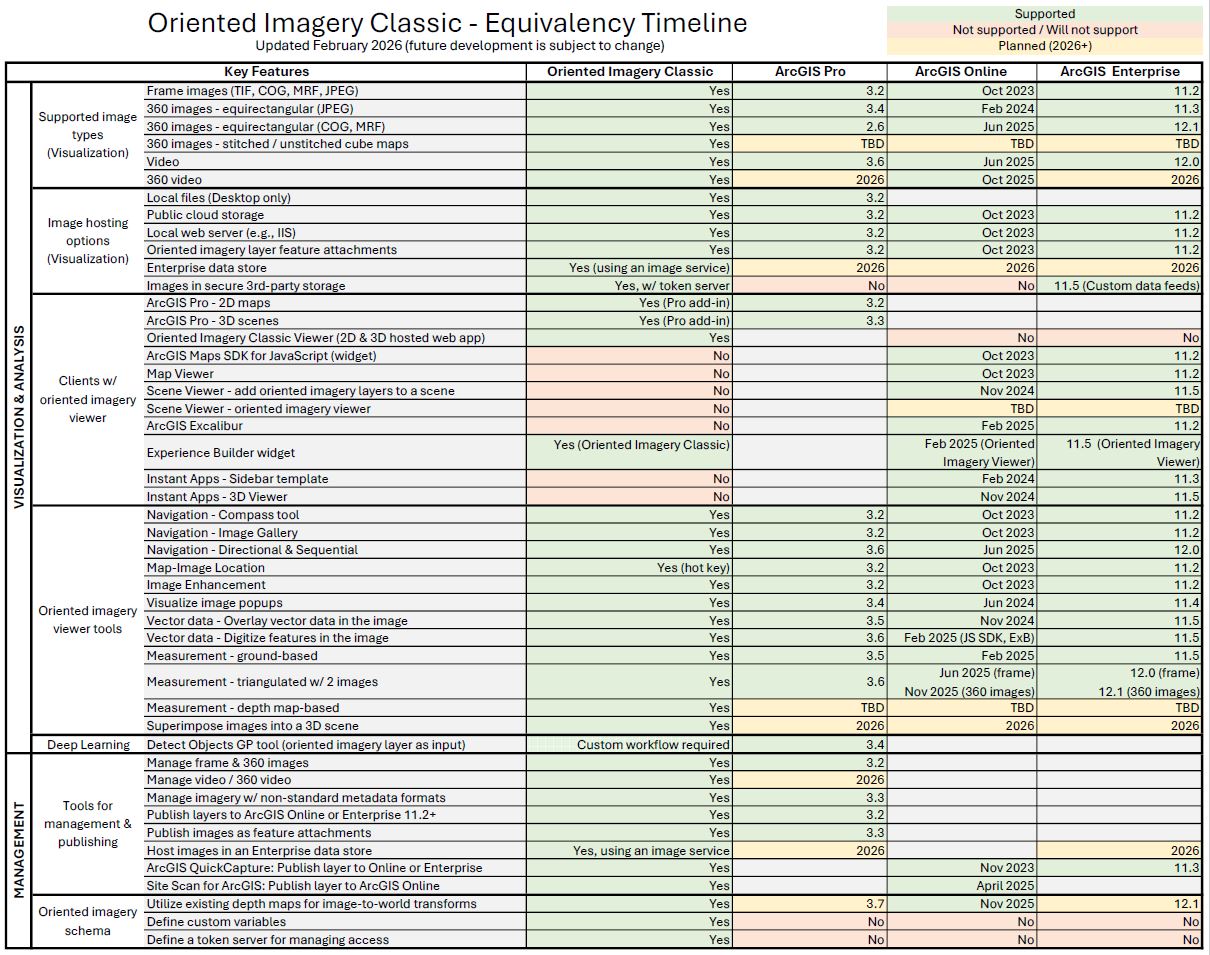
The table below shows key features from Oriented Imagery Classic and when they became available across ArcGIS foundational products.
Features planned for 2026
A few Classic features are still in development, including:
- A workflow for managing video using an oriented imagery dataset
- Support for managing and visualizing 360° video
- The oriented imagery viewer integrated into Scene Viewer
- The ability to superimpose images in a 3D scene
We expect most users can migrate now without these features, but they are on track for release in 2026.
Classic features that won’t be supported
Some Oriented Imagery Classic features will not carry forward:
You will not be able to define custom variables as part of the oriented imagery layer schema the way you can with oriented imagery catalogs. This also means that we will not be able to support token servers, which rely on the custom variables in Oriented Imagery Classic. To securely host images, users can leverage feature attachments in ArcGIS Online or custom data feeds in ArcGIS Enterprise 11.5+. Support for secure image hosting using ArcGIS Enterprise cloud stores and ArcGIS Pro will be available in 2026.
Additionally, we do not plan to provide a separately hosted app like the Oriented Imagery Classic Explorer. Instead, users can take advantage of the built-in oriented imagery viewer in Map Viewer or ArcGIS Excalibur; build Instant Apps using the Sidebar and 3D Viewer templates; or build an Experience Builder app using the Oriented Imagery Viewer widget.
Next steps for Oriented Imagery Classic users
If you haven’t already, it’s time to familiarize yourself with the oriented imagery functionality that has been integrated into ArcGIS, and start migrating your Oriented Imagery Classic management workflows, oriented imagery catalogs, and apps.
Note: This blog was updated February 2026 to clarify timelines for depth map support across ArcGIS and for secure image hosting with ArcGIS Enterprise.

