- Home
- :
- All Communities
- :
- Products
- :
- ArcGIS Enterprise
- :
- High Availability and Disaster Recovery Questions
- :
- Re: Post WebGIS DR restore error: Invalid Token fo...
- Subscribe to RSS Feed
- Mark Topic as New
- Mark Topic as Read
- Float this Topic for Current User
- Bookmark
- Printer Friendly Page
Post WebGIS DR restore error: Invalid Token for federated server

- Mark as New
- Bookmark
- Subscribe to RSS Feed
- Permalink
Current environment:
- 2 servers at 10.8.1, both running Windows Server 2016:
- 1 primary hosting server running Portal, Server and webadaptors
- 1 image server
I've completed a WebGIS DR restore to a new machine for our primary hosting server, and now when I try to federate the second server (Image Server) it is returning and error when it validates:
Error: The server at 'https://<FQDN of image server>:6443/arcgis/admin/info' returned and error. Server machine 'https://<FQDN of hosting server>:7443/arcgis/sharing/rest/community/self' returned an error. 'Invalid Token'.
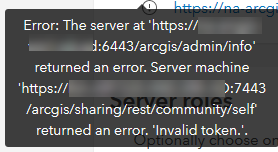
Any ideas where to dig into this?

- Mark as New
- Bookmark
- Subscribe to RSS Feed
- Permalink
Hello @WarrenMedernach,
facing a similar issue when going through LB after webgisdr restore as well: did you ever find what was the issue ?
thanks !

- Mark as New
- Bookmark
- Subscribe to RSS Feed
- Permalink
Hi,
Did you check the configuration of the LB it should allow the request if the internal machine name then traverse back with the hostname (webcontext URL) , is the SSL attached at the LB Level

- Mark as New
- Bookmark
- Subscribe to RSS Feed
- Permalink
Sorry to resurrect an old post, but did you ever get this to work? I'm experiencing the same issue.
- Mark as New
- Bookmark
- Subscribe to RSS Feed
- Permalink
Hi @NikoR , I'm really sorry, but I cannot recall exactly how we resolved this. It might have been a certificate issue, but I can't say for sure.


- Mark as New
- Bookmark
- Subscribe to RSS Feed
- Permalink
Check if your credentials align. I had similar issues after password changes and restores. parts of the deployments still had the old credentials and therefore could not generate the token.
Checking certificates is also a good tip.
