Select to view content in your preferred language

What Time is it: When Changed != Modified

3099
5
08-26-2014 07:14 AM
Labels (1)
JoshuaBixby
MVP Esteemed Contributor
0 5 3,099

Recently, a program specialist approached me with questions about the file modified dates in ArcCatalog.  I started by explaining the Modified column in ArcCatalog shows when the data or schema was last changed in a shapefile or feature class; well, a feature class in a file geodatabase at least.  The user wasn't buying it, so I set out to show him what I meant.

I can't recall if Modified has been an option in the Contents window all along or if it was added sometime along the way, but I do know it isn't turned on by default.  Since I don't use it much, I had to go enable it:
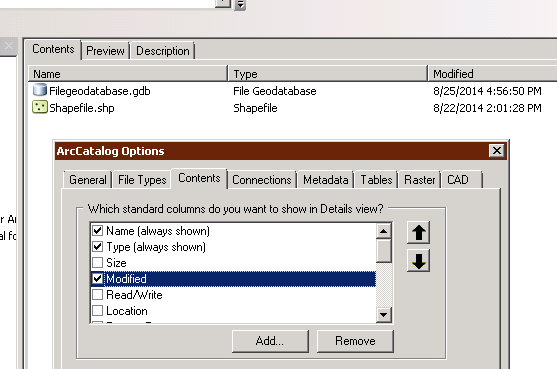
arccatalog_102_contents_tab_modified.PNG

I don't like demoing on real data for several reasons, including the fact the data can sometimes be the problem, so I whipped up an empty shapefile and feature class for testing.  As you can see, the shapefile was created and last modified the other day.  Let's use ArcPy and an InsertCursor to put a record into the shapefile and check the Modified date.
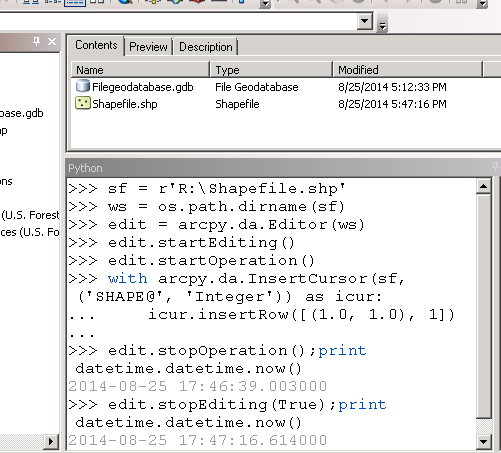
arccatalog_arcpy_insert_record_shapefile.PNG

After refreshing the Contents window, we can see the Modified date gets updated after the edit session is ended using the stopEditing command.  That seems pretty reasonable, i.e., the changes are committed after the editing is complete and the Modified column is updated to reflect the time the edit session ended.  Let's do the same thing with a feature class.
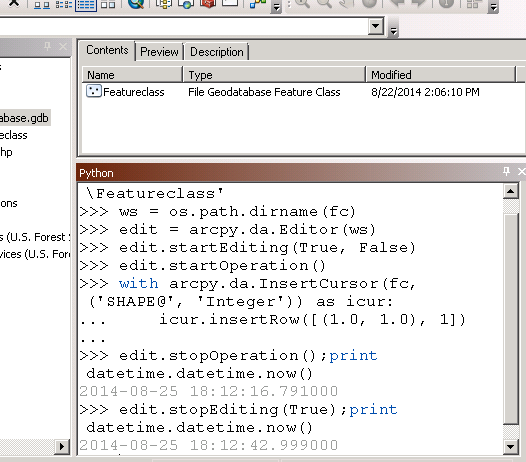
arccatalog_arcpy_insert_record_featureclass.PNG

That's odd.  After ending the edit session and refreshing the Contents window, ArcCatalog is still showing the feature class as being modified when it was created a few days ago.  Maybe it is my code or something is messed up with this ArcCatalog session.  I am going to close out of ArcCatalog and start over.
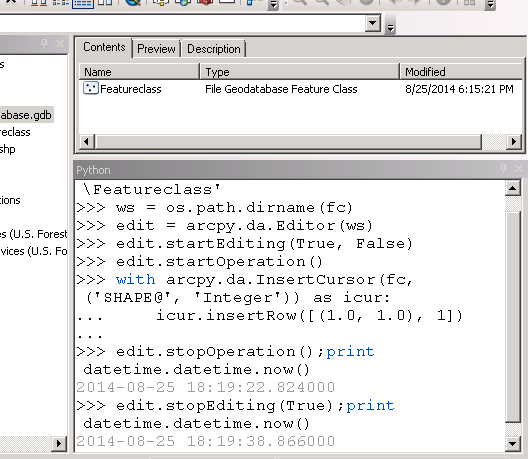
arccatalog_arcpy_insert_record_featureclass_2.PNG

This is even more odd.  The Modified column now shows 4 minutes before the edit session ended.  In fact, the Modified column shows a time that is prior to starting my edit session (the timestamps for starting the session aren't given above, but the edit session was started less than a minute before I ended it).

If the Modified column isn't showing the start or end of an edit session, what is it showing with feature classes?  The answer, when ArcCatalog or ArcMap is closed.  I have checked in ArcMap with manual edit sessions, and the behavior is the same.  Yes, the Modified column for feature classes doesn't show when data is updated like with shapefiles but when the application is closed.  In our organization with casual GIS users and disconnected Citrix sessions, the discrepancy can be days.

5 Comments
JoshuaBixby
MVP Esteemed Contributor

I submitted this information through Esri Support and a bug was opened:

#NIM104745 - The date modified field in ArcCatalog contents tab does not update after edits made to a file geodatabase feature class.
JoshuaBixby
MVP Esteemed Contributor

Looking back through existing bugs, came across the following from ArcGIS 9.2:

       NIM006067:  Date Modified field does not update as a result of edits made to file geodatabase feat...

I can't say whether that earlier bug is related to this issue.  The bug above was addressed in 9.2 SP2 and 9.3, but sometimes bugs come back in later versions.  Regardless, this doesn't seem to be the first time there has been an issue with the Modified properties of file geodatabases.  Let's hope the 'Low' severity of the earlier bug isn't an indicator of how much developers care about giving accurate information to users.

JoshuaBixby
MVP Esteemed Contributor

First response from Esri Development is Declined, "known issue."  The explanation was a bit terse and jumbled, so I asked for clarification.  If it is a "known issue," it isn't well documented because I have yet to find any reference to this limitation.  If you have, please share a link here.

I will wait to draw a final conclusion but this has the potential to be yet another Esri Known Unknown.

JoshuaBixby
MVP Esteemed Contributor

Final answer... "known issue."  Unfortunately, my request for clarification on the first response was to repeat the symptoms I was seeing.  I don't consider repeating observable facts as offering an explanation, let alone clarification, but they have a story and are sticking to it.  Accepting Esri isn't going to change a behavior, a behavior that I clearly argue is a bug, there are still a couple outstanding questions.

First, Esri Development says it is a known “limitation” that the feature class modified times aren’t actually accurate.  The problem with this statement is that I nor anyone I know has ever found documentation of this limitation.  If it is known, why not document it so that it can be known by the tens or hundreds of thousands of ArcGIS Desktop users around the world and not just a small team of people in Redlands.

Second, there is a flawed logic in given users incorrect information with no caveats rather than no information at all.  When it comes to ArcSDE and Personal Geodatabases, the “Modified” column is empty because there is no mechanism for Esri to give the users reliable information.  Why not do the same with file geodatabases instead of giving incorrect information?

This ties is well with my What's in a Name When Known = Unknown‌ blog post where I raise the issue of known limits of the software not being documented and the impacts that causes to users.

JoshuaBixby
MVP Esteemed Contributor

Esri has released a KB article acknowledging and describing the limitation of feature class modified dates in ArcCatalog:

FAQ:  In ArcCatalog, why is the time stamp incorrect on the date modified field of a file geodatabas...

A small step in a positive direction....

About the Author
Former geospatial systems engineer in the federal government now working in state government as a geospatial hosting architect.