- Home
- :
- All Communities
- :
- Services
- :
- Esri Technical Certification
- :
- Program Information
- :
- Stay Connected with Esri Technical Certification
Stay Connected with Esri Technical Certification


- Subscribe to RSS Feed
- Mark as New
- Mark as Read
- Bookmark
- Subscribe
- Printer Friendly Page
The Esri Technical Certification program offers various resources to help individuals through all stages of their certification journey. This article outlines the various ways you can stay connected with Esri Technical Certification to receive the latest updates and program information. Read on to learn more and ask questions here.
Esri Community with Your ArcGIS Account
Our certification site article outlines the importance and value of Esri Academy as our authoritative location to view exams, exam preparation resources, and other program details. However, the second most important place for individuals who want to view additional information and receive updates is Esri Community.
In Esri Community, individuals can customize their experience to be notified of all things Esri Technical Certification from resources to help you begin your certification journey to exam development participation opportunities. After signing in with your ArcGIS Account, you can read blogs, make comments, ask questions, and follow topics that interest you the most. (If you don’t have an ArcGIS account, create one here).
To ensure you receive Esri Technical Certification community updates in your inbox, be sure you have your Esri Community notification settings properly configured:
- Visit the “My Settings” in the dropdown menu at the top right side of the page
- Click on “Subscriptions & Notifications”
- Ensure the “Turn off all email notifications” option under “General Settings” is unchecked
- Scroll down the page and ensure your Email Notifications are configured to receive notifications for the various options listed. You can customize the frequency by getting immediate, daily, or weekly updates to best suit your needs.


Subscribe to the Esri Technical Certification Community
There are four different ways in which you can subscribe to the Esri Technical Certification Community. To learn more about how we structure our content to help you set up the proper subscriptions, read this article.
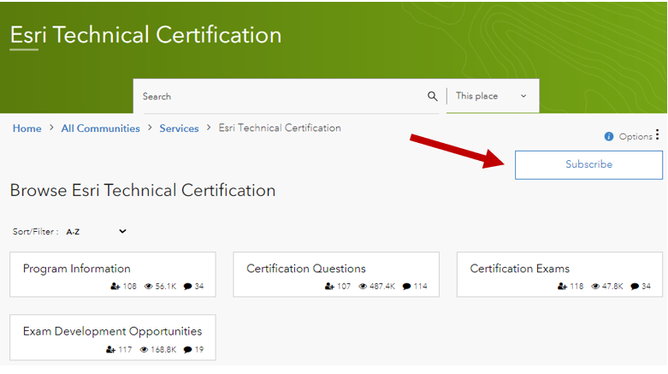
Subscribe to the Community Main Page
Click the “subscribe” button on the main page. This option gives you notifications when an update is made anywhere within the Esri Technical Certification community.
Subscribe to a Board
Click on the board and click “Subscribe to this Board.” This option will give you updates to all posts and labels within a specific board.

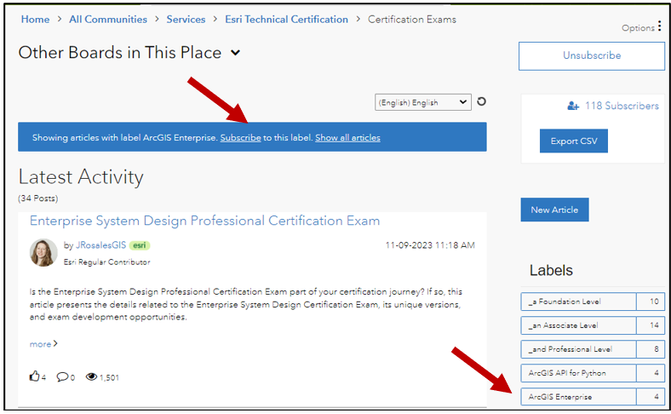
Subscribe to a Label
Click on a label and a blue notification box will appear at the top of the page. Click “Subscribe to this label.” This is helpful if you wish to subscribe to a particular exam level, exam software, or exam development participation updates.
Subscribe to an Article
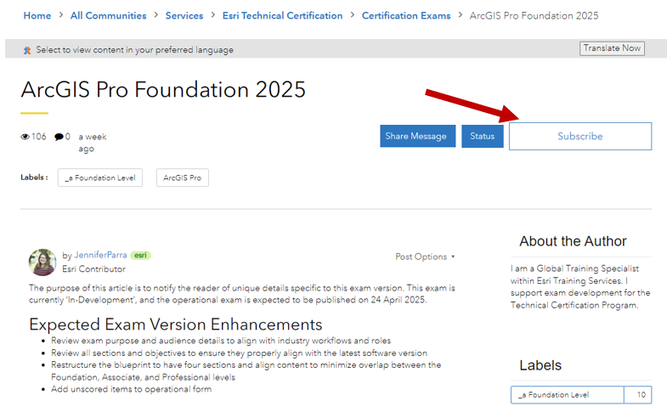
Visit any article and click “Subscribe” to receive updates to that article only. This is helpful if you’re wishing to stay up to date on a specific exam and its ongoing version updates.
Other Ways to Stay Connected
Esri Training E-Newsletter and Certification Program Emails with Your Subscription
Did you know you can update your Esri profile by updating your subscription preferences to receive important Esri Technical Certification program updates in your inbox?
- By subscribing to "Technical Certifications" you will receive important program updates related to related to exam development and/or retirement, exam vouchers, etc.
- By subscribing to "Training Opportunities" you will receive the Esri Training E-Newsletter 6 times per year to keep up with the latest in Esri Training and Certification.
To ensure you're registered to receive emails about Technical Certification and to receive the Training E-Newsletter, sign up or edit your email preferences here: https://go.esri.com/subscribe.
- Log in to your Esri profile and click "Profile & Settings," then click "Manage Mail and Email Preferences"
- Click on "Manage Email Preferences" and click on the "Customer Resources, Training, and Events" section to open the dropdown menu
- Check the "Technical Certifications" and "Training Opportunities" boxes to opt in
- Save preferences


Esri Technical Certification LinkedIn Group
Within the Esri Technical Certification LinkedIn Group, there are over 20,000 members. Join the group to meet others on their certification journey, start discussions, and receive program updates!

Contact Us
We are always accessible from our Esri Technical Certification website. At the bottom of each page, click the mail icon to contact us. Or simply click this link to fill out a request form.
